Fantasy Life i
Ενημερώθηκε
Τρέχουσα έκδοση
2.2.2.0
Προσφέρεται από

Με όλο το πάθος σας για το παιχνίδι Fantasy Life i, τα χέρια σας δεν πρέπει να περιορίζονται σε μια μικροσκοπική οθόνη του τηλεφώνου σας. Παίξτε σαν επαγγελματίας και αποκτήστε τον πλήρη έλεγχο του παιχνιδιού σας με πληκτρολόγιο και ποντίκι. Το MEmu σας προσφέρει όλα όσα περιμένετε. Κατεβάστε και παίξτε Fantasy Life i σε υπολογιστή. Παίξτε όσο θέλετε, χωρίς άλλους περιορισμούς μπαταρίας, δεδομένων κινητής τηλεφωνίας και ενοχλητικών κλήσεων. Το ολοκαίνουργιο MEmu 9 είναι η καλύτερη επιλογή για να παίξετε Fantasy Life i σε υπολογιστή. Ετοιμασμένο με την εμπειρία μας, το εξαιρετικό σύστημα προκαθορισμένης αντιστοίχισης πλήκτρων καθιστά το Fantasy Life i ένα πραγματικό παιχνίδι υπολογιστή. Ο διαχειριστής πολλαπλών περιπτώσεων MEmu καθιστά δυνατό το παιχνίδι με 2 ή περισσότερους λογαριασμούς στην ίδια συσκευή. Και το πιο σημαντικό, η αποκλειστική μηχανή εξομοίωσης μας μπορεί να απελευθερώσει πλήρως τις δυνατότητες του υπολογιστή σας, κάνοντας τα πάντα ομαλά.
Show more
Απολαύστε την υπέροχη εμπειρία αναπαραγωγής του Fantasy Life i σε υπολογιστή με το MEMU App Player. Πρόκειται για έναν ισχυρό δωρεάν εξομοιωτή Android που σας επιτρέπει να παίζετε χιλιάδες παιχνίδια Android. From thrilling adventures to building up your own island, the anything-goes slow-life RPG comes to mobile!
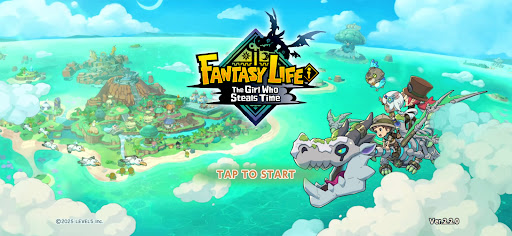
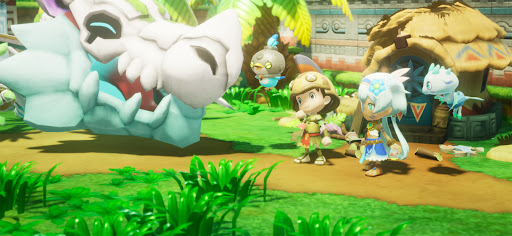
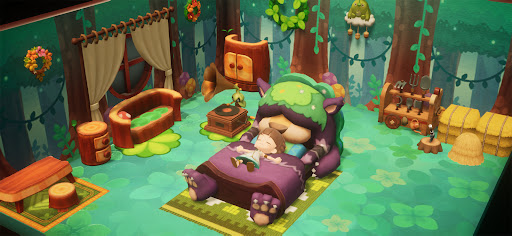
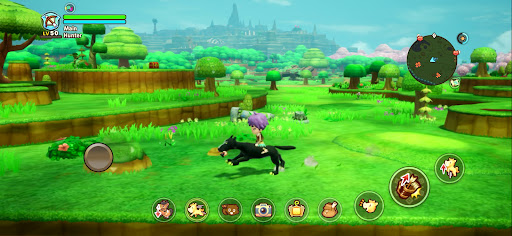
From thrilling adventures to building up your own island, the anything-goes slow-life RPG comes to mobile!
Experience an epic story, explore a vast open world, or simply relax with fishing, cooking, and crafting.
Do what you want, whenever and wherever you like—all in the palm of your hand. Start your very own Fantasy Life!
■ Play Anytime on Your Smartphone
Whether you want to enjoy a laid-back life as a farmer and grow crops at your own pace, or simply run free across a vast landscape, your fantasy life is always waiting whenever you have a spare moment.
Cross-play support lets you play together with friends on both mobile devices and consoles!
■ Guided by a Dragon to a Mysterious Island
You are an adventurer who sets sail alongside the archaeologist Edward and his team.
Following the guiding light from a fossilized dragon, you discover an uncharted island.
The Depths, a mysterious skeletal dragon, and a message from a girl pleading, "Save this world..."
Travel between the island's golden age 1,000 years ago and the present day to uncover the mystery behind its destruction!
■ Shape Your Adventure with 14 Unique Lives
In this world, a Life is your chosen profession, and each Life has its own identity and playstyle.
Switch to a Gathering Life to gather ingredients and materials, a Crafting Life to create weapons and meals, or a Combat Life to battle monsters. Swap between Lives anytime and create a Fantasy Life that's uniquely yours.
■ Craft Your Island
Put your Lives to work and gather resources to restore the island to its former glory!
Place houses and objects, reshape the landscape, and even create your own rivers and roads to build an island that's truly one of a kind.
Expand your home, freely arrange furniture, and customize your interiors!
■ Embark on an Open-World Adventure!
Explore the largest continent in the series and venture wherever your heart takes you!
Climb towering cliffs, swim across rivers and lakes, or ride across the land on your favorite mount.
Oh, and the Teleportation Gate lets you easily travel to the continent from anywhere.
■ Continue Your Adventure Across Devices
Cross-save support lets you continue your adventure on your smartphone from your existing console save data.
Gather materials on the go with your smartphone, then switch back to your console at home for more in-depth crafting.
You can also enjoy multiplayer by inviting friends to your island or exploring dungeons together. How you play is entirely up to you.
*The 2P Family Co-op feature is not available in the mobile version.
▼ Official X
https://x.com/FANTASYLIFE_EN
▼ Official Website
https://www.fantasylife.jp/fli/en/
▼ System Requirements
Supported OS: Android 10 or later
Please note that even if your device meets the minimum system requirements, performance may vary depending on your device model, usage conditions, or other factors.
Show more

1. Κατεβάστε το πρόγραμμα εγκατάστασης MEmu και ολοκληρώστε την εγκατάσταση

2. Ξεκινήστε το MEmu και στη συνέχεια ανοίξτε το Google Play στην επιφάνεια εργασίας

3. Αναζητήστε τον Fantasy Life i στο Google Play
Install
4. Λήψη και εγκατάσταση του Fantasy Life i
5. Μόλις ολοκληρωθεί η εγκατάσταση, κάντε κλικ στο εικονίδιο για να ξεκινήσετε

6. Enjoy playing Fantasy Life i on PC with MEmu
Το MEmu Play, αποτελεί την ιδανικότερη δωρεάν λύση για την εξομοίωση του λειτουργικού Android, και χρησιμοποιείται ήδη από περισσότερους από 50 εκατομμύρια χρήστες, ο οποίοι απολαμβάνουν, την καταπληκτική εμπειρία παιχνιδιού που προσφέρεται μέσω της εφαρμογής. Με τη χρήση του MEmu Virtualization, είναι δυνατή η αναπαραγωγή παιχνιδιών Android στον υπολογιστή, ακόμη και εκείνων που απαιτούν μεγάλη επεξεργαστική ισχύ γραφικών, δίχως συμβιβασμούς στην ποιότητα και στην εμπειρία χρήσης, ακριβώς όπως ένα τελευταίας γενιάς κινητό τηλέφωνο.
Μεγαλύτερη οθόνη με καλύτερα γραφικά. Μεγάλη διάρκεια ζωής, χωρίς περιορισμό μπαταρίας ή δεδομένων κινητής τηλεφωνίας.
Πλήρης υποστήριξη αντιστοίχισης πλήκτρων για ακριβή έλεγχο του πληκτρολογίου και του ποντικιού ή του gamepad.
Πολλαπλοί λογαριασμοί παιχνιδιών ή εργασίες σε έναν υπολογιστή ταυτόχρονα με τον διαχειριστή πολλαπλών περιπτώσεων.
Play Fantasy Life i on PC by following steps: