Fantasy Life i
Zaktualizowano
Aktualna wersja
2.2.2.0
Sprzedawca

Przy całej swojej pasji do grania w Fantasy Life i, twoje ręce nie powinny być ograniczone na małym ekranie telefonu. Graj jak zawodowiec i uzyskaj pełną kontrolę nad grą za pomocą klawiatury i myszy. MEmu oferuje ci wszystko, czego oczekujesz. Pobierz i graj Fantasy Life i na PC. Graj tak długo, jak chcesz, bez ograniczeń baterii, danych komórkowych i niepokojących połączeń. Zupełnie nowy MEmu 9 to najlepszy wybór do grania w Fantasy Life i na PC. Przygotowany dzięki naszej wiedzy, znakomity, wstępnie ustawiony system mapowania klawiszy sprawia, że Fantasy Life i jest prawdziwą grą na PC. Zakodowany naszą absorpcją, menedżer wielu instancji umożliwia granie na 2 lub więcej kontach na tym samym urządzeniu. A co najważniejsze, nasz emulator może uwolnić pełny potencjał twojego komputera, sprawić, że wszystko będzie płynne. Dbamy nie tylko o to, jak grasz, ale także o cały proces czerpania radości z grania.
Pokaż więcej
Ciesz się wspaniałym doświadczeniem podczas grania w Fantasy Life i na komputerze z aplikacją MEMU App Player. Jest to potężny darmowy emulator Androida pozwalający grać w tysiące gier na Androida. Od ekscytujących przygód po budowanie własnej wyspy – ta gra RPG w stylu slow life, w której wszystko jest dozwolone, trafia na urządzenia mobilne!
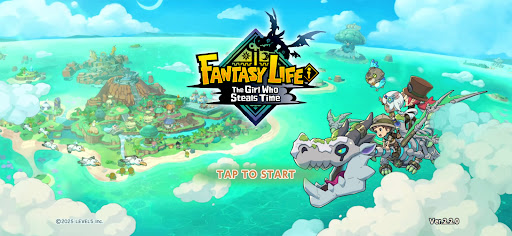
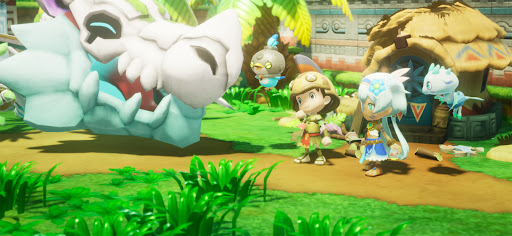
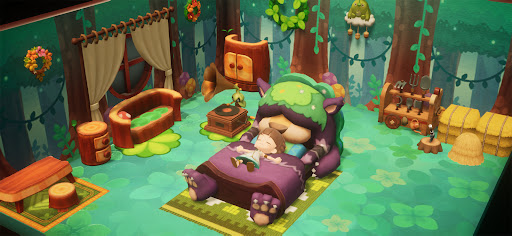
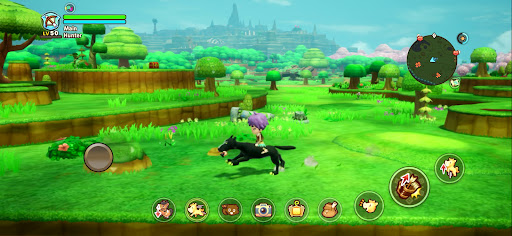
Od ekscytujących przygód po budowanie własnej wyspy – ta gra RPG w stylu slow life, w której wszystko jest dozwolone, trafia na urządzenia mobilne!
Przeżyj epicką historię, eksploruj rozległy otwarty świat lub po prostu zrelaksuj się, łowiąc ryby, gotując i tworząc.
Rób, co chcesz, kiedy i gdzie chcesz – wszystko w zasięgu ręki. Rozpocznij własne życie w świecie fantasy!
■ Graj w dowolnym momencie na smartfonie
Niezależnie od tego, czy chcesz cieszyć się spokojnym życiem rolnika i uprawiać rośliny we własnym tempie, czy po prostu swobodnie przemierzać rozległe tereny, Twoje życie w świecie fantasy zawsze czeka na Ciebie, gdy tylko znajdziesz wolną chwilę.
Obsługa trybu międzyplatformowego pozwala grać ze znajomymi zarówno na urządzeniach mobilnych, jak i konsolach!
■ Prowadzony przez smoka na tajemniczą wyspę
Jesteś poszukiwaczem przygód, który wyrusza w rejs wraz z archeologiem Edwardem i jego zespołem.
Podążając za światłem skamieniałego smoka, odkrywasz niezbadaną wyspę. Głębiny, tajemniczy szkieletowy smok i wiadomość od dziewczyny błagającej: „Uratuj ten świat…”
Podróżuj między złotą erą wyspy 1000 lat temu a dniem dzisiejszym, aby odkryć tajemnicę jej zniszczenia!
■ Kształtuj swoją przygodę dzięki 14 unikalnym życiom
W tym świecie życie to wybrany przez Ciebie zawód, a każde życie ma swoją własną tożsamość i styl gry.
Przełącz się na życie zbieracza, aby zbierać składniki i materiały, na życie rzemieślnika, aby tworzyć broń i posiłki, lub na życie bojowe, aby walczyć z potworami. Przełączaj się między życiami w dowolnym momencie i stwórz fantastyczne życie, które będzie Twoje.
■ Stwórz swoją wyspę
Zaangażuj swoje życia i zbieraj zasoby, aby przywrócić wyspie dawną świetność!
Stawiaj domy i przedmioty, przekształcaj krajobraz, a nawet twórz własne rzeki i drogi, aby zbudować wyspę jedyną w swoim rodzaju.
Rozbuduj swój dom, dowolnie aranżuj meble i dostosuj wnętrza!
■ Wyrusz na przygodę w otwartym świecie!
Eksploruj największy kontynent w serii i wyruszaj, dokądkolwiek poniesie Cię serce!
Wspinaj się po strzelistych klifach, pływaj po rzekach i jeziorach lub przemierzaj ląd na swoim ulubionym wierzchowcu.
A, i Brama Teleportacyjna pozwala łatwo przenieść się na kontynent z dowolnego miejsca.
■ Kontynuuj swoją przygodę na różnych urządzeniach
Obsługa funkcji cross-save pozwala kontynuować przygodę na smartfonie z istniejących zapisów gry na konsoli.
Zbieraj materiały w podróży za pomocą smartfona, a następnie wróć do konsoli w domu, aby bardziej dogłębnie zająć się rzemiosłem.
Możesz również cieszyć się trybem wieloosobowym, zapraszając znajomych na swoją wyspę lub wspólnie eksplorując lochy. Sposób gry zależy wyłącznie od Ciebie.
*Funkcja kooperacji rodzinnej dla dwóch osób nie jest dostępna w wersji mobilnej.
▼ Oficjalna strona X
https://x.com/FANTASYLIFE_EN
▼ Oficjalna strona internetowa
https://www.fantasylife.jp/fli/en/
▼ Wymagania systemowe
Obsługiwany system operacyjny: Android 10 lub nowszy
Należy pamiętać, że nawet jeśli urządzenie spełnia minimalne wymagania systemowe, wydajność może się różnić w zależności od modelu urządzenia, warunków użytkowania lub innych czynników.
Pokaż więcej

1. Pobierz instalator MEmu i zakończ instalację

2. Uruchom MEmu, a następnie otwórz Google Play na pulpicie

3. Wyszukaj Fantasy Life i w Google Play
Install
4. Pobierz i zainstaluj Fantasy Life i
5. Po zakończeniu instalacji kliknij ikonę, aby rozpocząć

6. Ciesz się grą Fantasy Life i na PC z MEmu
MEmu Play to najlepszy emulator Androida, a 100 milionów ludzi już korzysta z jego i dosta doskonałe wrażenia z gier na Androida. Technologia wirtualizacji MEmu umożliwia płynne granie w tysiące gier Androida na komputerze, nawet tych najbardziej wymagających grafiki.
Większy ekran z lepszą grafiką; Długi czas, bez ograniczeń baterii lub danych mobilnych.
Pełna obsługa mapowania klawiszy dla precyzyjnego sterowania klawiaturą i myszą lub gamepadem.
Wiele kont gier lub zadań na jednym komputerze jednocześnie z menedżerem wielu instancji.
Play Fantasy Life i on PC by following steps: