Fantasy Life i
Оновлено
Поточна версія
2.2.2.0
Постачальник

Перестаньте турбуватися про надмірні витрати, використовуючи ххх на своєму мобільному телефоні, звільніться від крихітного екрану і насолоджуйтеся використанням програми на набагато більшому дисплеї. Відтепер отримуйте повний екран свого додатка за допомогою клавіатури та миші. MEmu пропонує вам усі дивовижні функції, які ви очікували: швидка установка та просте налаштування, інтуїтивно зрозумілі елементи керування, більше обмежень від акумулятора, мобільних даних та тривожних дзвінків. Новий MEmu 9 - найкращий вибір використання Fantasy Life i на вашому комп’ютері. За допомогою нашого поглинання менеджер із кількома примірниками одночасно дозволяє відкрити 2 або більше рахунків. І найголовніше, наш ексклюзивний емуляційний двигун може вивільнити весь потенціал вашого ПК, зробити все гладким і приємним.
Show more
Насолоджуйтесь чудовим досвідом Fantasy Life i гри на ПК за допомогою програми MEMU App Player. Це потужний безкоштовний емулятор Android, який дозволяє вам грати в тисячі ігор Android. Від захопливих пригод до будівництва власного острова, ця повільна рольова гра з усіма перевагами виходить на мобільних пристроях!
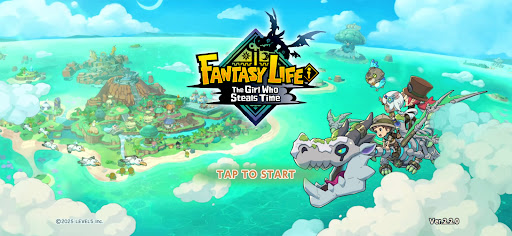
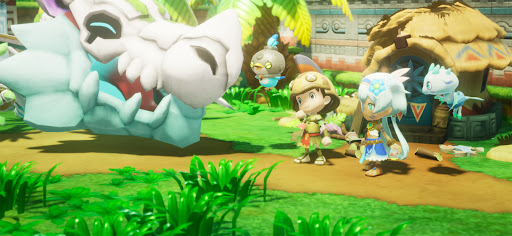
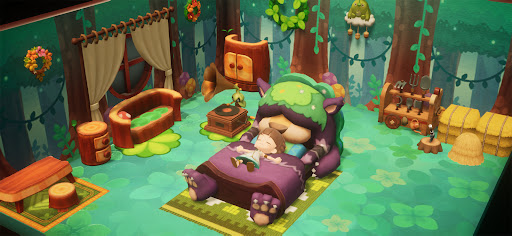
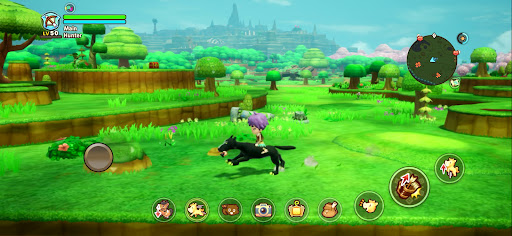
Від захопливих пригод до будівництва власного острова, ця повільна рольова гра з усіма перевагами виходить на мобільних пристроях!
Переживіть епічну історію, досліджуйте величезний відкритий світ або просто розслабтеся, рибалячи, готуючи та займаючись рукоділлям.
Робіть те, що хочете, коли завгодно і де завгодно — все це у вас на долоні. Почніть своє власне фентезійне життя!
■ Грайте будь-коли на своєму смартфоні
Незалежно від того, чи хочете ви насолоджуватися спокійним життям фермера та вирощувати врожай у власному темпі, чи просто вільно бігати по безкрайньому ландшафту, ваше фентезійне життя завжди чекає на вас, коли у вас з'явиться вільна хвилинка.
Підтримка крос-ігри дозволяє грати разом з друзями як на мобільних пристроях, так і на консолях!
■ Під проводом дракона до таємничого острова
Ви — шукач пригод, який вирушає у плавання разом з археологом Едвардом та його командою. Слідуючи дороговказу скам'янілого дракона, ви відкриваєте незвіданий острів.
Глибини, таємничий дракон-скелет і послання від дівчини, яка благає: «Врятуйте цей світ...»
Подорожуйте між золотим віком острова 1000 років тому та сьогоденням, щоб розкрити таємницю його руйнування!
■ Створіть свою пригоду з 14 унікальними життями
У цьому світі життя – це ваша обрана професія, і кожне життя має свою власну ідентичність та стиль гри.
Перемикайтеся на життя збирача, щоб збирати інгредієнти та матеріали, життя ремесла, щоб створювати зброю та їжу, або бойове життя, щоб битися з монстрами. Перемикайтеся між життями будь-коли та створюйте унікальне фентезійне життя.
■ Створіть свій острів
Використовуйте свої життя та збирайте ресурси, щоб відновити колишню славу острова!
Розміщуйте будинки та предмети, змінюйте ландшафт і навіть створюйте власні річки та дороги, щоб побудувати острів, який справді буде унікальним у своєму роді.
Розширте свій дім, вільно розставляйте меблі та налаштовуйте інтер'єри!
■ Вирушайте у пригоду у відкритому світі!
Дослідіть найбільший континент у серії та вирушайте туди, куди вас поведе серце!
Піднімайтеся на високі скелі, перепливайте річки та озера або їздіть верхи на своєму улюбленому маунті.
А ще завдяки Телепортаційним вратам ви можете легко подорожувати на континент з будь-якого місця.
■ Продовжуйте свою пригоду на різних пристроях
Підтримка перехресного збереження дозволяє вам продовжувати свою пригоду на смартфоні з існуючих збережених даних консолі.
Збирайте матеріали на ходу за допомогою смартфона, а потім повертайтеся до консолі вдома для більш глибокого крафтингу.
Ви також можете насолоджуватися багатокористувацьким режимом, запрошуючи друзів на свій острів або досліджуючи підземелля разом. Як ви граєте, повністю залежить від вас.
*Функція сімейного кооперативу 2P недоступна в мобільній версії.
▼ Офіційний X
https://x.com/FANTASYLIFE_EN
▼ Офіційний веб-сайт
https://www.fantasylife.jp/fli/en/
▼ Системні вимоги
Підтримувана ОС: Android 10 або пізніша версія
Зверніть увагу, що навіть якщо ваш пристрій відповідає мінімальним системним вимогам, продуктивність може відрізнятися залежно від моделі пристрою, умов використання або інших факторів.
Show more

1. Download MEmu installer and finish the setup

2. Start MEmu then open Google Play on the desktop

3. Search Fantasy Life i in Google Play
Install
4. Download and Install Fantasy Life i
5. On install completion click the icon to start

6. Enjoy playing Fantasy Life i on PC with MEmu
MEmu App Player є кращим безкоштовним емулятором Android, і 50 мільйонів людей вже користуються його чудовим ігровим досвідом Android. Технологія віртуалізації MEmu дає вам змогу відтворювати тисячі ігор Android на вашому комп'ютері, навіть найбільш насичених графікою.
Bigger screen with better graphics; Long duration, without limitation of battery or mobile data.
Full Keymapping support for precise control of keyboard and mouse or gamepad.
Multiple game accounts or tasks on single PC at one time with Multi-Instance manager.
Play Fantasy Life i on PC by following steps: