Fantasy Life i
Bijgewerkt
Huidige Versie
2.2.2.0
Aangeboden door

Met al je passie voor het spelen van Fantasy Life i, zouden je handen niet beperkt moeten zijn tot een klein scherm van je telefoon. Speel als een professional en krijg volledige controle over je spel met toetsenbord en muis. MEmu biedt je alles wat je verwacht. Download en speel Fantasy Life i op PC. Speel zo lang als je wilt, geen beperkingen meer van batterij, mobiele data en storende oproepen. De gloednieuwe MEmu 9 is de beste keuze om Fantasy Life i op PC te spelen. Voorbereid met onze expertise, maakt het uitmuntende vooraf ingestelde keymapping systeem van Fantasy Life i een echt PC-spel. MEmu multi-instance manager maakt het spelen van 2 of meer accounts op hetzelfde apparaat mogelijk. En het belangrijkste, onze exclusieve emulatie-engine kan het volledige potentieel van je PC benutten, waardoor alles soepel verloopt.
Meer tonen
Download Fantasy Life i op je pc met de MEmu Android-emulator. Geniet van spelen op een groot scherm. Van spannende avonturen tot het opbouwen van je eigen eiland: de alles-kan-slow-life RPG komt naar je mobiel!
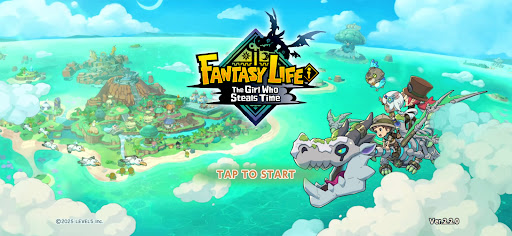
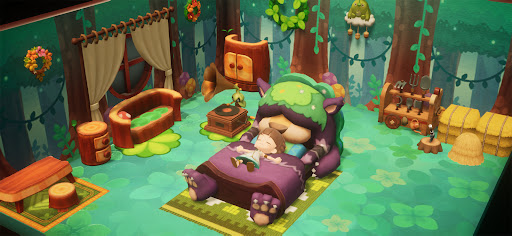
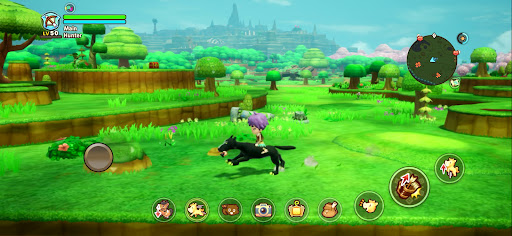
Van spannende avonturen tot het opbouwen van je eigen eiland: de alles-kan-slow-life RPG komt naar je mobiel!
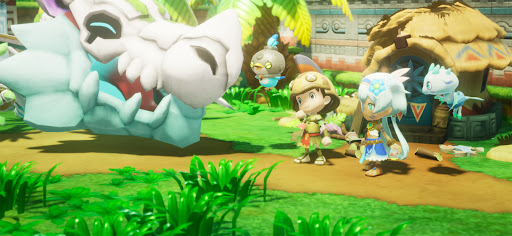
Beleef een episch verhaal, verken een uitgestrekte open wereld of ontspan gewoon met vissen, koken en knutselen.
Doe wat je wilt, wanneer en waar je wilt – allemaal in de palm van je hand. Begin je eigen fantasieleven!
■ Speel altijd en overal op je smartphone
Of je nu wilt genieten van een ontspannen leven als boer en in je eigen tempo gewassen wilt verbouwen, of gewoon vrij wilt rondrennen in een uitgestrekt landschap, je fantasieleven wacht altijd op je wanneer je een momentje over hebt.
Dankzij cross-play kun je samen met vrienden spelen op zowel mobiele apparaten als consoles!
■ Geleid door een draak naar een mysterieus eiland
Je bent een avonturier die samen met archeoloog Edward en zijn team de zee op gaat.
Geleid door het licht van een versteende draak ontdek je een onbekend eiland.
De Diepten, een mysterieuze skeletdraak en een boodschap van een meisje dat smeekt: "Red deze wereld..."
Reis tussen de gouden eeuw van het eiland, 1000 jaar geleden, en het heden om het mysterie achter de ondergang ervan te ontrafelen!
■ Geef vorm aan je avontuur met 14 unieke levens
In deze wereld is een Leven je gekozen beroep, en elk Leven heeft zijn eigen identiteit en speelstijl.
Schakel over naar een Verzamelleven om ingrediënten en materialen te verzamelen, een Ambachtsleven om wapens en maaltijden te maken, of een Vechtleven om monsters te bestrijden. Wissel op elk moment tussen Levens en creëer een fantasieleven dat uniek is voor jou.
■ Bouw je eiland
Zet je Levens aan het werk en verzamel grondstoffen om het eiland in zijn oude glorie te herstellen!
Plaats huizen en objecten, verander het landschap en creëer zelfs je eigen rivieren en wegen om een eiland te bouwen dat echt uniek is.
Breid je huis uit, plaats meubels naar eigen inzicht en pas je interieur aan!
■ Ga op avontuur in een open wereld!
Verken het grootste continent in de serie en ga waar je hart je ook heen leidt!
Beklim torenhoge kliffen, zwem door rivieren en meren, of rijd over het land op je favoriete rijdier.
Oh, en met de Teleportatiepoort kun je gemakkelijk van overal naar het continent reizen.
■ Ga verder met je avontuur op verschillende apparaten
Dankzij cross-save kun je je avontuur op je smartphone voortzetten met je bestaande savegame van de console.
Verzamel materialen onderweg met je smartphone en schakel thuis terug naar je console voor meer gedetailleerd craften.
Je kunt ook multiplayer spelen door vrienden uit te nodigen naar je eiland of samen dungeons te verkennen. Hoe je speelt, is helemaal aan jou.
*De 2P Family Co-op-functie is niet beschikbaar in de mobiele versie.
▼ Officiële X
https://x.com/FANTASYLIFE_EN
▼ Officiële website
https://www.fantasylife.jp/fli/en/
▼ Systeemvereisten
Ondersteunde besturingssystemen: Android 10 of hoger
Houd er rekening mee dat, zelfs als uw apparaat aan de minimale systeemvereisten voldoet, de prestaties kunnen variëren afhankelijk van uw apparaatmodel, gebruiksomstandigheden of andere factoren.
Meer tonen

1. Download de MEmu-installatie en voltooi de setup

2. Start MEmu en open vervolgens Google Play op het bureaublad

3. Zoek Fantasy Life i in Google Play
Install
4. Download en installeer Fantasy Life i
5. Klik op het icoon om te starten na het voltooien van de installatie

6. Geniet van het spelen van Fantasy Life i op PC met MEmu
MEmu Play is de beste Android Emulator en 100 miljoen mensen genieten al van de superieure Android-game-ervaring. De virtualisatietechnologie van MEmu stelt je in staat om duizenden Android-spellen soepel op je PC te spelen, zelfs de meest grafisch intensieve.
Groter scherm met betere graphics; Lange duur, zonder beperking van batterij of mobiele data.
Volledige Keymapping-ondersteuning voor nauwkeurige besturing van toetsenbord en muis of gamepad.
Meerdere game-accounts of taken op één PC tegelijk met Multi-Instance manager.
Speel Fantasy Life i op PC door de volgende stappen te volgen: