Dungeon Crawl 94: What Was Taken
अपडेट किया गया
वर्तमान वर्शन
संसाधन

अपने सेलफोन पर Dungeon Crawl 94: What Was Taken का उपयोग करते समय ओवरचार्ज के बारे में चिंता करना बंद करें, अपने आप को छोटी स्क्रीन से मुक्त करें और बहुत बड़े डिस्प्ले पर ऐप का उपयोग करने का आनंद लें। अब से, कीबोर्ड और माउस के साथ अपने ऐप का पूर्ण-स्क्रीन अनुभव प्राप्त करें। एमईएमयू आपको उन सभी आश्चर्यजनक सुविधाओं की पेशकश करता है जिनकी आपको उम्मीद थी: त्वरित इंस्टॉल और आसान सेटअप, सहज नियंत्रण, बैटरी की कोई सीमा नहीं, मोबाइल डेटा और परेशान कॉल। आपके कंप्यूटर पर Dungeon Crawl 94: What Was Taken का उपयोग करने का सबसे अच्छा विकल्प नया MEmu 9 है। हमारे अवशोषण के साथ कोडित, बहु-उदाहरण प्रबंधक एक ही समय में 2 या अधिक खाते खोलना संभव बनाता है। और सबसे महत्वपूर्ण, हमारा अनन्य उत्सर्जन इंजन आपके पीसी की पूरी क्षमता को जारी कर सकता है, सब कुछ सुचारू और सुखद बना सकता है।
और दिखाएं
डाउनलोड करें Dungeon Crawl 94: What Was Taken पीसी पर MEmu एंड्रॉयड एमुलेटर के साथ बड़े पर्दे पर खेलने का आनंद लें। Dungeon Crawl 94: What Was Taken is a turn-based, grid-based pixel art RPG where every move matters.
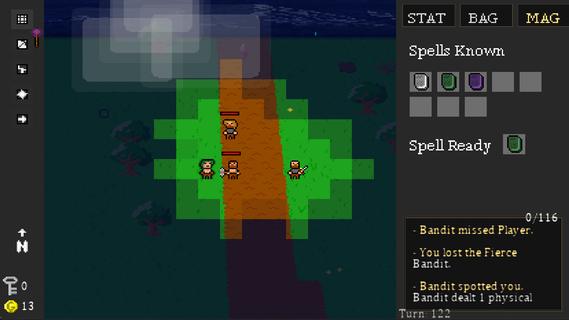
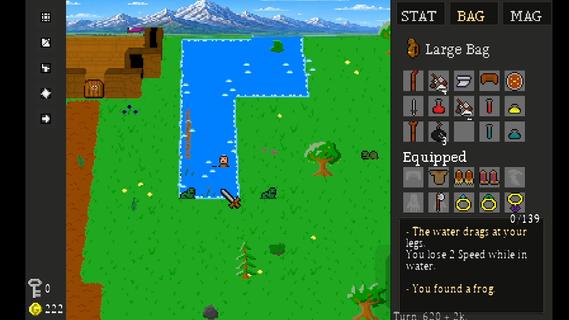
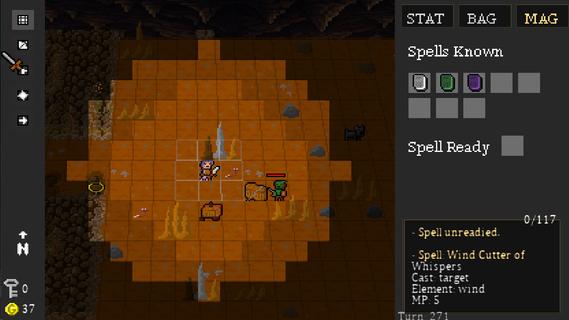
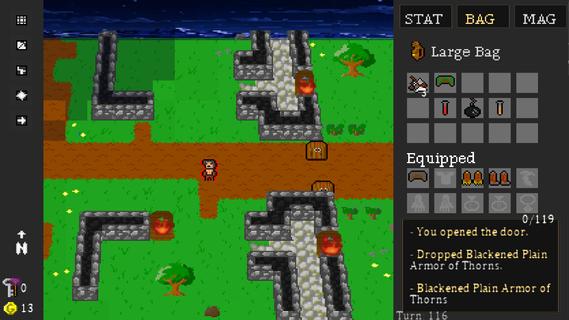
Dungeon Crawl 94: What Was Taken is a turn-based, grid-based pixel art RPG where every move matters. Explore a dangerous world of procedurally generated roads, forests, caves, dungeons, and other locations as you search for what was taken from you.Movement takes place one tile at a time, and every step advances the world around you. Enemies patrol, wildlife wanders, and danger continues to move with every turn. Sometimes fighting is the answer. Sometimes escaping is the smarter choice.Create your character and develop seven attributes: Strength, Dexterity, Intelligence, Wisdom, Speed, Constitution, and Luck. Equip weapons and armor, learn elemental magic, discover rare items, and build a character suited to the way you want to play.Explore dangerous dungeons filled with traps, puzzles, hidden treasures, merchants, enemies, and powerful bosses. Gather supplies, trade, craft useful items, and make camp as you push farther into the world.Procedural generation, multiple difficulty levels, hidden secrets, randomized loot, and different character builds make each journey through Dungeon Crawl 94: What Was Taken a little different from the last.FeaturesGrid-Based Turn-Based Exploration â Move one tile at a time as enemies and the world react to your actions.Procedurally Generated Adventures â Explore randomized roads, forests, caves, dungeons, and other locations.Seven Character Attributes â Develop Strength, Dexterity, Intelligence, Wisdom, Speed, Constitution, and Luck.Tactical Combat â Fight with melee weapons, bows, shields, and elemental magic.Equipment & Loot â Discover weapons, armor, magical items, consumables, and rare legendary treasures.Magic â Learn and use spells for combat, survival, and exploration.Crafting & Camping â Manage supplies and craft useful items as you travel.Merchants & Trading â Buy, sell, and manage your resources along the journey.Traps, Puzzles & Secrets â Search carefully for hidden areas and ways through environmental obstacles.Boss Battles â Face powerful enemies with unique challenges.Dynamic Pixel-Art World â Explore atmospheric environments with lighting, weather, and a tile-based visual style.Multiple Ways to Play â Randomized maps, different character builds, and multiple difficulty settings encourage new adventures.Xbox Controller, Keyboard & Mouse Support â Play using your preferred supported input method.
और दिखाएं

1. MEmu इंस्टॉलर को डाउनलोड करें और इंस्टॉलेशन को पूरा करें

2. MEmu शुरू करें फिर होमपेज पर Google Play खोलें

3. Google Play में Dungeon Crawl 94: What Was Taken खोजें
Install
4. Dungeon Crawl 94: What Was Taken डाउनलोड कर इंस्टॉल करें
5. इंस्टॉल पूरा होने पर आइकन दबाएं

6. MEmu से पीसी पर Dungeon Crawl 94: What Was Taken खेलने का आनंद लें
MEmu Play सबसे बेहतरीन मुफ़्त Android एमुलेटर है और 5 करोड़ लोग पहले ही इसके शानदार Android गेमिंग अनुभव का आनंद ले चुके हैं। MEmu 9 वर्चुअलाइज़ेशन तकनीक आपको अपने PC पर हज़ारों Android गेम, यहाँ तक कि सबसे ज़्यादा ग्राफ़िक्स वाले गेम भी, आसानी से खेलने की सुविधा देती है।
असीमित बैटरी या मोबाइल डेटा के साथ बेहतर ग्राफिक्स के साथ बड़ी स्क्रीन; लंबी अवधि।
कीबोर्ड और माउस या गेमपैड के उत्तम नियंत्रण के लिए संपूर्ण कीमैपिंग का समर्थन करता हैं।
एक ही पीसी पर मल्टी-इंस्टेंस मैनेजर के साथ एक समय में कई गेम खाते या कार्य कर सकते हैं।
Play Dungeon Crawl 94: What Was Taken on PC by following steps: