Dungeon Crawl 94: What Was Taken
Zaktualizowano
Aktualna wersja
Sprzedawca

Przy całej swojej pasji do grania w Dungeon Crawl 94: What Was Taken, twoje ręce nie powinny być ograniczone na małym ekranie telefonu. Graj jak zawodowiec i uzyskaj pełną kontrolę nad grą za pomocą klawiatury i myszy. MEmu oferuje ci wszystko, czego oczekujesz. Pobierz i graj Dungeon Crawl 94: What Was Taken na PC. Graj tak długo, jak chcesz, bez ograniczeń baterii, danych komórkowych i niepokojących połączeń. Zupełnie nowy MEmu 9 to najlepszy wybór do grania w Dungeon Crawl 94: What Was Taken na PC. Przygotowany dzięki naszej wiedzy, znakomity, wstępnie ustawiony system mapowania klawiszy sprawia, że Dungeon Crawl 94: What Was Taken jest prawdziwą grą na PC. Zakodowany naszą absorpcją, menedżer wielu instancji umożliwia granie na 2 lub więcej kontach na tym samym urządzeniu. A co najważniejsze, nasz emulator może uwolnić pełny potencjał twojego komputera, sprawić, że wszystko będzie płynne. Dbamy nie tylko o to, jak grasz, ale także o cały proces czerpania radości z grania.
Pokaż więcej
Ciesz się wspaniałym doświadczeniem podczas grania w Dungeon Crawl 94: What Was Taken na komputerze z aplikacją MEMU App Player. Jest to potężny darmowy emulator Androida pozwalający grać w tysiące gier na Androida. Dungeon Crawl 94: What Was Taken is a turn-based, grid-based pixel art RPG where every move matters.
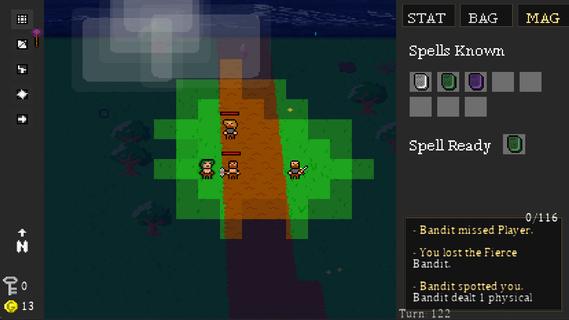
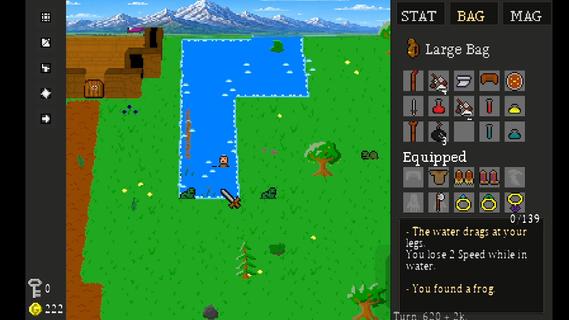
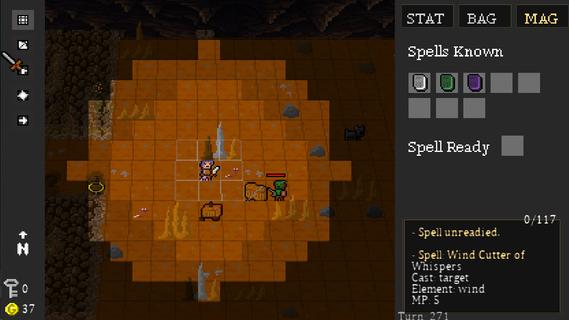
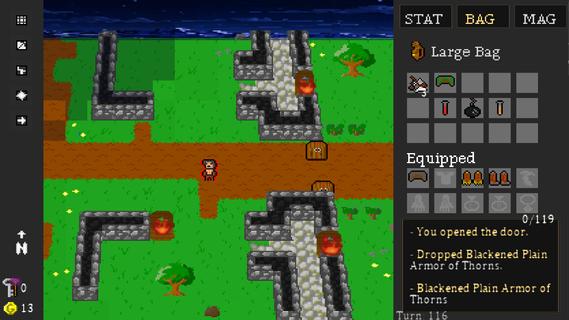
Dungeon Crawl 94: What Was Taken is a turn-based, grid-based pixel art RPG where every move matters. Explore a dangerous world of procedurally generated roads, forests, caves, dungeons, and other locations as you search for what was taken from you.Movement takes place one tile at a time, and every step advances the world around you. Enemies patrol, wildlife wanders, and danger continues to move with every turn. Sometimes fighting is the answer. Sometimes escaping is the smarter choice.Create your character and develop seven attributes: Strength, Dexterity, Intelligence, Wisdom, Speed, Constitution, and Luck. Equip weapons and armor, learn elemental magic, discover rare items, and build a character suited to the way you want to play.Explore dangerous dungeons filled with traps, puzzles, hidden treasures, merchants, enemies, and powerful bosses. Gather supplies, trade, craft useful items, and make camp as you push farther into the world.Procedural generation, multiple difficulty levels, hidden secrets, randomized loot, and different character builds make each journey through Dungeon Crawl 94: What Was Taken a little different from the last.FeaturesGrid-Based Turn-Based Exploration â Move one tile at a time as enemies and the world react to your actions.Procedurally Generated Adventures â Explore randomized roads, forests, caves, dungeons, and other locations.Seven Character Attributes â Develop Strength, Dexterity, Intelligence, Wisdom, Speed, Constitution, and Luck.Tactical Combat â Fight with melee weapons, bows, shields, and elemental magic.Equipment & Loot â Discover weapons, armor, magical items, consumables, and rare legendary treasures.Magic â Learn and use spells for combat, survival, and exploration.Crafting & Camping â Manage supplies and craft useful items as you travel.Merchants & Trading â Buy, sell, and manage your resources along the journey.Traps, Puzzles & Secrets â Search carefully for hidden areas and ways through environmental obstacles.Boss Battles â Face powerful enemies with unique challenges.Dynamic Pixel-Art World â Explore atmospheric environments with lighting, weather, and a tile-based visual style.Multiple Ways to Play â Randomized maps, different character builds, and multiple difficulty settings encourage new adventures.Xbox Controller, Keyboard & Mouse Support â Play using your preferred supported input method.
Pokaż więcej

1. Pobierz instalator MEmu i zakończ instalację

2. Uruchom MEmu, a następnie otwórz Google Play na pulpicie

3. Wyszukaj Dungeon Crawl 94: What Was Taken w Google Play
Install
4. Pobierz i zainstaluj Dungeon Crawl 94: What Was Taken
5. Po zakończeniu instalacji kliknij ikonę, aby rozpocząć

6. Ciesz się grą Dungeon Crawl 94: What Was Taken na PC z MEmu
MEmu Play to najlepszy emulator Androida, a 100 milionów ludzi już korzysta z jego i dosta doskonałe wrażenia z gier na Androida. Technologia wirtualizacji MEmu umożliwia płynne granie w tysiące gier Androida na komputerze, nawet tych najbardziej wymagających grafiki.
Większy ekran z lepszą grafiką; Długi czas, bez ograniczeń baterii lub danych mobilnych.
Pełna obsługa mapowania klawiszy dla precyzyjnego sterowania klawiaturą i myszą lub gamepadem.
Wiele kont gier lub zadań na jednym komputerze jednocześnie z menedżerem wielu instancji.
Play Dungeon Crawl 94: What Was Taken on PC by following steps: