Dungeon Crawl 94: What Was Taken
อัปเดตเมื่อ
เวอร์ชันปัจจุบัน
ให้บริการโดย

เวลาคุณเล่น Dungeon Crawl 94: What Was Taken, คุณอาจรู้สึกว่ามือคุณอาจบังจอแล้วทำให้ไม่ได้เล่นแบบเต็มที่. เล่นแบบไร้ขีดจำกัดด้วยเม้าส์และคีย์บอร์ด. MEmu มีตัวเลือกหลายอย่างให้คุณใช้งานเกมที่คุณเล่นแบบที่คุณต้องการ. ดาวน์โหลดและเล่น Dungeon Crawl 94: What Was Taken บน PC. เล่นนานแค่ไหนก็ได้, ไม่ต้องชาร์จแบตเตอรี่, หรือเจอคนโทรเข้ามาระหว่างเล่น. MEmu 9 เป็นตัวเลือกสำหรับการเล่น Dungeon Crawl 94: What Was Taken บน PC. ทางทีมงานเราได้ปรับแต่งเกม, ปรับให้เล่นเกมบางเกมได้เหมือนเล่น Dungeon Crawl 94: What Was Taken เป็นเกม PC เช่นเล็งด้วยเม้าส์หรือใช้คีย์บอร์ด. ระบบของเรายังทำให้คุณสามารถเปิดเล่นได้มากกว่า 2 เกมพร้อมๆกันในคอมของคุณ. และที่สำคัญที่สุด, ระบบโปรแกรมของเราสามารถทำให้คุณใช้ระบบของ PC ทำให้เกมลื่นเหมือนกับใช้โทรศัพท์รุ่นล่าสุด. เราไม่ได้ดูแลเรื่องการเล่นเกม, แต่เราดูแลถึงความสนุกสนานที่คุณได้จากการเล่นด้วย.
แสดงเพิ่มเติม
ดาวน์โหลด Dungeon Crawl 94: What Was Taken บน PC ด้วย MEmu Android Emulator สนุกกับการเล่นบนหน้าจอขนาดใหญ่ Dungeon Crawl 94: What Was Taken is a turn-based, grid-based pixel art RPG where every move matters.
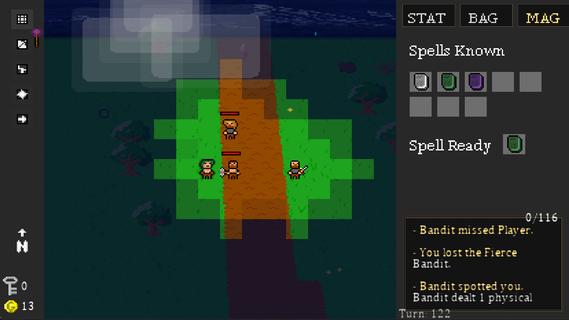
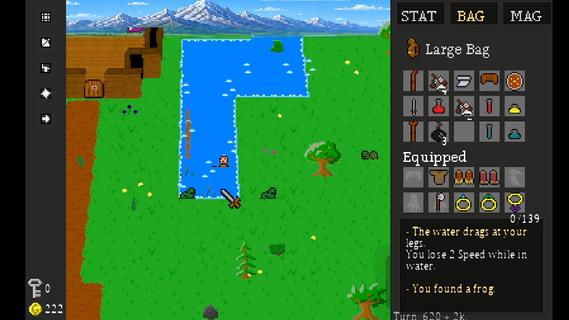
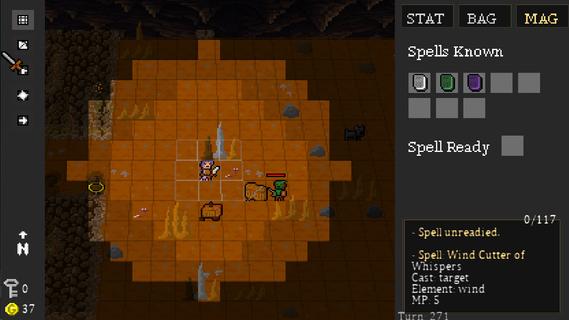
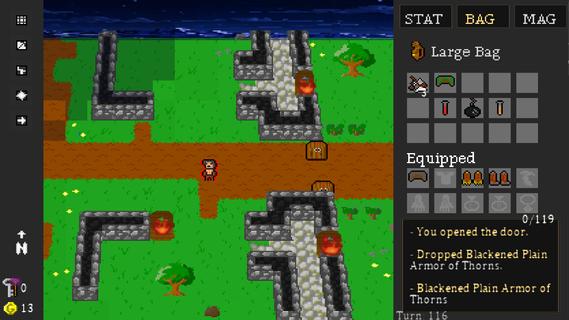
Dungeon Crawl 94: What Was Taken is a turn-based, grid-based pixel art RPG where every move matters. Explore a dangerous world of procedurally generated roads, forests, caves, dungeons, and other locations as you search for what was taken from you.Movement takes place one tile at a time, and every step advances the world around you. Enemies patrol, wildlife wanders, and danger continues to move with every turn. Sometimes fighting is the answer. Sometimes escaping is the smarter choice.Create your character and develop seven attributes: Strength, Dexterity, Intelligence, Wisdom, Speed, Constitution, and Luck. Equip weapons and armor, learn elemental magic, discover rare items, and build a character suited to the way you want to play.Explore dangerous dungeons filled with traps, puzzles, hidden treasures, merchants, enemies, and powerful bosses. Gather supplies, trade, craft useful items, and make camp as you push farther into the world.Procedural generation, multiple difficulty levels, hidden secrets, randomized loot, and different character builds make each journey through Dungeon Crawl 94: What Was Taken a little different from the last.FeaturesGrid-Based Turn-Based Exploration â Move one tile at a time as enemies and the world react to your actions.Procedurally Generated Adventures â Explore randomized roads, forests, caves, dungeons, and other locations.Seven Character Attributes â Develop Strength, Dexterity, Intelligence, Wisdom, Speed, Constitution, and Luck.Tactical Combat â Fight with melee weapons, bows, shields, and elemental magic.Equipment & Loot â Discover weapons, armor, magical items, consumables, and rare legendary treasures.Magic â Learn and use spells for combat, survival, and exploration.Crafting & Camping â Manage supplies and craft useful items as you travel.Merchants & Trading â Buy, sell, and manage your resources along the journey.Traps, Puzzles & Secrets â Search carefully for hidden areas and ways through environmental obstacles.Boss Battles â Face powerful enemies with unique challenges.Dynamic Pixel-Art World â Explore atmospheric environments with lighting, weather, and a tile-based visual style.Multiple Ways to Play â Randomized maps, different character builds, and multiple difficulty settings encourage new adventures.Xbox Controller, Keyboard & Mouse Support â Play using your preferred supported input method.
แสดงเพิ่มเติม

1. ดาวน์โหลดตัวติดตั้ง MEmu และสิ้นสุดการติดตั้ง

2. เริ่ม MEmu จากนั้นเปิด Google Play บนหน้าแรก

3. ค้นหา Dungeon Crawl 94: What Was Taken ใน Google Play
Install
4. ดาวน์โหลดและติดตั้ง Dungeon Crawl 94: What Was Taken
5. เมื่อติดตั้งเสร็จให้คลิกที่ไอคอนเพื่อเริ่มใช้งาน

6. สนุกกับการเล่น Dungeon Crawl 94: What Was Taken บนพีซีด้วย MEmu
MEmu App Player เป็นอีมูเลเตอร์ Android ที่ดีที่สุดและผู้คนกว่า 50 ล้านคนเพลิดเพลินไปกับประสบการณ์การเล่นเกม Android ที่ยอดเยี่ยม เทคโนโลยีการจำลองเสมือนของ MEmu ช่วยให้คุณเล่นเกม Android หลายพันเกมได้อย่างราบรื่นบนพีซีของคุณแม้แต่เกมที่ต้องใช้กราฟิกมากที่สุด
จอใหญ่และกราฟฟิกสวยกว่า; เล่นได้นาน, ไม่ต้องใช้แบตเตอรี่โทรศัพท์หรือเน็ตโทรศัพท์.
ระบบปรับแต่งปุ่มคีย์บอร์ดและเม้าส์ตามที่คุณเลือก
เล่นมากกว่าหนึ่งเกมบน PC ในเวลาเดียวกันด้วยระบบหลายจอหรือ Multi-Instance manager.
Play Dungeon Crawl 94: What Was Taken on PC by following steps:























![[ไกด์เกม] CookieRun Classic แนะนำ 5 คุกกี้น่าปั้น น่าลงทุน ที่มือใหม่ห้ามพลาด! (เล่นบน PC ผ่าน MEmu ให้ลื่นสุด ๆ) PC](https://www.memuplay.com/blog/wp-content/uploads/2026/08/579c01ab-a953-45b3-8115-9b6279b7d6f9.png)