Idle Gnome Garden: Farm Tycoon
अपडेट किया गया
वर्तमान वर्शन
संसाधन

अपने सेलफोन पर Idle Gnome Garden: Farm Tycoon का उपयोग करते समय ओवरचार्ज के बारे में चिंता करना बंद करें, अपने आप को छोटी स्क्रीन से मुक्त करें और बहुत बड़े डिस्प्ले पर ऐप का उपयोग करने का आनंद लें। अब से, कीबोर्ड और माउस के साथ अपने ऐप का पूर्ण-स्क्रीन अनुभव प्राप्त करें। एमईएमयू आपको उन सभी आश्चर्यजनक सुविधाओं की पेशकश करता है जिनकी आपको उम्मीद थी: त्वरित इंस्टॉल और आसान सेटअप, सहज नियंत्रण, बैटरी की कोई सीमा नहीं, मोबाइल डेटा और परेशान कॉल। आपके कंप्यूटर पर Idle Gnome Garden: Farm Tycoon का उपयोग करने का सबसे अच्छा विकल्प नया MEmu 9 है। हमारे अवशोषण के साथ कोडित, बहु-उदाहरण प्रबंधक एक ही समय में 2 या अधिक खाते खोलना संभव बनाता है। और सबसे महत्वपूर्ण, हमारा अनन्य उत्सर्जन इंजन आपके पीसी की पूरी क्षमता को जारी कर सकता है, सब कुछ सुचारू और सुखद बना सकता है।
और दिखाएं
डाउनलोड करें Idle Gnome Garden: Farm Tycoon पीसी पर MEmu एंड्रॉयड एमुलेटर के साथ बड़े पर्दे पर खेलने का आनंद लें। Welcome to Idle Gnome Garden: Farm Tycoon, the charming and highly addictive management game where you turn a tiny patch of land into the most bustling and profitable farm in the valley!



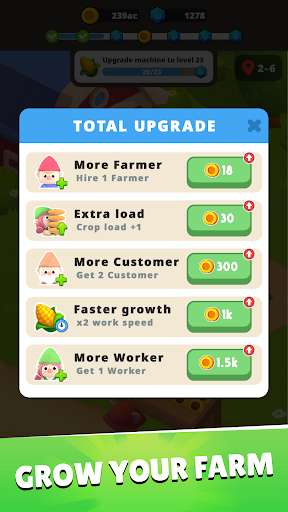
Welcome to Idle Gnome Garden: Farm Tycoon, the charming and highly addictive management game where you turn a tiny patch of land into the most bustling and profitable farm in the valley!
Simple Management, Deep Tycoon Experience
Let's experience the full cycle of farm management. You are the ultimate farm manager, overseeing every lively step.
Planting & Growing: Dive into your abundant Seed Storage and collect a vast variety of seeds. Sow them carefully to grow a huge bounty of fresh, high-quality fruits and vegetables.
Harvesting: Watch your crops ripen and enjoy the satisfying hustle of a big harvest! The more you plant, the more you reap.
Market & Sales: Run your very own lively market stall! Adorable gnome customers are lining up to buy your fresh produce. Manage your inventory and set up your stall to maximize profits.
Expansion & Upgrade: Reinvest your earnings to unlock new fields, faster growing methods, and exotic seeds to attract even more customers. Expand your little farm into a sprawling tycoon empire!
A Farm Brimming with Life & Hustle
The atmosphere on your farm is bursting with vibrant energy! Feel the exhilarating hustle and bustle as you constantly plant, harvest, and sell to meet the growing demand. Every seed sown and every coin earned contributes to the lively growth of your farm. Get ready for the thrilling, non-stop action of a real-life farm manager!
Start with nothing and strategically grow your operations, from the first seed planted to the final sale at the farmer's market.
Download Idle Gnome Garden: Farm Tycoon now and start building your thriving agricultural empire!
You need help? Contact us via email: support@unimobgame.com
और दिखाएं

1. MEmu इंस्टॉलर को डाउनलोड करें और इंस्टॉलेशन को पूरा करें

2. MEmu शुरू करें फिर होमपेज पर Google Play खोलें

3. Google Play में Idle Gnome Garden: Farm Tycoon खोजें
Install
4. Idle Gnome Garden: Farm Tycoon डाउनलोड कर इंस्टॉल करें
5. इंस्टॉल पूरा होने पर आइकन दबाएं

6. MEmu से पीसी पर Idle Gnome Garden: Farm Tycoon खेलने का आनंद लें
MEmu Play सबसे बेहतरीन मुफ़्त Android एमुलेटर है और 5 करोड़ लोग पहले ही इसके शानदार Android गेमिंग अनुभव का आनंद ले चुके हैं। MEmu 9 वर्चुअलाइज़ेशन तकनीक आपको अपने PC पर हज़ारों Android गेम, यहाँ तक कि सबसे ज़्यादा ग्राफ़िक्स वाले गेम भी, आसानी से खेलने की सुविधा देती है।
असीमित बैटरी या मोबाइल डेटा के साथ बेहतर ग्राफिक्स के साथ बड़ी स्क्रीन; लंबी अवधि।
कीबोर्ड और माउस या गेमपैड के उत्तम नियंत्रण के लिए संपूर्ण कीमैपिंग का समर्थन करता हैं।
एक ही पीसी पर मल्टी-इंस्टेंस मैनेजर के साथ एक समय में कई गेम खाते या कार्य कर सकते हैं।
Play Idle Gnome Garden: Farm Tycoon on PC by following steps: