Idle Gnome Garden: Farm Tycoon
Zaktualizowano
Aktualna wersja
Sprzedawca

Przy całej swojej pasji do grania w Idle Gnome Garden: Farm Tycoon, twoje ręce nie powinny być ograniczone na małym ekranie telefonu. Graj jak zawodowiec i uzyskaj pełną kontrolę nad grą za pomocą klawiatury i myszy. MEmu oferuje ci wszystko, czego oczekujesz. Pobierz i graj Idle Gnome Garden: Farm Tycoon na PC. Graj tak długo, jak chcesz, bez ograniczeń baterii, danych komórkowych i niepokojących połączeń. Zupełnie nowy MEmu 9 to najlepszy wybór do grania w Idle Gnome Garden: Farm Tycoon na PC. Przygotowany dzięki naszej wiedzy, znakomity, wstępnie ustawiony system mapowania klawiszy sprawia, że Idle Gnome Garden: Farm Tycoon jest prawdziwą grą na PC. Zakodowany naszą absorpcją, menedżer wielu instancji umożliwia granie na 2 lub więcej kontach na tym samym urządzeniu. A co najważniejsze, nasz emulator może uwolnić pełny potencjał twojego komputera, sprawić, że wszystko będzie płynne. Dbamy nie tylko o to, jak grasz, ale także o cały proces czerpania radości z grania.
Pokaż więcej
Ciesz się wspaniałym doświadczeniem podczas grania w Idle Gnome Garden: Farm Tycoon na komputerze z aplikacją MEMU App Player. Jest to potężny darmowy emulator Androida pozwalający grać w tysiące gier na Androida. Welcome to Idle Gnome Garden: Farm Tycoon, the charming and highly addictive management game where you turn a tiny patch of land into the most bustling and profitable farm in the valley!



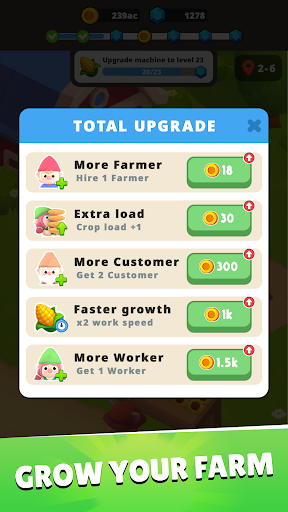
Welcome to Idle Gnome Garden: Farm Tycoon, the charming and highly addictive management game where you turn a tiny patch of land into the most bustling and profitable farm in the valley!
Simple Management, Deep Tycoon Experience
Let's experience the full cycle of farm management. You are the ultimate farm manager, overseeing every lively step.
Planting & Growing: Dive into your abundant Seed Storage and collect a vast variety of seeds. Sow them carefully to grow a huge bounty of fresh, high-quality fruits and vegetables.
Harvesting: Watch your crops ripen and enjoy the satisfying hustle of a big harvest! The more you plant, the more you reap.
Market & Sales: Run your very own lively market stall! Adorable gnome customers are lining up to buy your fresh produce. Manage your inventory and set up your stall to maximize profits.
Expansion & Upgrade: Reinvest your earnings to unlock new fields, faster growing methods, and exotic seeds to attract even more customers. Expand your little farm into a sprawling tycoon empire!
A Farm Brimming with Life & Hustle
The atmosphere on your farm is bursting with vibrant energy! Feel the exhilarating hustle and bustle as you constantly plant, harvest, and sell to meet the growing demand. Every seed sown and every coin earned contributes to the lively growth of your farm. Get ready for the thrilling, non-stop action of a real-life farm manager!
Start with nothing and strategically grow your operations, from the first seed planted to the final sale at the farmer's market.
Download Idle Gnome Garden: Farm Tycoon now and start building your thriving agricultural empire!
You need help? Contact us via email: support@unimobgame.com
Pokaż więcej

1. Pobierz instalator MEmu i zakończ instalację

2. Uruchom MEmu, a następnie otwórz Google Play na pulpicie

3. Wyszukaj Idle Gnome Garden: Farm Tycoon w Google Play
Install
4. Pobierz i zainstaluj Idle Gnome Garden: Farm Tycoon
5. Po zakończeniu instalacji kliknij ikonę, aby rozpocząć

6. Ciesz się grą Idle Gnome Garden: Farm Tycoon na PC z MEmu
MEmu Play to najlepszy emulator Androida, a 100 milionów ludzi już korzysta z jego i dosta doskonałe wrażenia z gier na Androida. Technologia wirtualizacji MEmu umożliwia płynne granie w tysiące gier Androida na komputerze, nawet tych najbardziej wymagających grafiki.
Większy ekran z lepszą grafiką; Długi czas, bez ograniczeń baterii lub danych mobilnych.
Pełna obsługa mapowania klawiszy dla precyzyjnego sterowania klawiaturą i myszą lub gamepadem.
Wiele kont gier lub zadań na jednym komputerze jednocześnie z menedżerem wielu instancji.
Play Idle Gnome Garden: Farm Tycoon on PC by following steps: