
5 Rupees
Updated
Current Version
1.0.0
Offered By

With your passion for 5 Rupees, you shouldn’t have to limit yourself to the small screen of a phone. Play like a pro and take full control of the game using a keyboard and mouse. MEmu gives you everything you’re looking for. Download and play 5 Rupees on PC. Play as long as you want — no more worries about battery life, mobile data, or unexpected calls. The all-new MEmu 9 is the best way to play 5 Rupees on PC. With our expertly designed keymapping system, 5 Rupees feels just like a real PC game. The MEmu multi-instance manager lets you run two or more accounts on the same device at the same time. Most importantly, our exclusive emulation engine unlocks your PC’s full potential, delivering smooth and seamless performance.
Show more
Download 5 Rupees on PC with MEmu Android Emulator. Enjoy playing on big screen. 5 RUPEES: Giant Entertainment App!
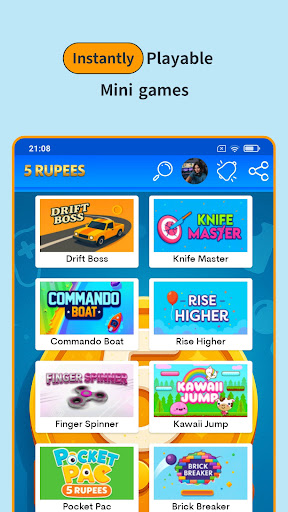
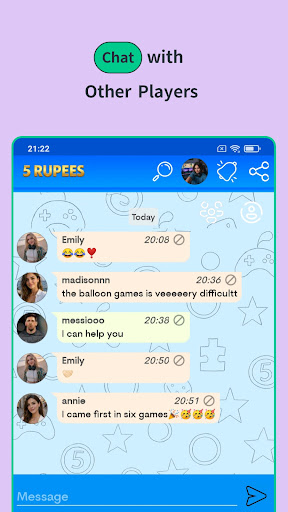

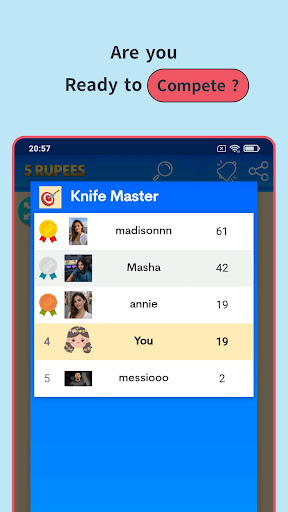
5 RUPEES: Giant Entertainment App!
Bored? Running out of space on your phone? Are you ready to enjoy hundreds of games in a single app?
Welcome to the world of mini games.Unlock the doors to the world of entertainment with 5 Rupees! Whether you're on the bus, on a break, or just unwinding after a long day; a massive arcade awaits you right at your fingertips. Colorful graphics, addictive levels, and never-ending action are waiting for you!
WHY SHOULD YOU DOWNLOAD THIS GAME?
All-in-One: No more downloading games one by one! We've gathered the most popular mini-games under one roof, from action to puzzles, racing to strategy. Experience maximum fun without filling up your phone's memory.
Eye-Catching and Colorful Graphics: A visual feast designed with vibrant colors and smooth animations that appeal to all ages. Each mini-game will draw you in with its own unique world.
Challenge and Compete: Playing isn't enough! Set the highest score, take your place on the leaderboard, and show your friends who's the boss. Are you ready to test your reflexes and wits?
Fast and Smooth Performance: A super lightweight build that runs without freezing or lagging, even on older phones. No waiting time, just click and play instantly!
WHAT'S INSIDE?
For Brainiacs: Brain-teasing puzzles and memory games.
For Speed Enthusiasts: Breathtaking races and endless runner games.
For Sharpshooters: Shooting games that hit the bullseye.
For Classic Lovers: Fruit slicing, snake, and block-breaking games.
...and much more added every week!
KEY FEATURES
Chat Feature: The ability to chat live with other players 24/7.
Simple Controls: Mechanics that can be easily played with just one finger.
Family Friendly: Suitable content for both children and adults.
Completely Free Updates: No need to pay extra fees for new games!
Say "Goodbye" to boredom! Fit the fun in your pocket right now!
Show more

1. Download MEmu installer and finish the setup

2. Start MEmu then open Google Play on the desktop

3. Search 5 Rupees in Google Play
Install
4. Download and Install 5 Rupees
5. On install completion click the icon to start

6. Enjoy playing 5 Rupees on PC with MEmu
MEmu Play is the best Android emulator and 100 million people already enjoy its superb Android gaming experience. The MEmu virtualization technology empowers you to play thousands of Android games smoothly on your PC, even the most graphic-intensive ones.
Bigger screen with better graphics; Long duration, without limitation of battery or mobile data.
Full Keymapping support for precise control of keyboard and mouse or gamepad.
Multiple game accounts or tasks on single PC at one time with Multi-Instance manager.
Play 5 Rupees on PC by following steps: