Abyssal Soul - Card Roguelike
Updated
Current Version
1.0.3
Offered By

With your passion for Abyssal Soul - Card Roguelike, you shouldn’t have to limit yourself to the small screen of a phone. Play like a pro and take full control of the game using a keyboard and mouse. MEmu gives you everything you’re looking for. Download and play Abyssal Soul - Card Roguelike on PC. Play as long as you want — no more worries about battery life, mobile data, or unexpected calls. The all-new MEmu 9 is the best way to play Abyssal Soul - Card Roguelike on PC. With our expertly designed keymapping system, Abyssal Soul - Card Roguelike feels just like a real PC game. The MEmu multi-instance manager lets you run two or more accounts on the same device at the same time. Most importantly, our exclusive emulation engine unlocks your PC’s full potential, delivering smooth and seamless performance.
Show more
Download Abyssal Soul - Card Roguelike on PC with MEmu Android Emulator. Enjoy playing on big screen. Abyssal Soul is a sequential card-battle Roguelike game that blends strategic deck-building, multi-class progression, and Western fantasy art style, delivering a profound adventure centered on "sacrifice and choice.
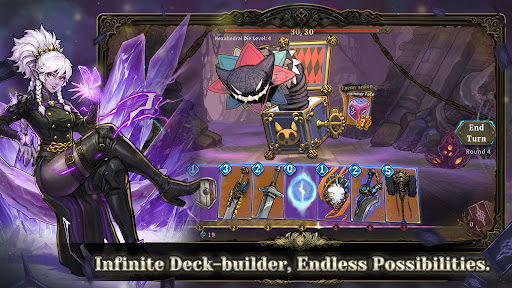
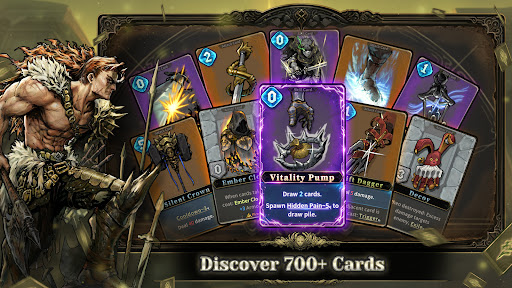
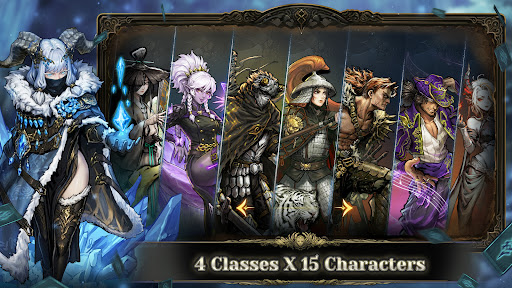
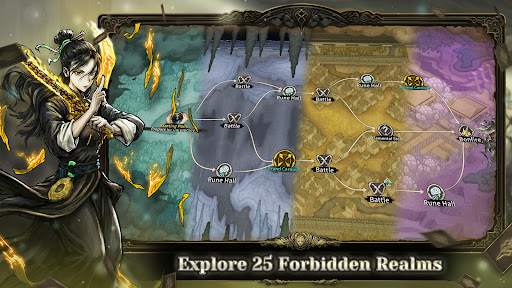
Abyssal Soul is a sequential card-battle Roguelike game that blends strategic deck-building, multi-class progression, and Western fantasy art style, delivering a profound adventure centered on "sacrifice and choice." Within recurring "rituals," you will select characters, plan routes, collect cards and blessings to confront the anomalies lurking in the depths of dreams.
【Unique Sequential Card Combat】
Break the logic of traditional roguelike card games! Casting a card sacrifices several subsequent cards as cost.
You must tactically adjust card positions to balance cost and benefit, maximizing the power of every play.
During combat, you can preview the enemy’s card sequence with no time limits within the turn-based mechanics.
【Deep Deck-Building & Class Mastery】
With over 700 Cards, 170 Auras, 50 Runes, and 85 Amulets, every run offers a fresh deck-building experience.
4 Classes, 17 distinct characters. Each class features a unique card pool and mechanics, while characters offer exclusive cards, talent trees, and starting builds.
Dual progression paths—card upgrades and character development—ensure your hero grows permanently stronger with every ritual.
【Easy to Master, Endless to Explore】
Built-in recommended deck builds allow new players to jump in quickly and master the endless combos.
The Memento system features a legacy mechanic: carry your best card into the next ritual.
14 difficulty tiers offer a tailored experience for everyone, from casual explorers to hardcore strategists.
Sequence as your blade, construction as your shield. Dive into the dream and face the anomalies.
Follow us:
http://www.chillyroom.com
Email: info@chillyroom.games
YouTube: @ChillyRoom
Instagram: @chillyroominc
X: @ChillyRoom
Discord: https://discord.gg/CVDHk73266
Show more

1. Download MEmu installer and finish the setup

2. Start MEmu then open Google Play on the desktop

3. Search Abyssal Soul - Card Roguelike in Google Play
Install
4. Download and Install Abyssal Soul - Card Roguelike
5. On install completion click the icon to start

6. Enjoy playing Abyssal Soul - Card Roguelike on PC with MEmu
MEmu Play is the best Android emulator and 100 million people already enjoy its superb Android gaming experience. The MEmu virtualization technology empowers you to play thousands of Android games smoothly on your PC, even the most graphic-intensive ones.
Bigger screen with better graphics; Long duration, without limitation of battery or mobile data.
Full Keymapping support for precise control of keyboard and mouse or gamepad.
Multiple game accounts or tasks on single PC at one time with Multi-Instance manager.
Play Abyssal Soul - Card Roguelike on PC by following steps: