Aha World
Updated
Current Version
5.4.0
Offered By

With your passion for Aha World, you shouldn’t have to limit yourself to the small screen of a phone. Play like a pro and take full control of the game using a keyboard and mouse. MEmu gives you everything you’re looking for. Download and play Aha World on PC. Play as long as you want — no more worries about battery life, mobile data, or unexpected calls. The all-new MEmu 9 is the best way to play Aha World on PC. With our expertly designed keymapping system, Aha World feels just like a real PC game. The MEmu multi-instance manager lets you run two or more accounts on the same device at the same time. Most importantly, our exclusive emulation engine unlocks your PC’s full potential, delivering smooth and seamless performance.
Show more
Download Aha World on PC with MEmu Android Emulator. Enjoy playing on big screen. Jump into Aha World, a fun role-playing game!
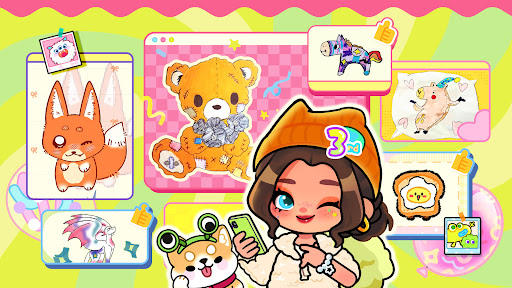

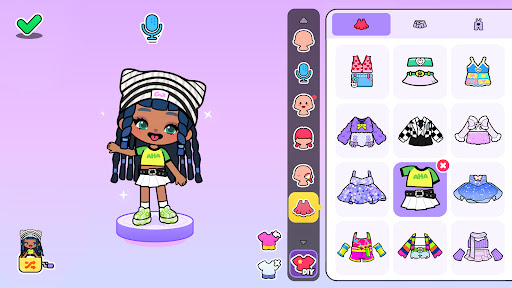
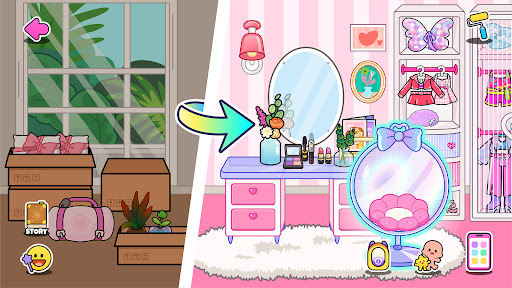
Jump into Aha World, a fun role-playing game! Dress up dolls, build your dream home, simulate daily life in a bustling world, and go on fantasy adventures. Enjoy your avatar adventures, fun doll activities, warm life moments, and exciting dress-up games.
DRESS UP YOUR DOLL
Design diverse doll looks for your world and have fun! Mix body shapes and hairstyles, add makeup, and pick from hundreds of clothes and accessories. Whether you prefer pink fashion or princess style, these dress-up games and girl games bring joy. Each outfit enriches doll games, adds charm to your world, and makes the makeover game and make up game more personal, perfect for avatar life.
ROLE PLAYING
Bring characters to life in Aha World! Design how dolls look, sound, and act—be a doctor, cop, pop star, or a girl with endless styles. Your world is yours! For more excitement, battle dragons, explore the Polar Regions, or create your own fantasy room. This makeover game lets you switch roles freely, enhances doll and girl games, brings fun to avatar life, and integrates dress-up and makeover games with scenes—keeping your world lively and full of fun.
DESIGN YOUR HOME
What's your dream home, girl? A pink apartment, a villa with a pool, or a fantasy room? Use over 3,000 furniture items or DIY pieces for your world. Building a home enriches life, gives girls a cozy space in doll and avatar games, and pairs with dress-up games, matching doll looks to home styles. It adds warmth to the makeover game and makes your world even more delightful.
LIFE SIMULATION
Experience city life: care for babies, shop, explore schools, hospitals, or a fantasy room. Step into the world and explore your avatar girl life. Feel the warmth of daily living, let girls enjoy the fun of simulation play, integrate doll games into daily tasks, and gain ideas for makeup and dress-up games (e.g., dressing up babies in cute outfits). It makes the role-playing game realistic and your world vivid.
MAGIC AND ADVENTURE
Dive into underwater treasures, frozen realms, fairy forests, or Dino Land with your doll. Makeup fun has no limits! Adventures add excitement to the makeup game. They allow you to explore alongside daily life, make doll games thrilling, and enhance dress-up games, leaving lasting memories.
GAME FEATURES
• 500+ stylish outfits: fuels dress-up games and diversifies doll games.
• 400+ dolls & 200+ animals: enriches doll games and makeover fun.
• 3000+ furniture: builds dream homes and fantasy rooms in your magical world.
• DIY clothing/furniture: personalizes dress-up games and your world.
• Weather control: experiences sun, rain, and snow—boosting simulation game realism.
• Hundreds of puzzles/Easter eggs: adds exploration to the role-playing game.
• Regular surprises: keeps avatar life and games fresh.
• Offline play: enjoy everything anytime, no Wi-Fi needed.
Aha World—your life world of role-playing game magic! Create, explore, and live your simulation life.
Contact us: contact@ahaworld.com
Show more

1. Download MEmu installer and finish the setup

2. Start MEmu then open Google Play on the desktop

3. Search Aha World in Google Play
Install
4. Download and Install Aha World
5. On install completion click the icon to start

6. Enjoy playing Aha World on PC with MEmu
MEmu Play is the best Android emulator and 100 million people already enjoy its superb Android gaming experience. The MEmu virtualization technology empowers you to play thousands of Android games smoothly on your PC, even the most graphic-intensive ones.
Bigger screen with better graphics; Long duration, without limitation of battery or mobile data.
Full Keymapping support for precise control of keyboard and mouse or gamepad.
Multiple game accounts or tasks on single PC at one time with Multi-Instance manager.
Play Aha World on PC by following steps: