Gacha Club
Updated
Current Version
1692112538
Offered By

With your passion for Gacha Club, you shouldn’t have to limit yourself to the small screen of a phone. Play like a pro and take full control of the game using a keyboard and mouse. MEmu gives you everything you’re looking for. Download and play Gacha Club on PC. Play as long as you want — no more worries about battery life, mobile data, or unexpected calls. The all-new MEmu 9 is the best way to play Gacha Club on PC. With our expertly designed keymapping system, Gacha Club feels just like a real PC game. The MEmu multi-instance manager lets you run two or more accounts on the same device at the same time. Most importantly, our exclusive emulation engine unlocks your PC’s full potential, delivering smooth and seamless performance.
Show more
Download Gacha Club on PC with MEmu Android Emulator. Enjoy playing on big screen. ★ Welcome to Gacha Club ★.

★ Welcome to Gacha Club ★
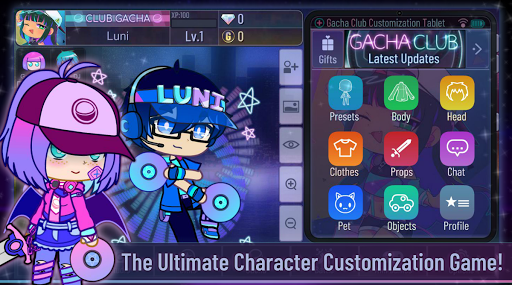
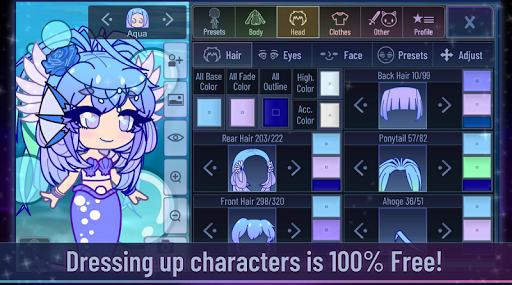
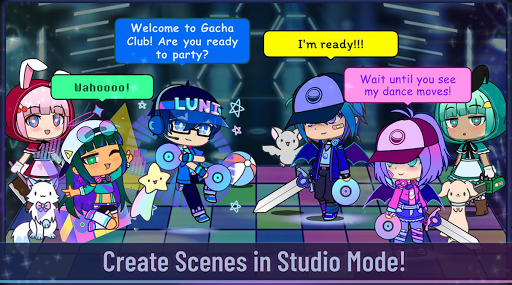
What club will you join? Get the party started and create your own anime styled characters and dress them up in your favorite fashion outfits! Choose from thousands of dresses, shirts, hairstyles, weapons, and much more! After designing your characters, enter the Studio and create any scene you can imagine! Add pets, objects, and choose your favorite background! Customization is 100% free, there are no in-app purchases!
Ready for more action? Gacha over 180 units to use in battle! Choose from four different modes, including Story mode, Tower mode, and more! Collect gems, gold, and materials to enhance, awaken, and increase your skill levels! You can also play your favorite mini-games and collect gems and bytes to Gacha for more units! What are you waiting for? Step into Gacha Club and begin your adventure today!
CREATE YOUR OWN CHARACTERS
★ Customize 10 main characters and 90 extra characters!
★ Change the colors for almost all of your items!
★ Choose from 600 different poses!
★ Adjust your hair/eyes/items to fit your characters!
★ Choose and customize hundreds of pets and objects!
★ Set custom profiles for all your characters!
★ Import and Export your friend’s characters!
STUDIO MODE
★ Add up to 10 characters anywhere on the screen!
★ Add your favorite pets and objects to the scene, too!
★ Choose from a wide variety of backgrounds and foregrounds!
★ Make your characters talk to each other with custom text boxes, pets too!
★ Add a Narrator to create story-telling scenes!
★ Save and Load up to 15 scenes!
★ Use face presets to quickly change your face.
GACHA AND BATTLE
★ Gacha over 180 units to use in battle!
★ Gacha for 150 pets to increase your stats!
★ Collect super rare Corrupted and DJ characters!
★ Use materials to enhance, awaken, and increase skill levels!
★ Choose from four battle modes: Story, Training, Tower, and Shadows of Corruption
MINI GAMES
★ Play fun mini-games such as Usagi vs Neko or Mascot Whack!
★ Collect gems and bytes to gacha for more characters!
★ Free 2 Play, you can farm for gems easily!
★ Play offline! No Wi-Fi is needed to play!
«Notes»
- The game may lag on old devices & devices with 4k screens.
- Please restart the game if you experience lag over time.
- If you experience glitches with the game, please make sure you have storage available on your phone.
- There are no In-App Purchases.
Thank you for playing Gacha Club!
Like us on Facebook: http://facebook.com/Lunime
Facebook Group: http://www.facebook.com/groups/GachaClub/
Visit our Website: http://www.Lunime.com
Show more

1. Download MEmu installer and finish the setup

2. Start MEmu then open Google Play on the desktop

3. Search Gacha Club in Google Play
Install
4. Download and Install Gacha Club
5. On install completion click the icon to start

6. Enjoy playing Gacha Club on PC with MEmu
MEmu Play is the best Android emulator and 100 million people already enjoy its superb Android gaming experience. The MEmu virtualization technology empowers you to play thousands of Android games smoothly on your PC, even the most graphic-intensive ones.
Bigger screen with better graphics; Long duration, without limitation of battery or mobile data.
Full Keymapping support for precise control of keyboard and mouse or gamepad.
Multiple game accounts or tasks on single PC at one time with Multi-Instance manager.
Play Gacha Club on PC by following steps: