
Asenso - Finance Simulator
Updated
Current Version
1.0.4
Offered By

With your passion for Asenso - Finance Simulator, you shouldn’t have to limit yourself to the small screen of a phone. Play like a pro and take full control of the game using a keyboard and mouse. MEmu gives you everything you’re looking for. Download and play Asenso - Finance Simulator on PC. Play as long as you want — no more worries about battery life, mobile data, or unexpected calls. The all-new MEmu 9 is the best way to play Asenso - Finance Simulator on PC. With our expertly designed keymapping system, Asenso - Finance Simulator feels just like a real PC game. The MEmu multi-instance manager lets you run two or more accounts on the same device at the same time. Most importantly, our exclusive emulation engine unlocks your PC’s full potential, delivering smooth and seamless performance.
Show more
Download Asenso - Finance Simulator on PC with MEmu Android Emulator. Enjoy playing on big screen. Welcome to Asenso – Financial Simulator, an interactive life RPG and educational game designed to help you master personal finance in a completely zero-risk environment.
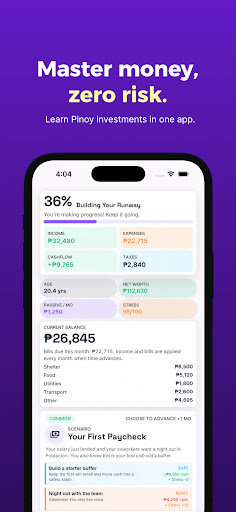
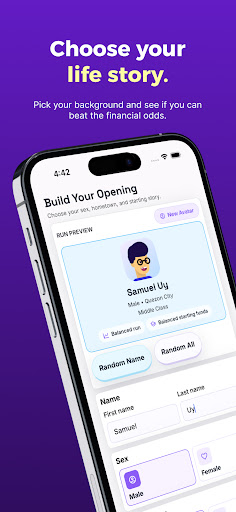
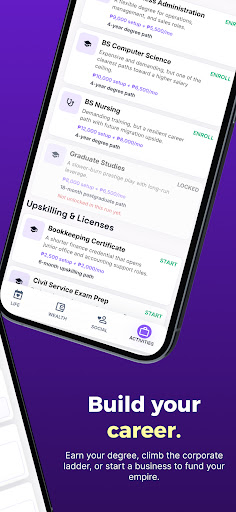
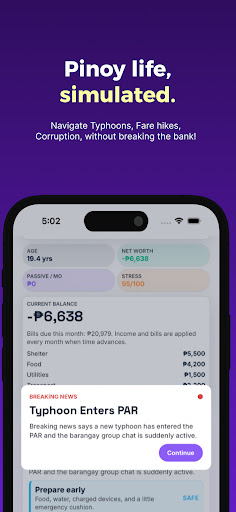
Welcome to Asenso – Financial Simulator, an interactive life RPG and educational game designed to help you master personal finance in a completely zero-risk environment. Turn the Philippine economy into your personal sandbox and experience the thrill of investing, building your net worth, and navigating real-world financial challenges — without risking a single Peso.
Whether you're a complete beginner building financial confidence or a seasoned saver testing new strategies, Asenso turns financial literacy into an engaging, replayable challenge. Make your biggest money mistakes in the game so you never have to make them in real life.
CHOOSE YOUR PINOY STORY
Create your custom character and pick your starting hometown — from the busy streets of Quezon City to the vibrant hubs of Davao. Manage your career path, start a side hustle, and balance your daily spending to secure your future.
REALISTIC INVESTMENTS, ZERO RISK
Allocate your simulated income into fictionalized versions of real-world investment vehicles tailored to the Philippine market. Test your strategies with local government savings programs, the local stock market, Real Estate REITs, and digital banks. Watch your Net Worth, Credit Score, and Passive Income grow in real time.
SURVIVE THE UNEXPECTED
Life in the Philippines is unpredictable. Brace your portfolio for random, realistic economic events. Protect your Emergency Fund when a typhoon enters PAR, adjust your budget during sudden inflation hikes, and maximize your 13th-month pay before the dreaded Petsa de Peligro hits.
LEARN BY PLAYING
Access a built-in Investment Library to learn the actual mechanics behind the asset classes you buy in-game. Bridge the gap between gaming and real life — test strategies safely, learn how compound interest works, and apply those winning concepts to your actual wallet.
Ready to level up your financial IQ and play your way to prosperity? Download Asenso today and start building your empire!
DISCLAIMERS & LEGAL NOTICE
1. Not Financial Advice: Asenso is an educational video game and simulation. All scenarios, market fluctuations, and outcomes depicted in the app are for entertainment and educational purposes only. Nothing in this app constitutes professional financial, investment, or legal advice.
2. No Real-World Value: All in-game currency, investments, and assets are purely fictional and have no monetary value. They cannot be exchanged for real money or tangible assets.
3. Trademarks & Affiliations: All product names, logos, brands, and institutional references (such as Pag-IBIG MP2, PSE, etc.) are the property of their respective trademark holders and are used purely in a referential, educational context. Asenso is an independently developed game and is not affiliated with, endorsed by, sponsored by, or connected to any government agency, financial institution, or trademark holder.
Show more

1. Download MEmu installer and finish the setup

2. Start MEmu then open Google Play on the desktop

3. Search Asenso - Finance Simulator in Google Play
Install
4. Download and Install Asenso - Finance Simulator
5. On install completion click the icon to start

6. Enjoy playing Asenso - Finance Simulator on PC with MEmu
MEmu Play is the best Android emulator and 100 million people already enjoy its superb Android gaming experience. The MEmu virtualization technology empowers you to play thousands of Android games smoothly on your PC, even the most graphic-intensive ones.
Bigger screen with better graphics; Long duration, without limitation of battery or mobile data.
Full Keymapping support for precise control of keyboard and mouse or gamepad.
Multiple game accounts or tasks on single PC at one time with Multi-Instance manager.
Play Asenso - Finance Simulator on PC by following steps:














































