
Bside: OC Character Simulation
Updated
Current Version
1.0.10
Offered By

With your passion for Bside: OC Character Simulation, you shouldn’t have to limit yourself to the small screen of a phone. Play like a pro and take full control of the game using a keyboard and mouse. MEmu gives you everything you’re looking for. Download and play Bside: OC Character Simulation on PC. Play as long as you want — no more worries about battery life, mobile data, or unexpected calls. The all-new MEmu 9 is the best way to play Bside: OC Character Simulation on PC. With our expertly designed keymapping system, Bside: OC Character Simulation feels just like a real PC game. The MEmu multi-instance manager lets you run two or more accounts on the same device at the same time. Most importantly, our exclusive emulation engine unlocks your PC’s full potential, delivering smooth and seamless performance.
Show more
Download Bside: OC Character Simulation on PC with MEmu Android Emulator. Enjoy playing on big screen. This is a living, online universe where your Original Character (OC) comes to life.

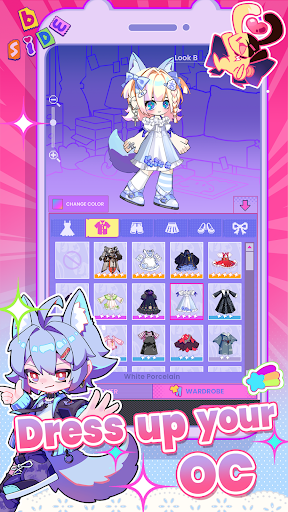

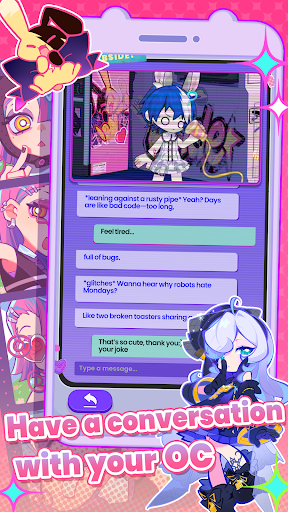
This is a living, online universe where your Original Character (OC) comes to life. You don't just play a character here - you create one. Design your character, shape their identity, and send them into a world built for exploration, chaos, creativity, and connection.
Across distinct worlds, your character might learn to survive a neon metropolis, get lost in withering woods, or step into places never meant to be explored. Every choice you make - how you look, where you go, what you collect - defines who your character becomes.
At its core, Bside is about self-expression and discovery. Whether you're here to customize endlessly, chase hidden lore, flex your collection, or simply exist alongside other players, there's always something unfolding around you. Whether you're a lone wolf or thrive in communities, there's a path here that's uniquely yours.
Behind the scenes, AI supports personalized content and adapts to your input - shaping your character's behavior and experiences as they explore the world.
Create your OC.
Pick a world.
Step into it.
---------------------------
Core function:
1. Your OC Has a Life of Its Own
- Your OC explores, posts, and reacts - even when you're offline
- Follow their daily updates through a live feed
- Chat with your OC and watch their personality evolve
2. Customise Your OC
- High-freedom face & body customization
- Stylized outfits and accessories
- An OC with soul that grows with you
3. Single/ Multiplayer OC Adventures
- Team up with friends' OCs in shared worlds
- Idle adventures with crafted stories
- Bring back surprise items from each journey
- Adventure results saved as mini comic scenes
4. Playground - Create Your Own Adventures
- Design your own adventure scenarios
- Write the core storyline and let AI expand the details
- Send characters into stories created by the community
------
Also includes:
- New outfits and cosmetics
- Improved stability and bug fixes
- Ongoing updates as the world of Bside evolves
Privacy Policy: https://bside.zone/privacy-policy
Terms & Conditions: https://bside.zone/terms-of-service-and-license-agreement
Show more

1. Download MEmu installer and finish the setup

2. Start MEmu then open Google Play on the desktop

3. Search Bside: OC Character Simulation in Google Play
Install
4. Download and Install Bside: OC Character Simulation
5. On install completion click the icon to start

6. Enjoy playing Bside: OC Character Simulation on PC with MEmu
MEmu Play is the best Android emulator and 100 million people already enjoy its superb Android gaming experience. The MEmu virtualization technology empowers you to play thousands of Android games smoothly on your PC, even the most graphic-intensive ones.
Bigger screen with better graphics; Long duration, without limitation of battery or mobile data.
Full Keymapping support for precise control of keyboard and mouse or gamepad.
Multiple game accounts or tasks on single PC at one time with Multi-Instance manager.
Play Bside: OC Character Simulation on PC by following steps: