Bus Simulator : World
Updated
Current Version
1.0
Offered By

With your passion for Bus Simulator : World, you shouldn’t have to limit yourself to the small screen of a phone. Play like a pro and take full control of the game using a keyboard and mouse. MEmu gives you everything you’re looking for. Download and play Bus Simulator : World on PC. Play as long as you want — no more worries about battery life, mobile data, or unexpected calls. The all-new MEmu 9 is the best way to play Bus Simulator : World on PC. With our expertly designed keymapping system, Bus Simulator : World feels just like a real PC game. The MEmu multi-instance manager lets you run two or more accounts on the same device at the same time. Most importantly, our exclusive emulation engine unlocks your PC’s full potential, delivering smooth and seamless performance.
Show more
Download Bus Simulator : World on PC with MEmu Android Emulator. Enjoy playing on big screen. Take the wheel of the ultimate coach and drive real passengers across three continents.
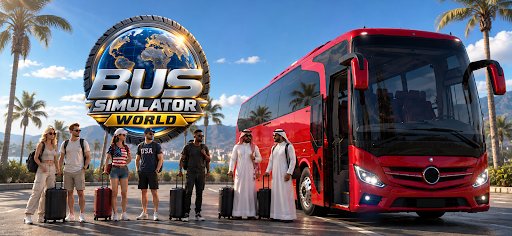
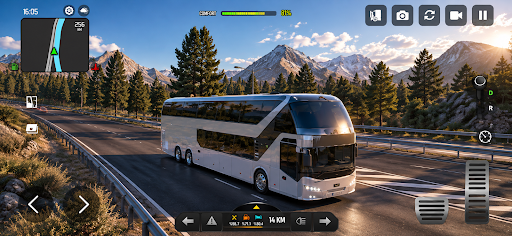
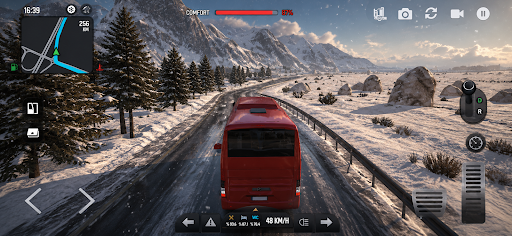
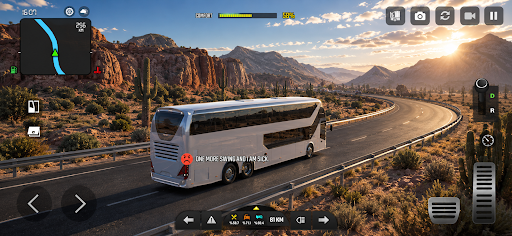
Take the wheel of the ultimate coach and drive real passengers across three continents. Pick up your riders at the terminal, load their luggage, close the doors and roll out on long-distance routes through Europe, the Middle East and North America. Every kilometre is yours to drive, day or night, sun, rain or snow.
YOUR PASSENGERS ARE WATCHING
This is not a cargo run. Forty people are sitting behind you, and they notice everything. Brake too hard, swerve, speed, bump over a curb, and they will let you know. Drive smooth and they tip you at the end of the ride. Drive badly and they ask for refunds. Keep the comfort bar full for the ultimate perfect ride.
A FLEET OF 14 BUSES
Start in a compact city coach and work your way up to the double-decker flagships. Coaches, city buses, school buses and luxury liners, each with its own cockpit, doors, gearbox and handling. Every bus has a real interior you can drive from, with a working dashboard, mirrors and doors.
BUILD THE BUS COMPANY
Buy offices in new cities, hire drivers and send your spare buses out on routes while you drive your own. Earn licences, level up your company and grow from a single bus to an ultimate company operator. Your drivers keep earning while you are on the road.
MAKE IT YOURS
Paint your bus, apply vinyls, change rims, horns and LED lights. Upgrade the engine, tyres, transmission and suspension. A better suspension is not just faster laps, it is happier passengers. Build your ultimate bus.
DRIVE YOUR WAY
Steering wheel, tilt or buttons. Choose the time of day and the weather before every route. Switch between cockpit, chase and orbit cameras. Realistic traffic, working signals, fuel stops, rest areas and a living world map with dozens of cities to discover.
THE ROAD TRIP
Long highways, mountain passes, coastal roads and tunnels. Weather that changes as you drive. A day-night cycle that turns a routine route into the ultimate road trip.
DAILY REWARDS AND GOALS
Log in every day for rewards, complete goals for extra cash and gold, and unlock the ultimate premium pack with unlimited fuel, no ads and exclusive buses.
Bus Simulator World is the ultimate bus driving experience. Download now and start your first route.
Show more

1. Download MEmu installer and finish the setup

2. Start MEmu then open Google Play on the desktop

3. Search Bus Simulator : World in Google Play
Install
4. Download and Install Bus Simulator : World
5. On install completion click the icon to start

6. Enjoy playing Bus Simulator : World on PC with MEmu
MEmu Play is the best Android emulator and 100 million people already enjoy its superb Android gaming experience. The MEmu virtualization technology empowers you to play thousands of Android games smoothly on your PC, even the most graphic-intensive ones.
Bigger screen with better graphics; Long duration, without limitation of battery or mobile data.
Full Keymapping support for precise control of keyboard and mouse or gamepad.
Multiple game accounts or tasks on single PC at one time with Multi-Instance manager.
Play Bus Simulator : World on PC by following steps: