Classic Words Solo
Updated
Current Version
1713208165
Offered By

With your passion for Classic Words Solo, you shouldn’t have to limit yourself to the small screen of a phone. Play like a pro and take full control of the game using a keyboard and mouse. MEmu gives you everything you’re looking for. Download and play Classic Words Solo on PC. Play as long as you want — no more worries about battery life, mobile data, or unexpected calls. The all-new MEmu 9 is the best way to play Classic Words Solo on PC. With our expertly designed keymapping system, Classic Words Solo feels just like a real PC game. The MEmu multi-instance manager lets you run two or more accounts on the same device at the same time. Most importantly, our exclusive emulation engine unlocks your PC’s full potential, delivering smooth and seamless performance.
Show more
Download Classic Words Solo on PC with MEmu Android Emulator. Enjoy playing on big screen. Classic Words is the number one word game to play against your smartphone or tablet (solitaire mode).
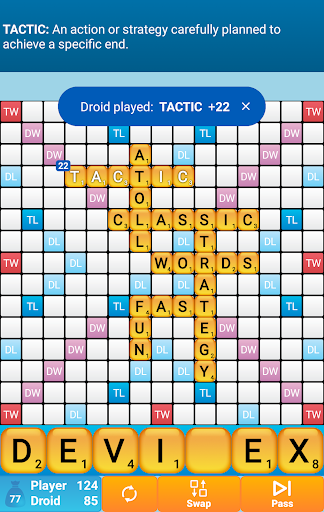
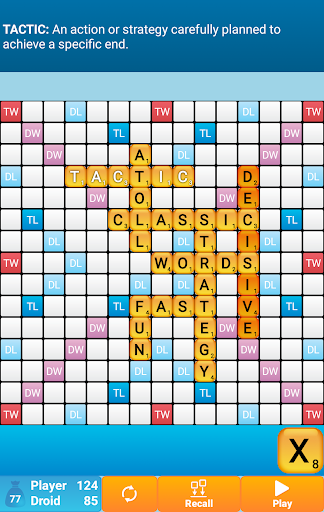
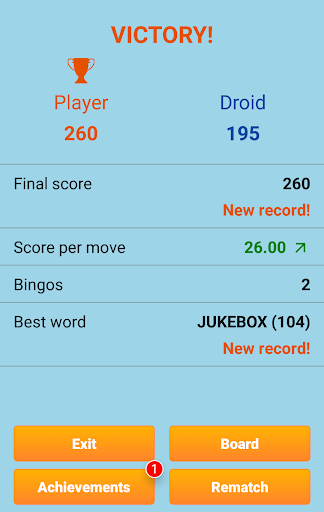
Classic Words is the number one word game to play against your smartphone or tablet (solitaire mode).
Enrich your vocabulary thanks to the built-in word definitions!
6 difficulty levels and many languages are supported: English, Spanish, French, Italian, German, Dutch, and Polish.
Tired of stumbling across cheaters or waiting hours for your opponent's next move on multiplayer word games?
Try out Classic Words for instant fun, no matter if you are a beginner in crossword games or a tournament player!
Choose the skill level of the computer (from beginner to expert), pick a word list (English word lists include the latest NASPA Word List 2020), and use your strategy skills and vocabulary to try and defeat the Droid.
Classic Words gameplay is classical to crosswords board games: create and place words on the board and boost your score by placing letters on the high scoring Double Letter, Double Word, Triple Letter, and Triple Word squares.
Use all 7 letters from your rack to play a Bingo and get a 50 points bonus.
This game is a great time killer for all board games and strategy games fans. It's also a fun way to improve your spelling and vocabulary.
Thanks to the fast reactivity and variable skill of the computer and quality word lists, Classic Words is used by many enthusiasts to play quick training matches and learn new words from the computer's moves.
Unlike multiplayer board games where some dishonest players use anagram solvers, there is no cheating possible when playing solitaire... Letters and blanks are always picked randomly, and the computer's artificial intelligence does not have more information than you do.
Only your tactics and creativity can make the difference...
Will you play strategically enough to outwit the computer and its extensive vocabulary?
☆ Features ☆
• Smart AI
• 6 levels of difficulty
• Display the definition of words by swiping them
• Supports offline play
• Languages and dictionaries supported:
- English (official NASPA Word List 2020, used in US tournaments, and International English official list)
- German (with support of Umlauts, and Ezset to be replaced by two 'S')
- French (official list used in tournaments)
- Italian
- Spanish
- Dutch
- Polish
• Distribution of letters and points is adapted to the language
Show more

1. Download MEmu installer and finish the setup

2. Start MEmu then open Google Play on the desktop

3. Search Classic Words Solo in Google Play
Install
4. Download and Install Classic Words Solo
5. On install completion click the icon to start

6. Enjoy playing Classic Words Solo on PC with MEmu
MEmu Play is the best Android emulator and 100 million people already enjoy its superb Android gaming experience. The MEmu virtualization technology empowers you to play thousands of Android games smoothly on your PC, even the most graphic-intensive ones.
Bigger screen with better graphics; Long duration, without limitation of battery or mobile data.
Full Keymapping support for precise control of keyboard and mouse or gamepad.
Multiple game accounts or tasks on single PC at one time with Multi-Instance manager.
Play Classic Words Solo on PC by following steps: