Bid Wars Stars - Multiplayer Auction Battles
Updated
Current Version
1.11.2
Offered By

With your passion for Bid Wars Stars - Multiplayer Auction Battles, you shouldn’t have to limit yourself to the small screen of a phone. Play like a pro and take full control of the game using a keyboard and mouse. MEmu gives you everything you’re looking for. Download and play Bid Wars Stars - Multiplayer Auction Battles on PC. Play as long as you want — no more worries about battery life, mobile data, or unexpected calls. The all-new MEmu 9 is the best way to play Bid Wars Stars - Multiplayer Auction Battles on PC. With our expertly designed keymapping system, Bid Wars Stars - Multiplayer Auction Battles feels just like a real PC game. The MEmu multi-instance manager lets you run two or more accounts on the same device at the same time. Most importantly, our exclusive emulation engine unlocks your PC’s full potential, delivering smooth and seamless performance.
Show more
Download Bid Wars Stars - Multiplayer Auction Battles on PC with MEmu Android Emulator. Enjoy playing on big screen. When storage lockers go unpaid, their contents go up for auction to the highest bidder.


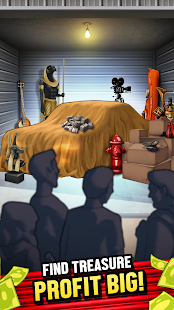
When storage lockers go unpaid, their contents go up for auction to the highest bidder. If you have what it takes, the next forgotten treasure could be yours! Are you up for the risk?
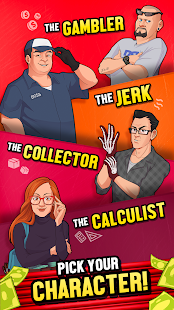
Welcome to Storage Battles, a virtual Auction Bidding game that puts you up against other players in real time. Pick the Character that suits your bidding style and battle against 3 other players to see who gets stuck with the trash, and who takes home the treasure!
Multiplayer Storage Wars
Compete in virtual auction wars against real players! In each match, bidders start with the same amount of money, so you can't buy out all the storage lockers! Take a look inside the garage, choose your strategy fast and be ready for your next bid! They don't call it Garage Wars for nothing!
Inspect the Storage Locker In 3d!
Touch and drag the screen to move around the virtual auction in 3d and see what treasures might be hiding in the far back of the storage locker. Try and learn the value of each of the items so you know when to bid and when to pass on a container.
But that's not all! There are plot twists that make these Garage Wars more exciting, so pay attention!
Locker Modifiers
Locker Modifiers will add exciting changes to each auction, and might have a big impact on your bid. Some storage containers will have extra boxes, while others might have fake items or valuable rare antiques!
Funny Characters, Over the Top Abilities
Pick the Character that suits your bidding style, and use their Abilities to your advantage! You will have to be strategic to win the Auction War, because you can only use 1 ability per locker.
Fight in the Storage Wars
Will you battle with "Aggressive" Greg, to steal other players bid? Or "Fun Times" Gina, who can spice the auction up with more boxes making it possible to strike it rich. If you are more of the detective type, Analytical Sarah will fit your profile. Her calculated guesses will help you make a less risky bid.
Help us make the best virtual Auction Game!
Storage Battles is a work in progress, we're trying to create the best multiplayer Storage Wars game possible. So come check it out (it’s totally free!), bid on some lockers, win the storage wars, and let us know what you think! We would like to make this game with your input - maybe the next update will feature your suggestion!
Show more

1. Download MEmu installer and finish the setup

2. Start MEmu then open Google Play on the desktop

3. Search Bid Wars Stars - Multiplayer Auction Battles in Google Play
Install
4. Download and Install Bid Wars Stars - Multiplayer Auction Battles
5. On install completion click the icon to start

6. Enjoy playing Bid Wars Stars - Multiplayer Auction Battles on PC with MEmu
MEmu Play is the best Android emulator and 100 million people already enjoy its superb Android gaming experience. The MEmu virtualization technology empowers you to play thousands of Android games smoothly on your PC, even the most graphic-intensive ones.
Bigger screen with better graphics; Long duration, without limitation of battery or mobile data.
Full Keymapping support for precise control of keyboard and mouse or gamepad.
Multiple game accounts or tasks on single PC at one time with Multi-Instance manager.
Play Bid Wars Stars - Multiplayer Auction Battles on PC by following steps: