World Cricket Championship 2
Updated
Current Version
5.3.1
Offered By

With your passion for World Cricket Championship 2, you shouldn’t have to limit yourself to the small screen of a phone. Play like a pro and take full control of the game using a keyboard and mouse. MEmu gives you everything you’re looking for. Download and play World Cricket Championship 2 on PC. Play as long as you want — no more worries about battery life, mobile data, or unexpected calls. The all-new MEmu 9 is the best way to play World Cricket Championship 2 on PC. With our expertly designed keymapping system, World Cricket Championship 2 feels just like a real PC game. The MEmu multi-instance manager lets you run two or more accounts on the same device at the same time. Most importantly, our exclusive emulation engine unlocks your PC’s full potential, delivering smooth and seamless performance.
Show more
Download World Cricket Championship 2 on PC with MEmu Android Emulator. Enjoy playing on big screen. Welcome to the Next Generation in Mobile Cricket Gaming!
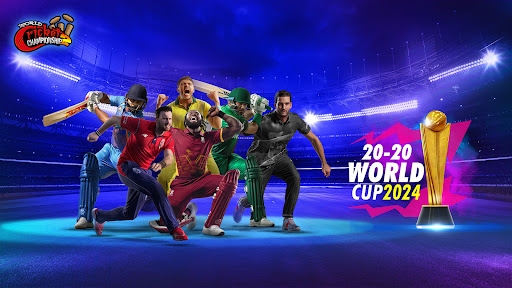
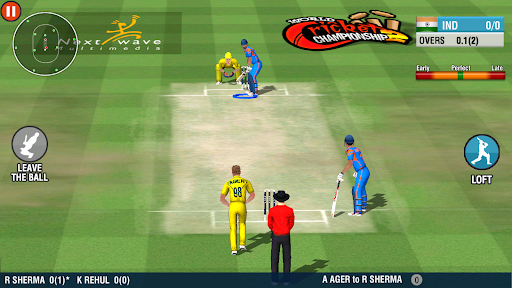
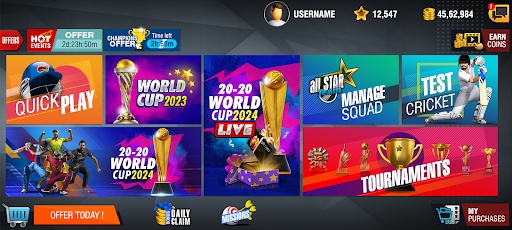
Welcome to the Next Generation in Mobile Cricket Gaming! Every cricket lover can now have the most advanced 3D mobile cricket game in the palm of their hands! You can play the maximum number of cricket shots including the famous Dil-scoop, the Helicopter shot and the Uper-Cut! This is a game built for you the cricket fan! You have loads to look forward to! You can customize your players and cheer your team with customized banners! You can also look forward to scintillating animations, more cricketing venues, new controls, and new camera angles! ‘World Cricket Championship 2’ has features that make it the most dynamic and versatile game in the world of mobile cricket. Be prepared for insane fun!!
Features:
· Online and Offline 1v1 Multiplayer via Online Rivals and Local Rivals
· Ashes to Ashes Test Tournament
· 150 different batting animations and 28 different bowling actions
. Rain Interruption, D/L Method
. Hot-Spot & Ultra Edge for LBW and Edge
· Enjoy the Blitz Tournament for free!
· Electrifying fielding with stunning diving catches & quick throws to surprise the opponent.
· Challenging AI opponent
· Realistic ball physics which responds to the pitch (Dead, Dusty, Green)
· Player attributes – Players gain extra skills for consistent performance
· 18 different international teams, 10 domestic teams, 42 different stadiums. TEST Cricket, Hot Events and more than 11 tournaments including World Cup, World 20-20 Cup, Blitz Tournament and ODI Series.
· The Gangs of Cricket mode where the user can form gangs and compete in challenges.
· Challenge A Friend mode enables the user to challenge your friends.
· Batsman may get injured for poor shot selection.
· The emotions of the fielders vary according to the circumstances of the match.
· Cinematic cameras and real-time lighting enhance the visual appeal.
- 3D Wagon wheel with dynamic game data
- Hawk-eye view for bowling summary & for LBW appeals
- 3D Bar chart for innings run scored
· Ultra slow motion Action replays with multiple camera angles
· Over 40+ in-game camera angles
· Two different batting controls (Classic & Pro)
· Two different batting camera settings (Bowler’s end & Batsman’s end)
· Fielders are configured with advanced ball - head coordination system
· Professional English and Hindi commentary with dynamic ground sounds
. Night mode in Quickplay and all tournaments with LED stumps
· Batting Timing Meter to time your lofted shots.
· Manual Field placement to control your opponent in All modes
. Share and save game highlights generated at the end of the match.
. A user can edit the playing 11 team, player names and their roles.
. Misfielding, stunning wicketkeeper catches, quick stumping & tight 3rd umpire decisions to create a realistic cricketing experience.
. New fielding, umpire, toss animations and 110+ new batting shots
· Battle-tested and updated engine to provide fluid 30fps gaming on most mid-range devices.
Awards & Recognition
- App Annie Report- Top Games by Time Spent, India 2016
- App Annie Report- Top Games by MAU, India 2016, 2017 & 2018
- Winner NASSCOM Gaming Forum Awards 2015 'Game of the Year' People’s Choice Award
- Google play store - Best games of 2015, 2016 & 2017
- Google play store - Most social games of 2017
Permissions Required:
GET_ACCOUNTS - To Sign-in into the game using your Google account
READ_PHONE_STATE -Enables us to send you push notifications on various updates & offers
Recommended System Specifications,
- Android OS : 4.1 or higher
- 2GB RAM
Show more

1. Download MEmu installer and finish the setup

2. Start MEmu then open Google Play on the desktop

3. Search World Cricket Championship 2 in Google Play
Install
4. Download and Install World Cricket Championship 2
5. On install completion click the icon to start

6. Enjoy playing World Cricket Championship 2 on PC with MEmu
MEmu Play is the best Android emulator and 100 million people already enjoy its superb Android gaming experience. The MEmu virtualization technology empowers you to play thousands of Android games smoothly on your PC, even the most graphic-intensive ones.
Bigger screen with better graphics; Long duration, without limitation of battery or mobile data.
Full Keymapping support for precise control of keyboard and mouse or gamepad.
Multiple game accounts or tasks on single PC at one time with Multi-Instance manager.
Play World Cricket Championship 2 on PC by following steps: