World Cricket Championship 4
Updated
Current Version
Offered By

With your passion for World Cricket Championship 4, you shouldn’t have to limit yourself to the small screen of a phone. Play like a pro and take full control of the game using a keyboard and mouse. MEmu gives you everything you’re looking for. Download and play World Cricket Championship 4 on PC. Play as long as you want — no more worries about battery life, mobile data, or unexpected calls. The all-new MEmu 9 is the best way to play World Cricket Championship 4 on PC. With our expertly designed keymapping system, World Cricket Championship 4 feels just like a real PC game. The MEmu multi-instance manager lets you run two or more accounts on the same device at the same time. Most importantly, our exclusive emulation engine unlocks your PC’s full potential, delivering smooth and seamless performance.
Show more
Download World Cricket Championship 4 on PC with MEmu Android Emulator. Enjoy playing on big screen. World Cricket Championship 4 – The Next Generation of Mobile Cricket.

World Cricket Championship 4 – The Next Generation of Mobile Cricket
World Cricket Championship 4 (WCC4) is the most advanced and ambitious cricket game ever built for mobile devices. As the next evolution of the globally loved WCC franchise, WCC4 focuses on deep squad strategy, refined gameplay mechanics, realistic cricket simulation, and stunning photorealistic visuals, delivering a true next-gen cricket experience.
Built for cricket fans and mobile gamers alike, WCC4 emphasizes skill-based gameplay, authenticity, and long-term progression, making every match meaningful.
Squad-Based Cricket with dynamic players
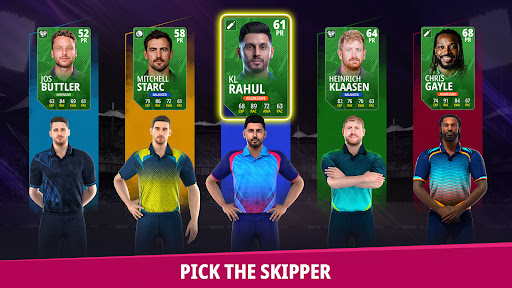
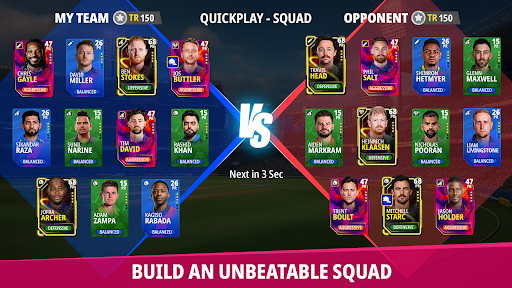
At the core of WCC4 lies its powerful Squad system, designed to give players full control over team building and match preparation.
Build squads with dynamic players
Each player comes with unique attributes and play styles
Manage a dynamic 24-player squad
Experiment with different combinations across formats
Strategically swap players to optimize performance
Squad balance, planning, and decision-making directly impact match outcomes.
Divisions & Fan-Based Progression
Progression in WCC4 is driven by Fans, a performance-based system that reflects your journey and popularity.
Fans are earned or lost based on match results and performance
Strong performances increase your Fan count
Losses and poor performances can reduce Fans
Advancing through Divisions depends on maintaining and growing your Fans
Higher Divisions unlock access to stronger players and better rewards
This system creates meaningful stakes for every match and rewards consistent skill.
Refined Batting & Bowling Gameplay
WCC4 significantly improves upon previous titles with reworked batting and bowling controls:
More responsive and precise batting mechanics
Improved bowling controls with better feedback
Smarter AI that adapts to match situations
Dynamic difficulty that adjusts to individual player skill
Every match feels competitive, engaging, and rewarding.
Completely Overhauled Physics Simulation
WCC4 features a fully rebuilt physics system, delivering a more realistic and immersive cricket simulation.
Enhanced ball behavior and trajectories
Improved bat-ball interaction
More natural player movement and animations
Greater realism in shots, catches, and bowling actions
The new physics engine ensures cricket that feels authentic and fluid.
Photorealistic Visuals & Scanned Player Models
WCC4 sets a new benchmark for visual quality in mobile cricket games.
Photorealistic graphics
High-quality scanned player models
Improved stadium environments
Enhanced lighting, shadows, and crowd presentation
Smooth animations across gameplay and cutscenes
This visual upgrade delivers broadcast-quality cricket presentation on mobile.
Multiple Tournaments & Game Modes
WCC4 offers a wide range of cricket formats and modes to suit every play style:
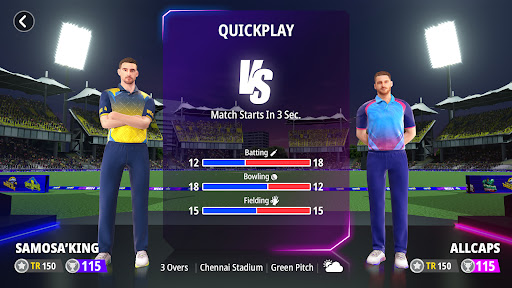
Quick matches and exhibitions
Domestic and international tournaments
Limited-overs and long-format cricket
Rotating live events and challenges added over time
From short sessions to extended tournaments, WCC4 delivers variety and depth
A True Next-Gen Mobile Cricket Experience
World Cricket Championship 4 is built to be strategic, realistic, visually stunning, and deeply engaging, redefining what mobile cricket games can achieve.
Get ready to experience cricket like never before.
Show more

1. Download MEmu installer and finish the setup

2. Start MEmu then open Google Play on the desktop

3. Search World Cricket Championship 4 in Google Play
Install
4. Download and Install World Cricket Championship 4
5. On install completion click the icon to start

6. Enjoy playing World Cricket Championship 4 on PC with MEmu
MEmu Play is the best Android emulator and 100 million people already enjoy its superb Android gaming experience. The MEmu virtualization technology empowers you to play thousands of Android games smoothly on your PC, even the most graphic-intensive ones.
Bigger screen with better graphics; Long duration, without limitation of battery or mobile data.
Full Keymapping support for precise control of keyboard and mouse or gamepad.
Multiple game accounts or tasks on single PC at one time with Multi-Instance manager.
Play World Cricket Championship 4 on PC by following steps: