ホロウシューター
Updated
Current Version
1.1.5
Offered By

With your passion for ホロウシューター, you shouldn’t have to limit yourself to the small screen of a phone. Play like a pro and take full control of the game using a keyboard and mouse. MEmu gives you everything you’re looking for. Download and play ホロウシューター on PC. Play as long as you want — no more worries about battery life, mobile data, or unexpected calls. The all-new MEmu 9 is the best way to play ホロウシューター on PC. With our expertly designed keymapping system, ホロウシューター feels just like a real PC game. The MEmu multi-instance manager lets you run two or more accounts on the same device at the same time. Most importantly, our exclusive emulation engine unlocks your PC’s full potential, delivering smooth and seamless performance.
Show more
Download ホロウシューター on PC with MEmu Android Emulator. Enjoy playing on big screen. 「しっかり狙う」スマホ向け3Dシューティング!
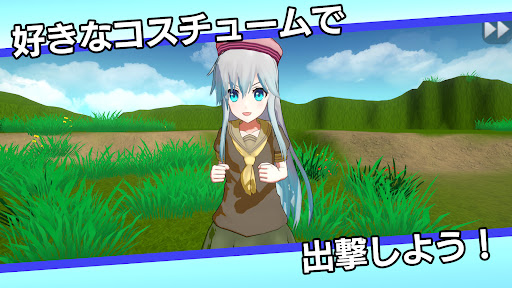
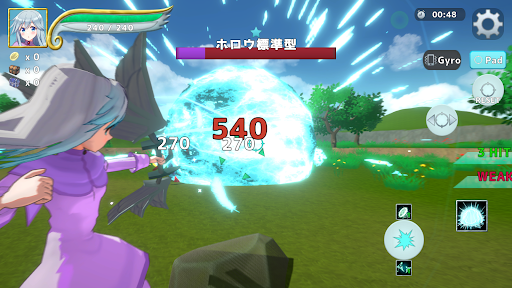
「しっかり狙う」スマホ向け3Dシューティング!
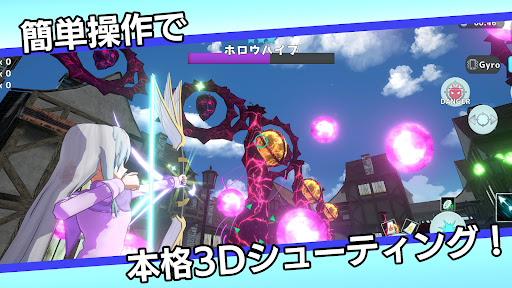
弓矢を扱う女の子「セラフィー」を操作して、押し寄せる敵軍を蹴散らそう!
【ゲームの魅力】
スマートフォン用だけど超本格的な3Dシューティングが楽しめる!
本ゲームはスタミナ制を採用。3クリアしたメインクエストであれば
1日一定回数スキップ可能。忙しい日でもサクサク育成が可能!
クエストをプレイし続けることでレア装備などをドロップ。
キャラクターのカスタマイズ性は無限大!
■簡単操作で本格TPS
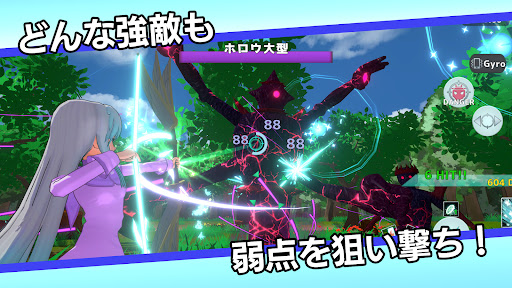
ジャイロ機能に対応しており、直感的な操作で狙い撃ち!
狙った敵を追い続けるオートカメラを採用しており、煩雑なカメラ操作は不要!
■クエストクリアで新スキル獲得
クエストをクリアすることで、新しいチャージショットが解禁。
多彩な戦術で高難易度クエストもサクサク攻略!
■多彩な育成要素
装備を集めて、キャラクターを強化!
特殊な戦闘効果を持つ魔石を組み合わせて、自分だけの戦闘スタイルで戦おう!
■好きなコスチュームで戦おう
コスチュームを入手すると、セラフィーの見た目を変更できます。
セーラー服やワンピースなど、多彩なコスチュームを用意!
服、頭部、その他の3箇所を変更可能。好きな組み合わせで戦場を駆け抜けよう!
■チャレンジモード、スコアアタックモードなど搭載
メインクエストを進めると様々なモードが解禁。
己の限界に挑もう!
【こんな人におすすめ!】
・3DアクションゲームやTPSが好き
・弓やシューティングゲームで狙い撃つのが好き
・キャラクターを育成したり、装備を集めるゲームが好き
・かわいいキャラクターの着せ替えを楽しみたい
・一人でじっくり遊べるシングルプレイゲームを探している
このソフトウェアには、(株)CRI・ミドルウェアの「CRIWARE」が使用されています。
Show more

1. Download MEmu installer and finish the setup

2. Start MEmu then open Google Play on the desktop

3. Search ホロウシューター in Google Play
Install
4. Download and Install ホロウシューター
5. On install completion click the icon to start

6. Enjoy playing ホロウシューター on PC with MEmu
MEmu Play is the best Android emulator and 100 million people already enjoy its superb Android gaming experience. The MEmu virtualization technology empowers you to play thousands of Android games smoothly on your PC, even the most graphic-intensive ones.
Bigger screen with better graphics; Long duration, without limitation of battery or mobile data.
Full Keymapping support for precise control of keyboard and mouse or gamepad.
Multiple game accounts or tasks on single PC at one time with Multi-Instance manager.
Play ホロウシューター on PC by following steps: