Çiğ Köfteci: Wrap Shop Tycoon
Updated
Current Version
1.0.1
Offered By

With your passion for Çiğ Köfteci: Wrap Shop Tycoon, you shouldn’t have to limit yourself to the small screen of a phone. Play like a pro and take full control of the game using a keyboard and mouse. MEmu gives you everything you’re looking for. Download and play Çiğ Köfteci: Wrap Shop Tycoon on PC. Play as long as you want — no more worries about battery life, mobile data, or unexpected calls. The all-new MEmu 9 is the best way to play Çiğ Köfteci: Wrap Shop Tycoon on PC. With our expertly designed keymapping system, Çiğ Köfteci: Wrap Shop Tycoon feels just like a real PC game. The MEmu multi-instance manager lets you run two or more accounts on the same device at the same time. Most importantly, our exclusive emulation engine unlocks your PC’s full potential, delivering smooth and seamless performance.
Show more
Download Çiğ Köfteci: Wrap Shop Tycoon on PC with MEmu Android Emulator. Enjoy playing on big screen. The çiğ köfte shop is yours now!
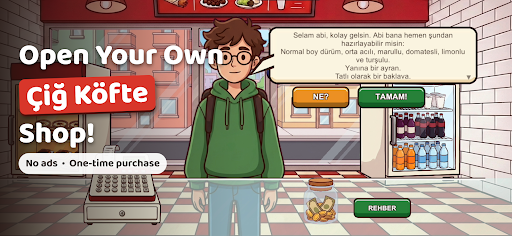
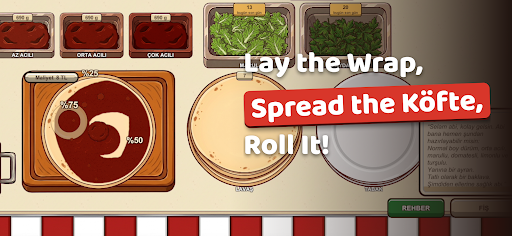
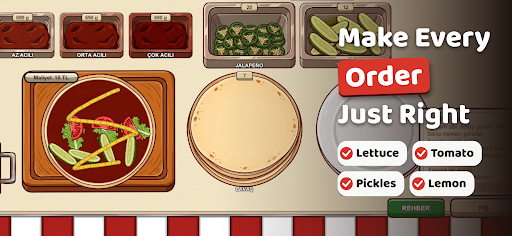
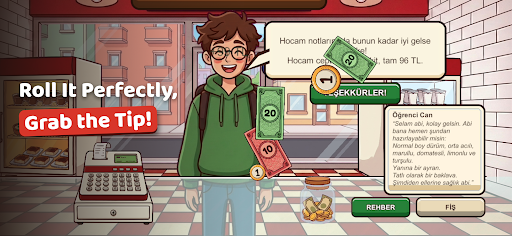
The çiğ köfte shop is yours now! Open the lavash, spread the köfte, add the toppings, roll it tight and send every customer away happy.
No ads, no in-app purchases, no internet needed. Pay once, play as long as you like.
Çiğ köfte is a spicy Turkish street food: a bulgur and pepper paste rolled in thin lavash with fresh greens and pomegranate sauce. Can you become the most loved çiğ köfte maker in the neighborhood? Open up every morning, fill orders all day, pay the rent at night and grow your shop. Rent goes up every week, and only a smart shopkeeper lasts!
RUN THE COUNTER
• Read the ticket: wrap or plate, how many grams, how hot?
• Open the lavash, spread the köfte, add lettuce, tomato, pickles and pomegranate sauce one by one
• Roll it tight, hit the perfect fill and grab the tip
• Finish the order with ayran, şalgam or soda, and don't forget desserts like sütlaç, kazandibi and baklava
32 UNIQUE CUSTOMERS
From Hayriye Teyze to Ahmet Dayı, from the student in a hurry to the picky office worker, every customer has their own habits, patience and lines. Some tip big, others complain about one extra leaf of lettuce.
MANAGE YOUR SHOP
• Order your own stock every night: too much spoils, too little loses customers
• Pay the rent and bills and keep the till out of the red: you get a final warning, and a second one closes the shop
• Complete daily goals for extra income
GROW AND UPGRADE
• Earn reputation, level up and add large sizes to the menu
• Unlock 22 ingredients, 8 drinks and 9 desserts step by step
• Boost your shop with upgrades for prep speed, customer patience and stock discounts
HOW MANY DAYS CAN YOU LAST?
Your score is the number of days you keep the shop open. Compete with friends on the Google Play Games leaderboard.
• Step-by-step tutorial on your first day
• A warm, authentic Turkish shop atmosphere
• Play in English, Turkish, German or Indonesian
• Plays offline, with no ads and no in-app purchases
Afiyet olsun! (Enjoy your meal!)
Show more

1. Download MEmu installer and finish the setup

2. Start MEmu then open Google Play on the desktop

3. Search Çiğ Köfteci: Wrap Shop Tycoon in Google Play
Install
4. Download and Install Çiğ Köfteci: Wrap Shop Tycoon
5. On install completion click the icon to start

6. Enjoy playing Çiğ Köfteci: Wrap Shop Tycoon on PC with MEmu
MEmu Play is the best Android emulator and 100 million people already enjoy its superb Android gaming experience. The MEmu virtualization technology empowers you to play thousands of Android games smoothly on your PC, even the most graphic-intensive ones.
Bigger screen with better graphics; Long duration, without limitation of battery or mobile data.
Full Keymapping support for precise control of keyboard and mouse or gamepad.
Multiple game accounts or tasks on single PC at one time with Multi-Instance manager.
Play Çiğ Köfteci: Wrap Shop Tycoon on PC by following steps: