心動防線
Updated
Current Version
v1.0.39
Offered By

With your passion for 心動防線, you shouldn’t have to limit yourself to the small screen of a phone. Play like a pro and take full control of the game using a keyboard and mouse. MEmu gives you everything you’re looking for. Download and play 心動防線 on PC. Play as long as you want — no more worries about battery life, mobile data, or unexpected calls. The all-new MEmu 9 is the best way to play 心動防線 on PC. With our expertly designed keymapping system, 心動防線 feels just like a real PC game. The MEmu multi-instance manager lets you run two or more accounts on the same device at the same time. Most importantly, our exclusive emulation engine unlocks your PC’s full potential, delivering smooth and seamless performance.
Show more
Download 心動防線 on PC with MEmu Android Emulator. Enjoy playing on big screen. Hey!

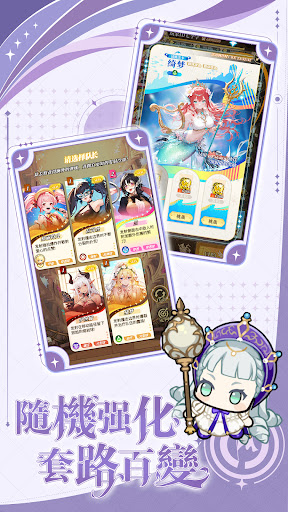
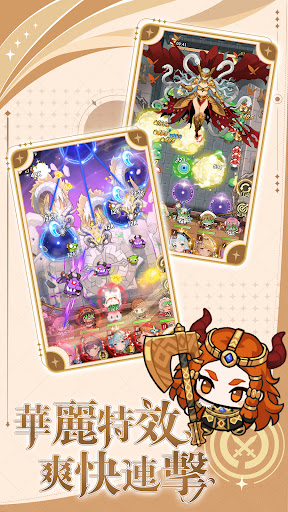
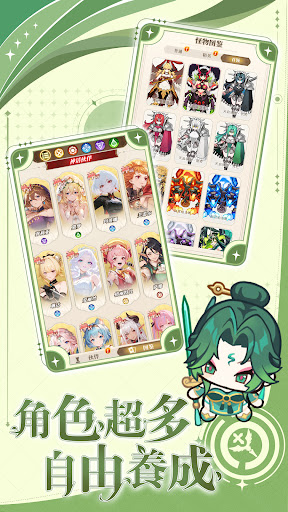
Hey! This incredibly engaging Japanese-style card-based catapult tower defense game lets you enjoy the strategic fun of offense and defense while easily placing your characters. Come and experience it!
▶ Flicking Arrows × Heart-Fluttering Bonds
Join forces with five unique and beautiful female allies, unleashing card "secret techniques" through skillful catapult commands. Every precise strike is a satisfying combination of offense and defense!
▶ Pinball Defense Line · Tactical Free Combinations
Freely customize your "Pinball Defense Line": chain-reaction bouncing attacks through enemy lines, piercing through multiple targets in one go, and unleashing a massive bomb that shakes the entire field! Create the strongest chain combos tailored to the characteristics of each level.
▶ Companionship Development · Collect Your Favorite Characters
Encounter various beautifully designed Japanese-style character cards, each with a unique story and skills. Deepen your bonds through adventures, upgrade your exclusive companions, and build the strongest lineup.
▶ Random Enhancements · A New Challenge Every Time
Utilizing a Roguelike mechanism, each challenge grants random ability bonuses! Freely build your own battle "strategies," making every level a fresh experience with strategic depth.
▶ Five-Person Team · Flexible Deployment
Adjust your five-person team composition at any time to counter the characteristics and attack patterns of different enemies. Combine character skills and pinball effects to create the most flexible offensive and defensive strategies and protect your last line of defense!
The game is easy to pick up and play, yet full of strategic combinations and endless possibilities. Whether commuting, taking a break, or simply wanting to exercise your brain, you can engage in a heart-pounding battle of defense anytime!
Download *Heartbeat Defense* now, build your strongest team, and decide the outcome with pinballs!
This game is classified as "Supplementary 16" according to the Game Software Rating Management Regulations.
The game includes in-app purchases such as virtual currency and items.
Please be mindful of your playtime and avoid addiction.
Show more

1. Download MEmu installer and finish the setup

2. Start MEmu then open Google Play on the desktop

3. Search 心動防線 in Google Play
Install
4. Download and Install 心動防線
5. On install completion click the icon to start

6. Enjoy playing 心動防線 on PC with MEmu
MEmu Play is the best Android emulator and 100 million people already enjoy its superb Android gaming experience. The MEmu virtualization technology empowers you to play thousands of Android games smoothly on your PC, even the most graphic-intensive ones.
Bigger screen with better graphics; Long duration, without limitation of battery or mobile data.
Full Keymapping support for precise control of keyboard and mouse or gamepad.
Multiple game accounts or tasks on single PC at one time with Multi-Instance manager.
Play 心動防線 on PC by following steps: