레전드 오브 이미르
Updated
Current Version
1.0.87
Offered By

With your passion for 레전드 오브 이미르, you shouldn’t have to limit yourself to the small screen of a phone. Play like a pro and take full control of the game using a keyboard and mouse. MEmu gives you everything you’re looking for. Download and play 레전드 오브 이미르 on PC. Play as long as you want — no more worries about battery life, mobile data, or unexpected calls. The all-new MEmu 9 is the best way to play 레전드 오브 이미르 on PC. With our expertly designed keymapping system, 레전드 오브 이미르 feels just like a real PC game. The MEmu multi-instance manager lets you run two or more accounts on the same device at the same time. Most importantly, our exclusive emulation engine unlocks your PC’s full potential, delivering smooth and seamless performance.
Show more
Download 레전드 오브 이미르 on PC with MEmu Android Emulator. Enjoy playing on big screen. A value that does not change over time, grand opening on February 20th!


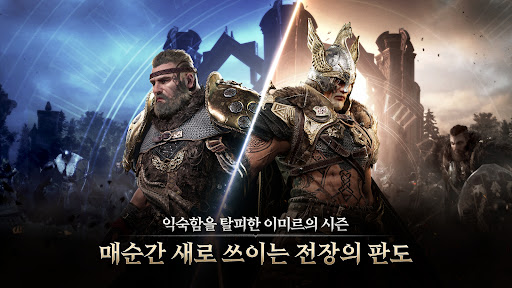

A value that does not change over time, grand opening on February 20th!
A battle where processes are alive and an economy where values are preserved!
Overwhelming scale and beautiful graphics that complete the worldview!
Legend of Ymir proves the unchanging value of MMORPG.
Join now on a great journey to prevent Ragnarok, the recurring end of the world.
Don’t miss out on the abundant launching events accompanying the opening.
▣ Synopsis
The world of Ragnarok repeats every 9,000 years.
The will to prevent Ragnarok is passed down to those who awaken according to fate.
This will go beyond reincarnation and a new hero of Ymir will be born.
The biographies of heroes who overcame the cycle of reincarnation amidst racial conflict and war.
The myth of the Ymir Continent will unfold again.
▣ Game Features
►Graphics where imagination and reality intersect
Amazing details that embrace the depth of Norse mythology, and a vibrant world created with Unreal Engine 5.
Experience the legend of the beginning right before your eyes.
►Ymir’s season system breaks away from the familiar
New battlefields and stories unfold every season, as well as changing enemies and events.
Break free from the fixed framework and experience the diversity of battle through a battlefield that is renewed every moment.
►Detailed control driven by post-judgment
Play that combines tension felt at your fingertips, perfect precision, and automatic convenience.
We redefine the joy of battle with immersive post-judgment and evasion controls.
►Actively designed growth experience
Your choice is the start of your adventure. The player's every action and decision charts a new direction for growth and blazes your own path.
Create that special journey with an adventure that starts with you.
►A new version of the in-game economy
Ymir’s own coin economy to preserve value, and establishment of a system of trust by ensuring transparency.
We create a new version of the game economy that has never been seen before through the clear use of top-level equipment, a limited quantity of goods, and a distributed ledger.
▣ Smartphone app access permission information
When using the app, access permission is requested to provide the following services.
[Required access rights]
doesn't exist
[Optional access rights]
doesn't exist
[How to revoke access rights]
▶ Android 6.0 or higher: Settings > App > Select permission item > Permission list > Select agree or withdraw access permission
▶ Below Android 6.0: Upgrade the operating system to revoke access rights or delete the app.
※ The app may not provide individual consent functions, and access permission can be revoked using the method above.
▣ Minimum specifications: Galaxy S10
Developer contact information:
Address: Wemade Tower, 49 Daewangpangyo-ro 644beon-gil, Bundang-gu, Seongnam-si, Gyeonggi-do
Email: support@wemade.com
Show more

1. Download MEmu installer and finish the setup

2. Start MEmu then open Google Play on the desktop

3. Search 레전드 오브 이미르 in Google Play
Install
4. Download and Install 레전드 오브 이미르
5. On install completion click the icon to start

6. Enjoy playing 레전드 오브 이미르 on PC with MEmu
MEmu Play is the best Android emulator and 100 million people already enjoy its superb Android gaming experience. The MEmu virtualization technology empowers you to play thousands of Android games smoothly on your PC, even the most graphic-intensive ones.
Bigger screen with better graphics; Long duration, without limitation of battery or mobile data.
Full Keymapping support for precise control of keyboard and mouse or gamepad.
Multiple game accounts or tasks on single PC at one time with Multi-Instance manager.
Play 레전드 오브 이미르 on PC by following steps: