NBA巔峰對決 PC

Download NBA巔峰對決 on PC

NBA巔峰對決 PC

NBA巔峰對決

  • Updated

  • Current Version

  • Offered By

    NBA巔峰對決 PC

Features of NBA巔峰對決 on PC

With your passion for NBA巔峰對決, you shouldn’t have to limit yourself to the small screen of a phone. Play like a pro and take full control of the game using a keyboard and mouse. MEmu gives you everything you’re looking for. Download and play NBA巔峰對決 on PC. Play as long as you want — no more worries about battery life, mobile data, or unexpected calls. The all-new MEmu 9 is the best way to play NBA巔峰對決 on PC. With our expertly designed keymapping system, NBA巔峰對決 feels just like a real PC game. The MEmu multi-instance manager lets you run two or more accounts on the same device at the same time. Most importantly, our exclusive emulation engine unlocks your PC’s full potential, delivering smooth and seamless performance.

Show more

Screenshots & Video of NBA巔峰對決 PC

Download NBA巔峰對決 on PC with MEmu Android Emulator. Enjoy playing on big screen. Gala Sports' in-house developed, next-generation 5v5 basketball mobile game is officially here!

Game Info

Gala Sports' in-house developed, next-generation 5v5 basketball mobile game is officially here!

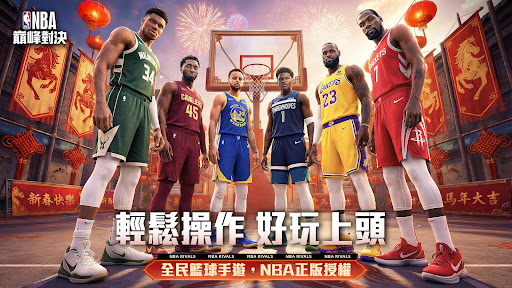
Officially licensed by the NBA and featuring NBA superstar Jimmy Butler as its global spokesperson, this game combines highly realistic graphics with innovative gameplay. Not only can you show off your skills in 3v3 and 5v5 matches, but you can also flexibly manipulate the player market between players. From on-court skills to business strategies, experience the dual thrills of both technical and strategic management!

[Extremely realistic graphics, immersive experience rivaling consoles]
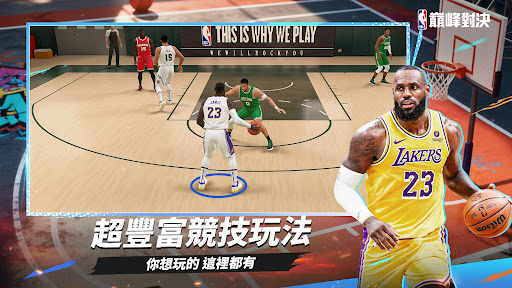
Powered by a next-generation engine, this game features highly realistic on-court visuals, panoramic 1:1 replicas of classic NBA games, and meticulously recreated figures of hundreds of current and legendary players, making you feel like you're right there in the live action.

[Complete NBA Player Collection, Build Your Dream Roster]
Superstars like LeBron James and Stephen Curry are all available, and from legendary stars to current and emerging players, you can recruit and form your own team! Compete with stars from across the ages to build your ultimate dream team!

[Street, Dynasty, Career, Multiple Modes]
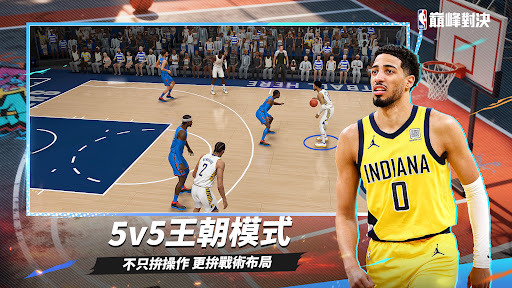
From fast-paced 3v3 street duels to team-driven 5v5 matches, jump in and start the action instantly! Whether you're a mechanical or competitive player, this is your basketball home!

[Professional Motion Engine, Ultra-Smooth Controls]
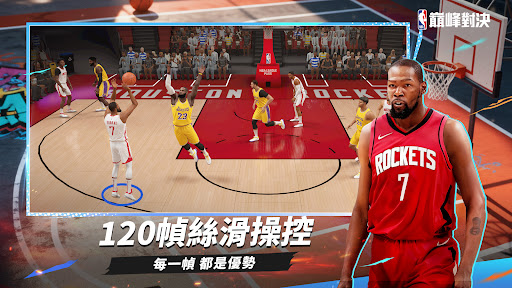
Utilizing our proprietary professional motion engine and motion-matching technology, we accurately reproduce over 6,000 sets of player action data. From dunks, runners, passes, cuts, to pull-up jump shots, every move is captured with authentic motion capture.

Combined with physics-based ballistics and ultra-low latency, this delivers silky-smooth control and millisecond-level feedback, allowing you to experience authentic NBA-style matches anytime, anywhere!

[Star Development and Evolution System, Build Your Own Super Roster]
A meticulous development system helps you cultivate your own super team! Build the most cost-effective roster by flexibly utilizing the salary cap. Unlock player badges and upgrade abilities through advanced player development, comprehensively enhancing your power and becoming a legend on the court!

[Player Free Trade Market: Master the NBA with Your Vision]
The all-new "Transfer Market" system allows you to flexibly manipulate the market, buying low and selling high. Flexibly adapt to player stats and market fluctuations to dominate the NBA off-court market with your vision!

[Taiwanese Professional Basketball Stars Join the Cross-League Tournament × Sports Anchor Zhang Liqun's Voice]
Popular Taiwanese professional basketball stars join the tournament! Face off against NBA stars in a fantastic cross-league showdown! Experienced sports anchor Zhang Liqun's voice acting for a truly immersive experience!

Show more

How to Download NBA巔峰對決 on PC

  • NBA巔峰對決 PC

    1. Download MEmu installer and finish the setup

  • NBA巔峰對決 PC

    2. Start MEmu then open Google Play on the desktop

  • NBA巔峰對決 PC

    3. Search NBA巔峰對決 in Google Play

  • NBA巔峰對決 PC Install

    4. Download and Install NBA巔峰對決

  • NBA巔峰對決 PC

    5. On install completion click the icon to start

  • NBA巔峰對決 PC
    NBA巔峰對決 PC NBA巔峰對決 PC

    6. Enjoy playing NBA巔峰對決 on PC with MEmu

Why Use MEmu for NBA巔峰對決

MEmu Play is the best Android emulator and 100 million people already enjoy its superb Android gaming experience. The MEmu virtualization technology empowers you to play thousands of Android games smoothly on your PC, even the most graphic-intensive ones.

  • Bigger screen with better graphics; Long duration, without limitation of battery or mobile data.

  • Full Keymapping support for precise control of keyboard and mouse or gamepad.

  • Multiple game accounts or tasks on single PC at one time with Multi-Instance manager.

Ready to Play?

Hot Topics

NBA巔峰對決 - FAQs

  • How to play NBA巔峰對決 on PC?

    Play NBA巔峰對決 on PC by following steps:

    • Download MEmu, then install and launch it
    • Login to Google Play Store, install the game
    • Enjoy playing the game on PC with MEmu
  • What are the minimum system requirements to run NBA巔峰對決 on PC?
    • Intel or AMD Processor
    • Microsoft Windows 7 and above
    • 2GB of memory
    • 5GB of free disk space
    • Hardware Virtualization Technology