Yu Yu Hakusho·Slugfest
Updated
Current Version
1.1.3
Offered By

With your passion for Yu Yu Hakusho·Slugfest, you shouldn’t have to limit yourself to the small screen of a phone. Play like a pro and take full control of the game using a keyboard and mouse. MEmu gives you everything you’re looking for. Download and play Yu Yu Hakusho·Slugfest on PC. Play as long as you want — no more worries about battery life, mobile data, or unexpected calls. The all-new MEmu 9 is the best way to play Yu Yu Hakusho·Slugfest on PC. With our expertly designed keymapping system, Yu Yu Hakusho·Slugfest feels just like a real PC game. The MEmu multi-instance manager lets you run two or more accounts on the same device at the same time. Most importantly, our exclusive emulation engine unlocks your PC’s full potential, delivering smooth and seamless performance.
Show more
Download Yu Yu Hakusho·Slugfest on PC with MEmu Android Emulator. Enjoy playing on big screen. The legendary anime returns—now as a mobile game!
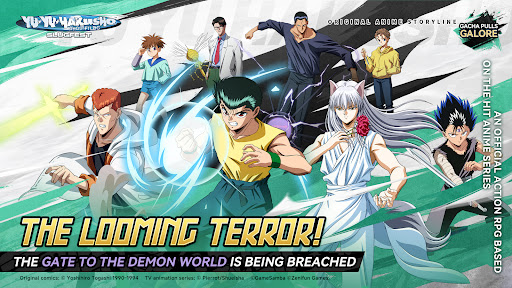


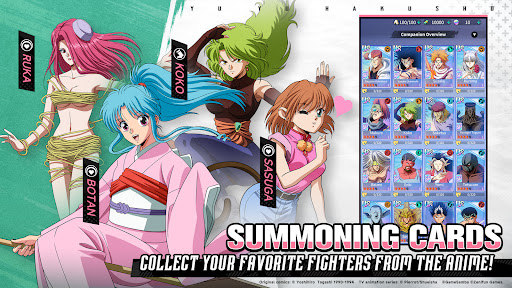
The legendary anime returns—now as a mobile game! Officially licensed by the Yu Yu Hakusho anime series, this brand-new title brings the action to your fingertips. One day, Yusuke Urameshi, a rebellious teenager, dies in a traffic accident while trying to save a child. However, he’s told by Botan—the guide of souls—that his death was unexpected in the Spirit World. If he can pass a series of trials set by the Spirit World, he’ll be granted a second chance at life. And so begins the unforgettable story of Yu Yu Hakusho! Team up with iconic characters, overcome challenges, and join Yusuke on an epic adventure in 《Yu Yu Hakusho》! ▶A Faithful Recreation of the World of Yu Yu Hakusho Dive into the world of Yu Yu Hakusho, faithfully recreated with stunning cel-shaded visuals. Iconic scenes are brought to life in high quality, immersing you in action-packed missions and story-driven challenges. Experience the emotion and intensity of the anime—right in the palm of your hand. ▶Assemble Your Dream Team – Strategic Combos Await Build your ultimate team with iconic characters like Yusuke, Kuwabara, Hiei, Kurama, Genkai, Younger Toguro, Sensui, Yomi, and more! Mix and match characters and skills to master team synergies and turn the tide of battle with your strategy! ▶Rich Content – The Path to Becoming the Strongest Dive into a wealth of content including "The Dark Tournament" "the hole to the Demon Realm" and "The Demon World Tournament"! Master every PVE/PVP/GVG mode—and strive to become the strongest! ▶Original Voice Cast & 3D Modeling Fan-favorite characters are brought to life with vivid 3D designs! Featuring voice acting by the original anime cast: Yusuke Urameshi (VA: Nozomu Sasaki) Kazuma Kuwabara (VA: Shigeru Chiba) Hiei (VA: Nobuyuki Hiyama) Kurama (VA: Megumi Ogata) Younger Toguro (VA:Tessho Genda) ...and more!
[IGRS Age Rating]: 13+
Show more

1. Download MEmu installer and finish the setup

2. Start MEmu then open Google Play on the desktop

3. Search Yu Yu Hakusho·Slugfest in Google Play
Install
4. Download and Install Yu Yu Hakusho·Slugfest
5. On install completion click the icon to start

6. Enjoy playing Yu Yu Hakusho·Slugfest on PC with MEmu
MEmu Play is the best Android emulator and 100 million people already enjoy its superb Android gaming experience. The MEmu virtualization technology empowers you to play thousands of Android games smoothly on your PC, even the most graphic-intensive ones.
Bigger screen with better graphics; Long duration, without limitation of battery or mobile data.
Full Keymapping support for precise control of keyboard and mouse or gamepad.
Multiple game accounts or tasks on single PC at one time with Multi-Instance manager.
Play Yu Yu Hakusho·Slugfest on PC by following steps: