Don't Touch Grass
Updated
Current Version
1.0.1
Offered By

With your passion for Don't Touch Grass, you shouldn’t have to limit yourself to the small screen of a phone. Play like a pro and take full control of the game using a keyboard and mouse. MEmu gives you everything you’re looking for. Download and play Don't Touch Grass on PC. Play as long as you want — no more worries about battery life, mobile data, or unexpected calls. The all-new MEmu 9 is the best way to play Don't Touch Grass on PC. With our expertly designed keymapping system, Don't Touch Grass feels just like a real PC game. The MEmu multi-instance manager lets you run two or more accounts on the same device at the same time. Most importantly, our exclusive emulation engine unlocks your PC’s full potential, delivering smooth and seamless performance.
Show more
Download Don't Touch Grass on PC with MEmu Android Emulator. Enjoy playing on big screen. The zombies have one goal: to touch your grass.
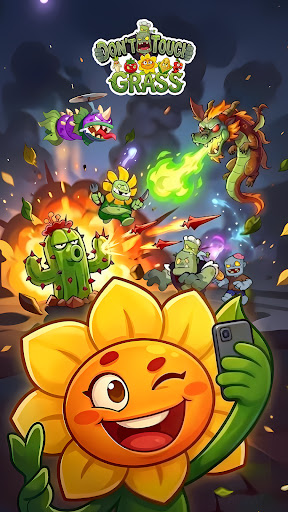
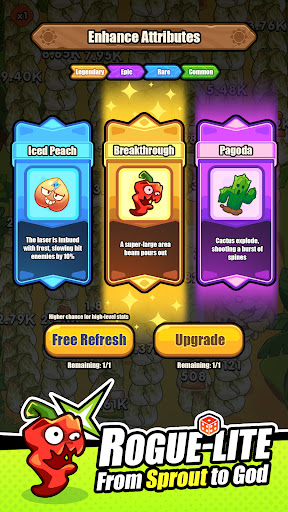
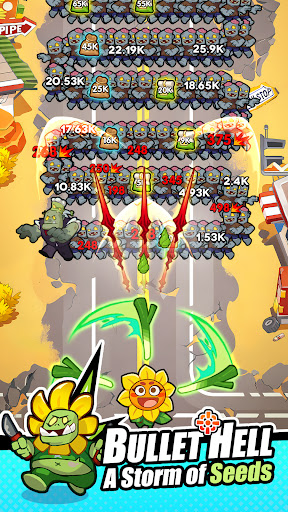
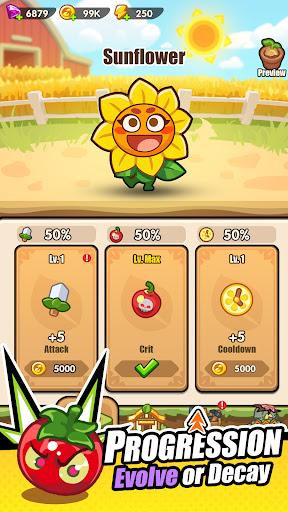
The zombies have one goal: to touch your grass. Your goal? Make sure they regret ever stepping onto your lawn.
This isn't your grandma’s garden. In Don't Touch Grass, you are the commander of a botanical battalion ready to wipe out the "Brain Rot" horde. It’s a high-octane mix of Classic Tower Defense and Roguelike Chaos where every run is different and every plant is a weapon of mass destruction.
GAME FEATURES: Defense Meets Roguelike
Defend the Line! Stop the zombie snakes and massive bosses from reaching your fence.
Roguelike Power-Ups! Every level up gives you a choice of three random attributes: will you pick Seed Volley +1, boost your Attack Speed by 50%, or maximize Seed Damage?.
Insane Plant Arsenal! Unlock and upgrade over a dozen "not-so-innocent" plants, from the Grumpy Tomato and Spinning Onion Sword to the elite Bamboo Dragon.
Infinite Evolution! Use the "Seed of Chaos" to mutate your plants into unstoppable forces that break the game’s balance.
AFK Rewards! Even when you aren't playing, your garden is growing. Collect the Idle Treasure Chest to get gold and gems while you sleep.
THE BATTLEGROUND: Protect Your Brains
Epic Boss Fights! Face off against massive, screen-filling zombie generals like the Drill-Head Giant and the Mad Scientist.
Strategic Loadouts! Mix and match different weapon types—projectiles, spinning blades, and area-of-effect traps—to find the ultimate "broken" build.
Vibrant 2D Visuals! Enjoy expressive Spine 2D animations where plants celebrate your victories and zombies turn into compost.
THEY’RE COMING FOR YOUR LAWN.
Don't let them touch it. Don't let them take your brains. It's time to turn the undead into fertilizer!
Download Don't Touch Grass NOW and show them who owns this garden!
Show more

1. Download MEmu installer and finish the setup

2. Start MEmu then open Google Play on the desktop

3. Search Don't Touch Grass in Google Play
Install
4. Download and Install Don't Touch Grass
5. On install completion click the icon to start

6. Enjoy playing Don't Touch Grass on PC with MEmu
MEmu Play is the best Android emulator and 100 million people already enjoy its superb Android gaming experience. The MEmu virtualization technology empowers you to play thousands of Android games smoothly on your PC, even the most graphic-intensive ones.
Bigger screen with better graphics; Long duration, without limitation of battery or mobile data.
Full Keymapping support for precise control of keyboard and mouse or gamepad.
Multiple game accounts or tasks on single PC at one time with Multi-Instance manager.
Play Don't Touch Grass on PC by following steps: