EE666Wavelo
Updated
Current Version
1.4.4
Offered By

With your passion for EE666Wavelo, you shouldn’t have to limit yourself to the small screen of a phone. Play like a pro and take full control of the game using a keyboard and mouse. MEmu gives you everything you’re looking for. Download and play EE666Wavelo on PC. Play as long as you want — no more worries about battery life, mobile data, or unexpected calls. The all-new MEmu 9 is the best way to play EE666Wavelo on PC. With our expertly designed keymapping system, EE666Wavelo feels just like a real PC game. The MEmu multi-instance manager lets you run two or more accounts on the same device at the same time. Most importantly, our exclusive emulation engine unlocks your PC’s full potential, delivering smooth and seamless performance.
Show more
Download EE666Wavelo on PC with MEmu Android Emulator. Enjoy playing on big screen. EE666Wavelo is a pixel-level symmetrical pattern generator tool designed for digital art enthusiasts and graphic designers.
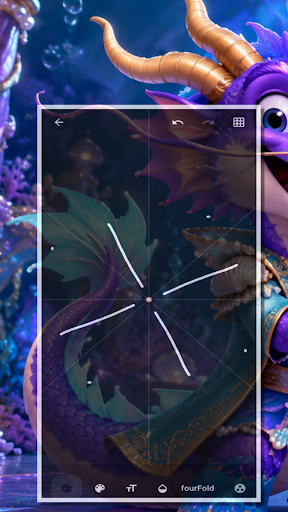

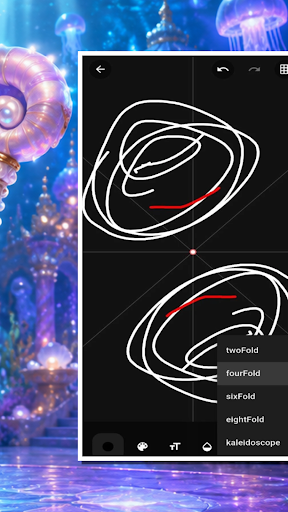
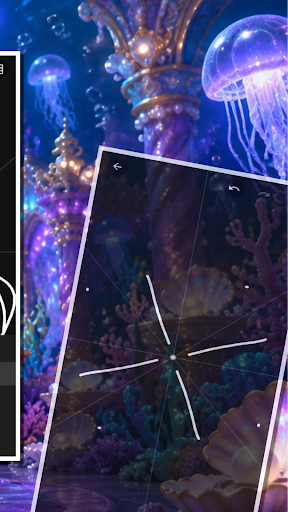
EE666Wavelo is a pixel-level symmetrical pattern generator tool designed for digital art enthusiasts and graphic designers. It serves as a creative laboratory that uses algorithms to mirror and array your strokes in real-time, allowing you to build complex geometric aesthetics with minimal effort.
The core mechanism revolves around the symmetrical brush. Choose from various brush types, including circle, square, star, and feather. As you glide your finger across the canvas, WaveloStitch synchronously draws all mirrored copies based on your preset symmetry axis—whether it is two-fold, four-fold, six-fold, eight-fold, or kaleidoscope mode.
Key features include:
- Real-time symmetry drawing: Watch your patterns unfold dynamically as you draw.
- Adjustable symmetry grid: Drag the center point or rotate the angle with precise control to alter the geometric layout.
- Full canvas control: Use a two-finger pinch to zoom and pan for fine local adjustments.
- Comprehensive toolset: Customize brush size (1-100 pixels), opacity, and select colors to match your vision.
- Project library: Save and manage your artistic creations. All your projects are stored locally with automatically generated thumbnail previews.
- Complete history: Undo and redo up to 50 steps per project to experiment freely.
- Minimalist dark theme: A focused user interface featuring frosted glass effects and a vibrant color scheme for an immersive drawing experience.
- Haptic feedback: Feel your interactions seamlessly without relying on sound.
Express your creativity and design intricate mandalas and geometric art with EE666Wavelo.
Show more

1. Download MEmu installer and finish the setup

2. Start MEmu then open Google Play on the desktop

3. Search EE666Wavelo in Google Play
Install
4. Download and Install EE666Wavelo
5. On install completion click the icon to start

6. Enjoy playing EE666Wavelo on PC with MEmu
MEmu Play is the best Android emulator and 100 million people already enjoy its superb Android gaming experience. The MEmu virtualization technology empowers you to play thousands of Android games smoothly on your PC, even the most graphic-intensive ones.
Bigger screen with better graphics; Long duration, without limitation of battery or mobile data.
Full Keymapping support for precise control of keyboard and mouse or gamepad.
Multiple game accounts or tasks on single PC at one time with Multi-Instance manager.
Play EE666Wavelo on PC by following steps: