
Engine Sim - Sound Simulator
Updated
Current Version
1.8.11
Offered By

With your passion for Engine Sim - Sound Simulator, you shouldn’t have to limit yourself to the small screen of a phone. Play like a pro and take full control of the game using a keyboard and mouse. MEmu gives you everything you’re looking for. Download and play Engine Sim - Sound Simulator on PC. Play as long as you want — no more worries about battery life, mobile data, or unexpected calls. The all-new MEmu 9 is the best way to play Engine Sim - Sound Simulator on PC. With our expertly designed keymapping system, Engine Sim - Sound Simulator feels just like a real PC game. The MEmu multi-instance manager lets you run two or more accounts on the same device at the same time. Most importantly, our exclusive emulation engine unlocks your PC’s full potential, delivering smooth and seamless performance.
Show more
Download Engine Sim - Sound Simulator on PC with MEmu Android Emulator. Enjoy playing on big screen. Put a finger on the screen and a 660cc turbo kei car wakes up.
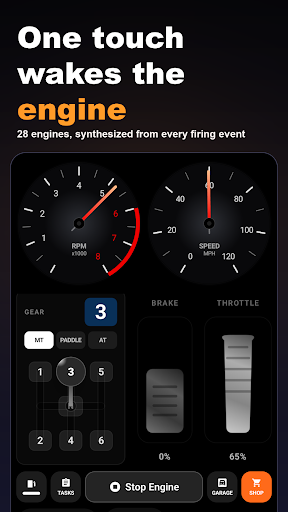
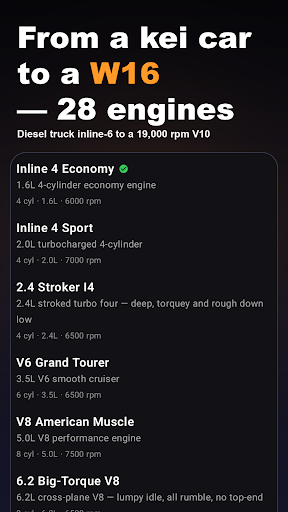
Put a finger on the screen and a 660cc turbo kei car wakes up. Slide over to a 4-rotor, a W16 or a racing V10 that screams to 19,000 rpm: 28 engines in all, each one synthesized live from how hard you press.
Start one on the train, in a waiting room or on the sofa, with no car anywhere near you.
ENGINES AND SOUND
- 28 engines: single, V-twin, two 660cc kei turbos, inline-4, inline-5, inline-6, a diesel truck inline-6, boxer-4, flat-6, V6, three V8s, V10, V12, W16, rotaries from 2-rotor to 4-rotor, and a racing V10 to 19,000 rpm
- Every sound is made live, not a recording on loop, so the same rev never sounds exactly the same twice
- The throttle follows your finger pressure: rest it for a soft idle, floor it for a full scream
- Per-cylinder firing, uneven exhaust timing and pipe resonance
- Haptics follow revs, load and shifts. Colour RPM gauge with rev-limiter cut
DRIVE IT YOURSELF
- H-pattern shifter or paddles, switch any time
- A clutch pedal with a real bite point: let it out too fast and the engine stalls
- Practice rev-matching: brake, blip, shift. Nail it and it's silent; botch it and the driveline thumps
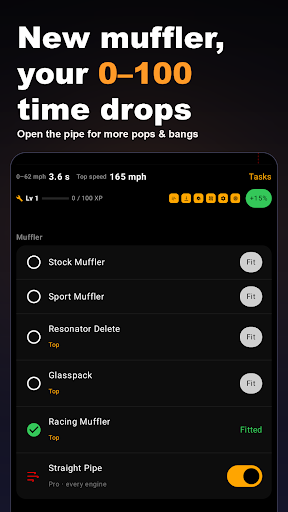
- Straight-pipe mode for pops and bangs on lift-off, and a back turbine for compressor surge
TUNE AND SHARE
- Tune each engine with mufflers, intakes, headers, superchargers, cams and ECU maps, and watch 0–100 km/h (0–62 mph), top speed and the torque curve change on the spot
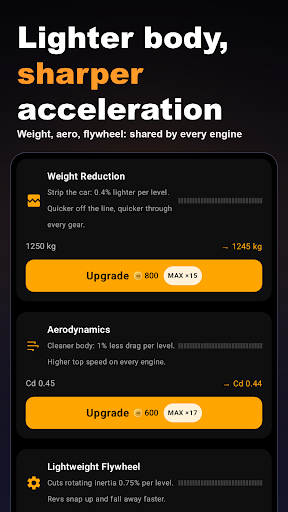
- Chassis tuning shared by every engine (weight, aero, flywheel), plus race clutch, race flywheel, carbon body and race aero
- Share a run as a video with the engine sound, or as audio only
REASONS TO KEEP DRIVING
- Miles from driving unlock engines and parts in the unlock tree, and garage miles keep building while the app is closed
- A Pit Stop summary after each drive (distance, miles earned, personal bests), daily tasks, a login bonus, weekly challenges and a trophy exchange
- A Parts Crate with the odds shown in the app, and invite codes that earn bonus miles
WHO IT'S FOR
- People who love engine and exhaust sounds
- Anyone curious how a V12 or a rotary sounds without owning one
- Drivers who want to practice the clutch and rev-matching before getting behind the wheel
AVAILABILITY
You start with the inline-4 and every core feature, with no ads on the driving screen. Driving earns miles that unlock the remaining engines and parts through the unlock tree. The next unowned V6, V8 or V12 can be rented for 10 minutes after a short video ad, and straight-pipe mode can be tried for 7 minutes the same way. Engines and parts can also be bought with an optional one-time in-app purchase. A one-time purchase removes the full-screen ads shown between engine switches; rentals and mile rewards stay available either way. No subscriptions.
Tip: headphones bring out the fine detail in every sound.
Show more

1. Download MEmu installer and finish the setup

2. Start MEmu then open Google Play on the desktop

3. Search Engine Sim - Sound Simulator in Google Play
Install
4. Download and Install Engine Sim - Sound Simulator
5. On install completion click the icon to start

6. Enjoy playing Engine Sim - Sound Simulator on PC with MEmu
MEmu Play is the best Android emulator and 100 million people already enjoy its superb Android gaming experience. The MEmu virtualization technology empowers you to play thousands of Android games smoothly on your PC, even the most graphic-intensive ones.
Bigger screen with better graphics; Long duration, without limitation of battery or mobile data.
Full Keymapping support for precise control of keyboard and mouse or gamepad.
Multiple game accounts or tasks on single PC at one time with Multi-Instance manager.
Play Engine Sim - Sound Simulator on PC by following steps: