Engine Simulator 3D
Updated
Current Version
1.4.11
Offered By

With your passion for Engine Simulator 3D, you shouldn’t have to limit yourself to the small screen of a phone. Play like a pro and take full control of the game using a keyboard and mouse. MEmu gives you everything you’re looking for. Download and play Engine Simulator 3D on PC. Play as long as you want — no more worries about battery life, mobile data, or unexpected calls. The all-new MEmu 9 is the best way to play Engine Simulator 3D on PC. With our expertly designed keymapping system, Engine Simulator 3D feels just like a real PC game. The MEmu multi-instance manager lets you run two or more accounts on the same device at the same time. Most importantly, our exclusive emulation engine unlocks your PC’s full potential, delivering smooth and seamless performance.
Show more
Download Engine Simulator 3D on PC with MEmu Android Emulator. Enjoy playing on big screen. Start the engine and move the throttle to hear and see the revs change.
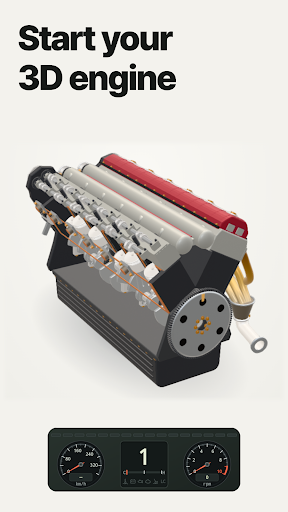
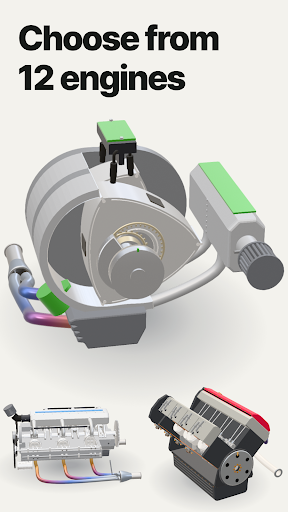
Start the engine and move the throttle to hear and see the revs change. Explore inline, V and rotary engines in 3D.
• A range of engines
12 3D models: Inline-3 Lightweight, Inline-4 High-rev, Inline-4 Hot Hatch, Inline-5 Rally, Inline-6 Silky, V6 Wide-bank, Flat-6 Circuit, V8 High-rev, V8 Muscle, V10 Supercar, V12 Grand, Rotary Twin-rotor. Drag to rotate the engine, then open the expanded view to inspect moving parts such as pistons, connecting rods, the crankshaft and rotors.
• Views and close-up inspection
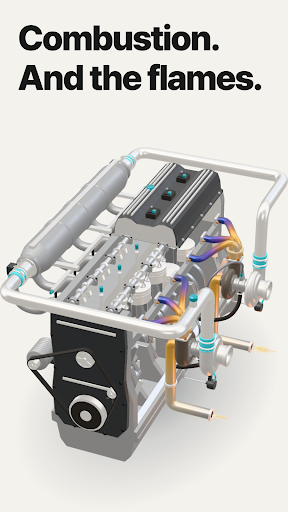
Choose a top, side, front or default view, and use two fingers to move or zoom the view. Cutaway and visual-only slow view work on the main and expanded screens; sound and engine speed stay unchanged. Choose from four backgrounds. Piston engines also show the combustion glow and exhaust heat.
• Four gearboxes
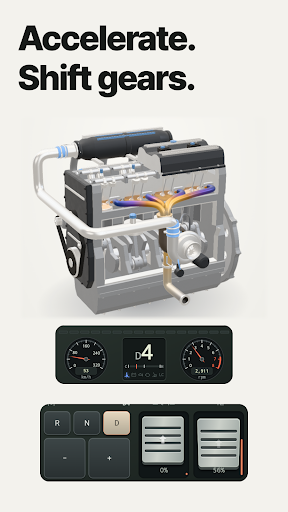
Choose a 5-speed manual, 6-speed manual, 8-speed automatic or 7-speed dual-clutch. Use the gear controls and clutch, brake and throttle pedals for the selected gearbox. Follow the engine state on the tachometer and gear display. With a manual gearbox, revs build more heavily in higher gears and you can feel the lever engage each gear. The clutch pedal shows engaged, slipping and open zones, and you can turn on a large shift lever in Settings.
• Drive modes and launch control
Comfort, Sport, Sport Plus and Custom drive modes change the throttle response, automatic shift points and exhaust valve sound. For Custom, choose throttle response, shifting, braking and exhaust valve separately in Settings and save them. Sport Plus also offers launch control.
• Exhaust and sound settings
Change the exhaust and tuning in Settings and compare the sound from idle to high revs. Audio is generated in real time from the engine's behavior; it does not play recordings of real vehicles. Inline-4 Hot Hatch: revised sound, Crackle by default, Stock selectable; optional intake/boost sounds. Turn on pops & bangs to hear it. Preparation screen, saved-tuning compatibility and setup messages.
• Ads and access
Start the default inline-six engine without watching an ad. Other engines can be previewed while stopped; a rewarded ad is offered when you first try to start one. A confirmed reward grants 24-hour access to that engine on this device. Press Start again after the ad closes. Passes are saved separately for each engine. Expiry does not interrupt an ongoing session, but returning to or reopening the app restores the default engine if the pass has expired. The default engine remains available if an ad cannot open or a reward is not confirmed. Banner ads may appear at the bottom of the screen.
No account or sign-in is required. The app interface is available in 17 languages, including English, Korean, Japanese and Chinese. The engines are original designs and do not reproduce any specific manufacturer or vehicle.
Show more

1. Download MEmu installer and finish the setup

2. Start MEmu then open Google Play on the desktop

3. Search Engine Simulator 3D in Google Play
Install
4. Download and Install Engine Simulator 3D
5. On install completion click the icon to start

6. Enjoy playing Engine Simulator 3D on PC with MEmu
MEmu Play is the best Android emulator and 100 million people already enjoy its superb Android gaming experience. The MEmu virtualization technology empowers you to play thousands of Android games smoothly on your PC, even the most graphic-intensive ones.
Bigger screen with better graphics; Long duration, without limitation of battery or mobile data.
Full Keymapping support for precise control of keyboard and mouse or gamepad.
Multiple game accounts or tasks on single PC at one time with Multi-Instance manager.
Play Engine Simulator 3D on PC by following steps: