
Fareidolia
Updated
Current Version
Offered By

With your passion for Fareidolia, you shouldn’t have to limit yourself to the small screen of a phone. Play like a pro and take full control of the game using a keyboard and mouse. MEmu gives you everything you’re looking for. Download and play Fareidolia on PC. Play as long as you want — no more worries about battery life, mobile data, or unexpected calls. The all-new MEmu 9 is the best way to play Fareidolia on PC. With our expertly designed keymapping system, Fareidolia feels just like a real PC game. The MEmu multi-instance manager lets you run two or more accounts on the same device at the same time. Most importantly, our exclusive emulation engine unlocks your PC’s full potential, delivering smooth and seamless performance.
Show more
Download Fareidolia on PC with MEmu Android Emulator. Enjoy playing on big screen. Fareidolia follows players who want an RPG where conversations, shared routines, and city problems matter alongside battles.


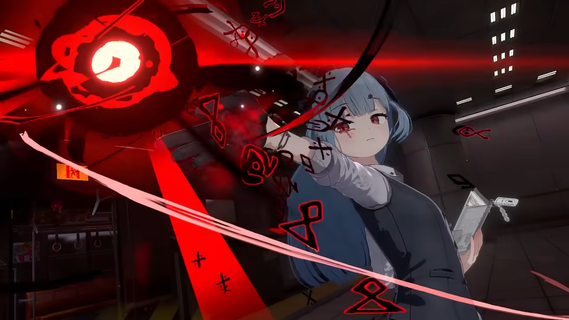

Fareidolia follows players who want an RPG where conversations, shared routines, and city problems matter alongside battles. Set in the Earth-like but slightly unfamiliar Anima City, the game places you in charge of a local office with responsibilities that affect its residents. The setting centers on meeting gifted characters called Mates and spending time in their world. For players following its earlier announcement, Fareidolia latest version refers to the project formerly introduced as Project RX.Life and combat in Anima CityLead the Restoration CenterFareidolia places you in the role of director of the Anima City Restoration Center. You also lead the Tasogare Hall office, giving your character a clear place in the city and its daily affairs. As problems arise, you work with the people around you to address unusual situations across Anima City.Get to know the MatesYou live alongside the Mates, gifted girls with their own personalities and abilities. The story focuses on building bonds through conversations and shared moments rather than treating characters only as battle units. This approach gives context to the people you meet and the events that involve them.Spend time on ordinary activitiesFareidolia includes quieter scenes where you can relax, read, cook, and spend time with characters. These activities support the game’s daily life setting and create space between city incidents. As a result, the pace can move from familiar routines to story events without staying focused on combat at all times.Follow character-centered storiesYou experience slice- of-life scenes and narrative moments built around the Mates and life in Anima City. The game presents the city as another world that still has recognizable everyday places and routines. Players looking for specific characters can watch for Minieh, Ohana, Shami, and the mysterious Elevator Girl as information about the game develops.Enter combat when situations changeFareidolia shifts from peaceful activities into combat when the story calls for it. Battles feature character skills and 3D anime visuals created with Unreal Engine 5. This contrast is part of the game’s main structure, with daily scenes and action existing within the same city setting.Fareidolia and Project RXFareidolia is the official new name for Project RX, an earlier name used for the game during its announcement period. Players who followed Project RX can use the new title when looking for current game information. Nexon Games develops Fareidolia through its IO DIVISION team.What to expect before downloadingThis is an upcoming RPG, so available content and access may depend on the game’s release status. Its premise is built around both relationship-focused daily life and combat, which may suit players who want story scenes between action sequences. The central setting is Anima City, not a separate collection of unrelated stages.How to begin in FareidoliaAfter you download Fareidolia, begin by following the opening story that introduces your role at the Anima City Restoration Center and Tasogare Hall. The game moves between city life, character interactions, and combat scenes. Pay attention to story events, since they establish the people and situations connected to your work in Anima City.Start the opening sequence and take on the role of the Restoration Center director and Tasogare Hall leader.Meet the Mates as the story introduces their personalities, abilities, and connection to the city.Take part in daily activities such as reading, cooking, relaxing, or spending time with characters when these scenes become available.Follow city events and investigate unusual problems that involve Anima City residents.Enter combat when the narrative shifts into action, then continue the story and return to daily life scenes.Get ready for life in Anima CityFareidolia is designed for players interested in a character-focused RPG that joins everyday interactions with combat. Its story begins with your work at the Restoration Center, then develops through the Mates, city events, and changing situations in Anima City. Currently, there's no official mobile release confirmed. Once the Android APK package is available, you can go back and download Fareidolia APK on APKPure.
Show more

1. Download MEmu installer and finish the setup

2. Start MEmu then open Google Play on the desktop

3. Search Fareidolia in Google Play
Install
4. Download and Install Fareidolia
5. On install completion click the icon to start

6. Enjoy playing Fareidolia on PC with MEmu
MEmu Play is the best Android emulator and 100 million people already enjoy its superb Android gaming experience. The MEmu virtualization technology empowers you to play thousands of Android games smoothly on your PC, even the most graphic-intensive ones.
Bigger screen with better graphics; Long duration, without limitation of battery or mobile data.
Full Keymapping support for precise control of keyboard and mouse or gamepad.
Multiple game accounts or tasks on single PC at one time with Multi-Instance manager.
Play Fareidolia on PC by following steps:

















































