Game Box: Relax Game&Mini Game
Updated
Current Version
1.0.33
Offered By

With your passion for Game Box: Relax Game&Mini Game, you shouldn’t have to limit yourself to the small screen of a phone. Play like a pro and take full control of the game using a keyboard and mouse. MEmu gives you everything you’re looking for. Download and play Game Box: Relax Game&Mini Game on PC. Play as long as you want — no more worries about battery life, mobile data, or unexpected calls. The all-new MEmu 9 is the best way to play Game Box: Relax Game&Mini Game on PC. With our expertly designed keymapping system, Game Box: Relax Game&Mini Game feels just like a real PC game. The MEmu multi-instance manager lets you run two or more accounts on the same device at the same time. Most importantly, our exclusive emulation engine unlocks your PC’s full potential, delivering smooth and seamless performance.
Show more
Download Game Box: Relax Game&Mini Game on PC with MEmu Android Emulator. Enjoy playing on big screen. Game Box: Game Box: Relax Game,Mini Game: Your Ultimate Mobile Gaming Treasury.

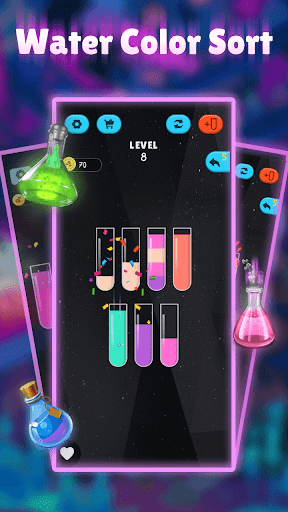
Game Box: Game Box: Relax Game,Mini Game: Your Ultimate Mobile Gaming Treasury
Welcome to Game Box: Relax Game,Mini Game, a dedicated entertainment haven for gaming enthusiasts! Whether you love brain-teasing puzzles, action-packed adventures, or nostalgic retro classics, this collection offers something for every gaming mood—designed to transform any moment into an enjoyable gaming experience!
Game Highlights
Diverse Gaming Universe, Endless Choices
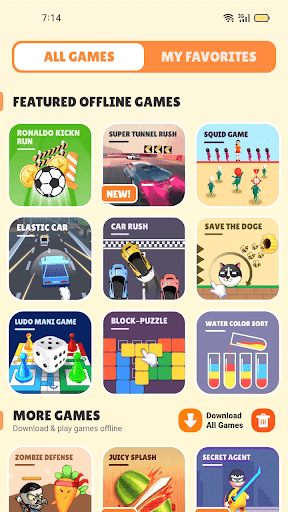
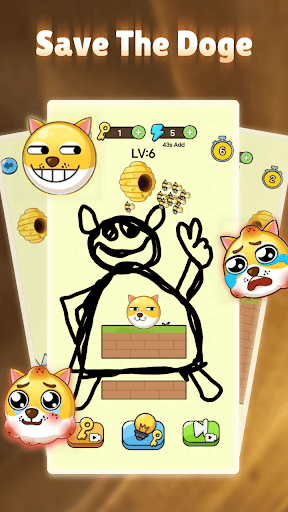
The game box hosts a rich array of mini-games, from logic-testing Sudoku to heart-pounding racing challenges, retro throwbacks, and creative casual titles. Every launch brings fresh excitement, catering to all your gaming cravings with versatile options.
Classic Revival, Nostalgic Delight
Relive the golden era of gaming with iconic titles like Match-3, Tic Tac Toe, and Snake. Simple controls reignite childhood memories, blending nostalgia with modern gameplay for timeless fun.
Thrilling Sports, Energetic Action
Experience the speed of car racing and the intensity of football matches. Sports-themed games challenge your reflexes and strategy, unleashing physical and mental vitality through dynamic gameplay.
All-Age Accessibility, Effortless Play
Designed with intuitive one-touch controls, the games ensure seamless enjoyment for players of all ages—from kids to adults and seniors—making gaming accessible to everyone.
Featured Games
● Racing & Adventure: Feel the adrenaline rush of high-speed races and obstacle challenges, bringing velocity and excitement directly to your screen.
● Green Field Battle: The new football casual game debuts, letting you experience passionate showdowns on the virtual pitch.
● Retro Classics: Rediscover timeless favorites like Snake and Tic Tac Toe, revisiting cherished memories through authentic gameplay.
● Match-3: Dive into a vibrant world of blocks, strategizing to clear patterns and chase high scores in this addictive puzzle experience.
● Fruit Merge: Combine identical fruits to create new varieties, testing your observation and tactical skills in a creative, fun-filled challenge.
● Mind Training: Sharpen focus and spatial awareness with puzzles and sliding block games, designed to enhance cognitive agility through engaging play.
Game Box: Relax Game,Mini Game is crafted for all gaming lovers—whether at home, traveling, or waiting, it delivers boundless entertainment whenever you want it. Download Puzzle games: Game Box now and immerse yourself in a world of endless gaming fun!
Show more

1. Download MEmu installer and finish the setup

2. Start MEmu then open Google Play on the desktop

3. Search Game Box: Relax Game&Mini Game in Google Play
Install
4. Download and Install Game Box: Relax Game&Mini Game
5. On install completion click the icon to start

6. Enjoy playing Game Box: Relax Game&Mini Game on PC with MEmu
MEmu Play is the best Android emulator and 100 million people already enjoy its superb Android gaming experience. The MEmu virtualization technology empowers you to play thousands of Android games smoothly on your PC, even the most graphic-intensive ones.
Bigger screen with better graphics; Long duration, without limitation of battery or mobile data.
Full Keymapping support for precise control of keyboard and mouse or gamepad.
Multiple game accounts or tasks on single PC at one time with Multi-Instance manager.
Play Game Box: Relax Game&Mini Game on PC by following steps: