
Grounded 2
Updated
Current Version
Offered By

With your passion for Grounded 2, you shouldn’t have to limit yourself to the small screen of a phone. Play like a pro and take full control of the game using a keyboard and mouse. MEmu gives you everything you’re looking for. Download and play Grounded 2 on PC. Play as long as you want — no more worries about battery life, mobile data, or unexpected calls. The all-new MEmu 9 is the best way to play Grounded 2 on PC. With our expertly designed keymapping system, Grounded 2 feels just like a real PC game. The MEmu multi-instance manager lets you run two or more accounts on the same device at the same time. Most importantly, our exclusive emulation engine unlocks your PC’s full potential, delivering smooth and seamless performance.
Show more
Download Grounded 2 on PC with MEmu Android Emulator. Enjoy playing on big screen. Grounded 2 builds upon the unique premise of its predecessor by shrinking players down to the size of insects, but this time the world feels even more vast and immersive.
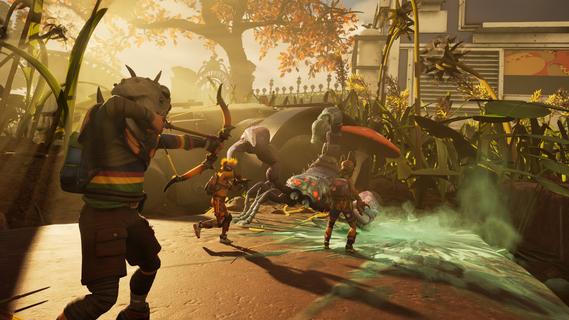

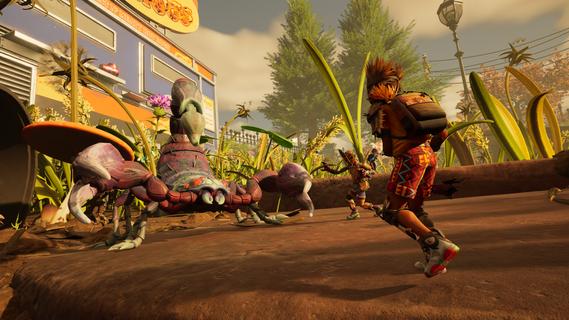
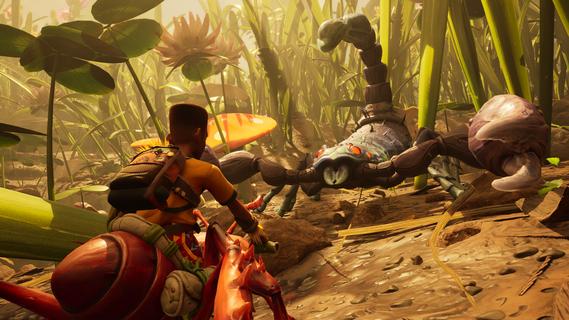
Grounded 2 builds upon the unique premise of its predecessor by shrinking players down to the size of insects, but this time the world feels even more vast and immersive. Set in a sprawling backyard environment, this open-world survival game invites players to explore, craft, and fight in a richly detailed microcosm where everyday objects become massive landmarks and threats. Players can enjoy the game solo or team up with friends in cooperative multiplayer mode, combining their skills to survive the dangers lurking in this oversized playground. The core gameplay revolves around resource gathering, crafting weapons and armor, and building a secure base to withstand the challenges ahead. The crafting system is deep and rewarding, encouraging experimentation with materials found throughout the environment to create tools that enhance combat and exploration. Movement and traversal have been expanded with the addition of a buggy, allowing players to navigate the vast backyard terrain more quickly and safely. This vehicle adds a new layer of strategy, enabling players to scout for resources, escape threats, or engage in combat from a mobile platform. The world of Grounded 2 is teeming with life, including hostile insects and mysterious creatures that pose constant danger. Players must stay alert and use their wits to outmaneuver predators and environmental hazards. The game’s AI is designed to create dynamic encounters, ensuring that no two play sessions feel the same. Beyond survival mechanics, Grounded 2 offers a compelling narrative thread that hints at a larger mystery. Something in the backyard hasn’t forgotten the players, adding suspense and intrigue to the exploration. This story element enriches the experience, motivating players to uncover secrets while managing their survival needs. Visually, the game impresses with detailed environments that transform mundane backyard elements into awe-inspiring vistas. From towering grass blades to intricate insect nests, the art direction enhances immersion and highlights the scale difference that defines the game’s charm. Grounded 2 balances action, strategy, and exploration, appealing to players who enjoy survival challenges with cooperative gameplay and a touch of mystery. Whether crafting a fortified base, battling giant spiders, or racing across the lawn in a buggy, players will find a rich, engaging world that rewards creativity and teamwork. In summary, Grounded 2 expands the original’s concept into a larger, more dynamic world filled with danger and discovery. Its blend of crafting, combat, and cooperative play, combined with an intriguing storyline and stunning visuals, makes it a standout title for fans of survival adventures.
Show more

1. Download MEmu installer and finish the setup

2. Start MEmu then open Google Play on the desktop

3. Search Grounded 2 in Google Play
Install
4. Download and Install Grounded 2
5. On install completion click the icon to start

6. Enjoy playing Grounded 2 on PC with MEmu
MEmu Play is the best Android emulator and 100 million people already enjoy its superb Android gaming experience. The MEmu virtualization technology empowers you to play thousands of Android games smoothly on your PC, even the most graphic-intensive ones.
Bigger screen with better graphics; Long duration, without limitation of battery or mobile data.
Full Keymapping support for precise control of keyboard and mouse or gamepad.
Multiple game accounts or tasks on single PC at one time with Multi-Instance manager.
Play Grounded 2 on PC by following steps: