Heavenfall Arena
Updated
Current Version
Offered By

With your passion for Heavenfall Arena, you shouldn’t have to limit yourself to the small screen of a phone. Play like a pro and take full control of the game using a keyboard and mouse. MEmu gives you everything you’re looking for. Download and play Heavenfall Arena on PC. Play as long as you want — no more worries about battery life, mobile data, or unexpected calls. The all-new MEmu 9 is the best way to play Heavenfall Arena on PC. With our expertly designed keymapping system, Heavenfall Arena feels just like a real PC game. The MEmu multi-instance manager lets you run two or more accounts on the same device at the same time. Most importantly, our exclusive emulation engine unlocks your PC’s full potential, delivering smooth and seamless performance.
Show more
Download Heavenfall Arena on PC with MEmu Android Emulator. Enjoy playing on big screen. Summon divine warriors and lead them through waves of kingdom battles in Heaven Fall Arena — a visually stunning idle RPG where your strategy determines the fate of heaven and earth.
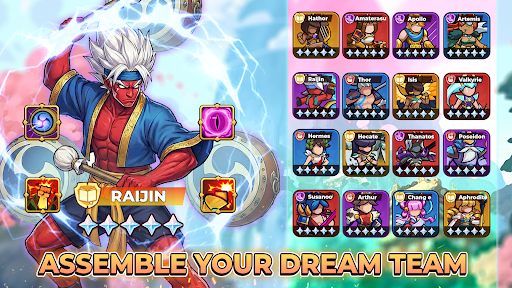
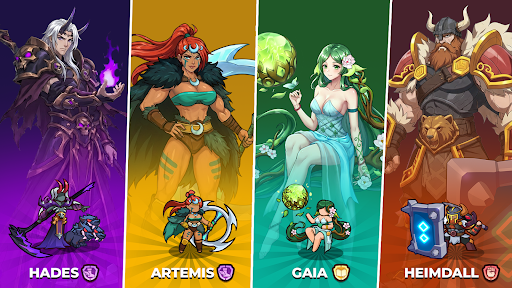
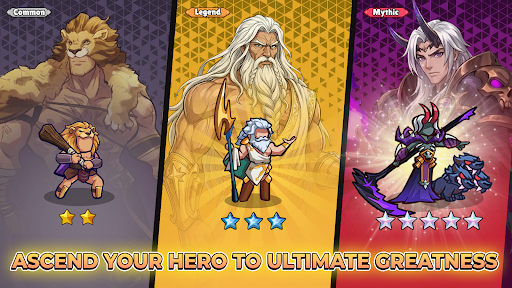
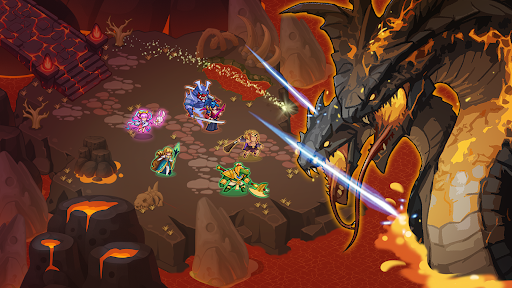
Summon divine warriors and lead them through waves of kingdom battles in Heaven Fall Arena — a visually stunning idle RPG where your strategy determines the fate of heaven and earth.
Enter the sacred arena where celestial forces clash in an endless war. As the chosen summoner, your journey begins in the crumbling remnants of a once-glorious kingdom, where only the strongest heroes can rise against the darkness. Collect and command legendary champions, each blessed by heaven, and guide them through epic campaigns, tactical showdowns, and evolving challenges.
In Heavenfall Arena, every battle is a test of both power and precision. Build your dream team, unlock powerful abilities, and master the flow of combat. Whether you're conquering stage after stage in idle mode or fine-tuning your team to dominate the PvP arena, your decisions shape every outcome.
Recruit from dozens of divine heroes — warriors, mages, guardians, and rogues — each with unique skills and synergies. Summon rare champions, ascend them to new levels, and discover legendary combos that can turn the tide of war.
This is more than just an idle game. It’s a grand saga of fallen gods, forgotten wars, and the return of heavenly power. With a richly detailed world, beautifully animated battles, and a constant stream of events and rewards, every step of your journey is filled with purpose.
Key Features:
• Strategic Summoning System
Use scrolls, stones, and blessings to summon powerful heroes from across the heavens.
• Arena Battles & PvP Ranks
Climb the arena leaderboard and prove your strength in real-time tactical fights.
• Idle Rewards, Active Depth
Earn resources while offline, then return to upgrade, evolve, and conquer.
• Hero Progression & Abilities
Unlock unique abilities, gear sets, and class synergies to maximize your team’s potential.
• Kingdom Campaigns & Events
Battle through cursed lands, ancient towers, and sacred skies in a growing world.
• A Heroic Journey Begins
Follow a compelling saga as you unite factions and reclaim the lost light of heaven.
Lead your army. Shape your fate. Dominate the arena.
Your journey to Heaven Fall Arena begins now.
Show more

1. Download MEmu installer and finish the setup

2. Start MEmu then open Google Play on the desktop

3. Search Heavenfall Arena in Google Play
Install
4. Download and Install Heavenfall Arena
5. On install completion click the icon to start

6. Enjoy playing Heavenfall Arena on PC with MEmu
MEmu Play is the best Android emulator and 100 million people already enjoy its superb Android gaming experience. The MEmu virtualization technology empowers you to play thousands of Android games smoothly on your PC, even the most graphic-intensive ones.
Bigger screen with better graphics; Long duration, without limitation of battery or mobile data.
Full Keymapping support for precise control of keyboard and mouse or gamepad.
Multiple game accounts or tasks on single PC at one time with Multi-Instance manager.
Play Heavenfall Arena on PC by following steps: