
Legend of Elements
Updated
Current Version
1.0.15
Offered By

With your passion for Legend of Elements, you shouldn’t have to limit yourself to the small screen of a phone. Play like a pro and take full control of the game using a keyboard and mouse. MEmu gives you everything you’re looking for. Download and play Legend of Elements on PC. Play as long as you want — no more worries about battery life, mobile data, or unexpected calls. The all-new MEmu 9 is the best way to play Legend of Elements on PC. With our expertly designed keymapping system, Legend of Elements feels just like a real PC game. The MEmu multi-instance manager lets you run two or more accounts on the same device at the same time. Most importantly, our exclusive emulation engine unlocks your PC’s full potential, delivering smooth and seamless performance.
Show more
Download Legend of Elements on PC with MEmu Android Emulator. Enjoy playing on big screen. Ready to save the world, Elementalist?


Ready to save the world, Elementalist?
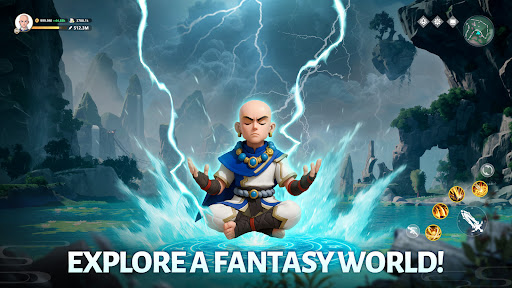
The distant lands of the East have long been rich in three elements: wind, fire, and thunder... Yet a sudden elemental storm plunged all into chaos. Now demons and dragons wreak havoc—and you must rise to be the savior of this world!
Awaken your elemental powers, and embark upon a fantastic adventure like none other!
[New Player Giveaway]
Just log in to claim 1,000 draws, the Limited-Edition Spirit Panda [Bambam], the Supreme Sword, and a generous item pack: all for free! Start your elemental journey with a bang!
[Wondrous Open-World Exploration]
A seamless open world awaits. Explore wildernesses, mountain valleys, thick forests, and even sprawling oceans. Mysterious forces and unknown thrills lie around every corner. Search for ancient treasures, tap into the power of nature itself, traverse lands no others dare tread... And you shall create a legend all your own!
[Endless Possibilities: Master Elemental Skills]
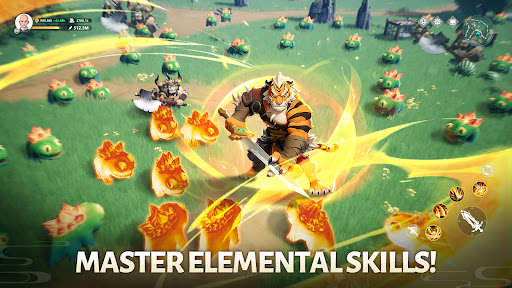
Choose from three classes, then begin your journey to master the elements of wind, fire, thunder, ice, and much more! There are hundreds of skills to mix and match from as you summon elemental spirits, take on fearful dragons and demons, and immerse yourself in thrilling combat!
[Discover Magical Companions]
Powerful Spirits and Pets abound in this elemental world, each holding mystical powers of their own. Recruit them as loyal companions, and build your own adventure squad!
[Team Up, Make Friends, And Adventure Together]
Join a clan to find kindred spirits, and set out on epic adventures together! Form teams to take down fierce monsters and mighty bosses together!
[Idle Rewards Galore]
Just turn on auto combat and leveling to boost your power, raking in Gear, Magites, and EXP with a single tap. Idle your way through the elemental world, stress-free!
________________________________________
A new legend is about to begin... Rise to become the elemental master!
Join Legend of Elements now to save the world and gain your glory!
Show more

1. Download MEmu installer and finish the setup

2. Start MEmu then open Google Play on the desktop

3. Search Legend of Elements in Google Play
Install
4. Download and Install Legend of Elements
5. On install completion click the icon to start

6. Enjoy playing Legend of Elements on PC with MEmu
MEmu Play is the best Android emulator and 100 million people already enjoy its superb Android gaming experience. The MEmu virtualization technology empowers you to play thousands of Android games smoothly on your PC, even the most graphic-intensive ones.
Bigger screen with better graphics; Long duration, without limitation of battery or mobile data.
Full Keymapping support for precise control of keyboard and mouse or gamepad.
Multiple game accounts or tasks on single PC at one time with Multi-Instance manager.
Play Legend of Elements on PC by following steps: