MU Immortal
Updated
Current Version
1745575344
Offered By

With your passion for MU Immortal, you shouldn’t have to limit yourself to the small screen of a phone. Play like a pro and take full control of the game using a keyboard and mouse. MEmu gives you everything you’re looking for. Download and play MU Immortal on PC. Play as long as you want — no more worries about battery life, mobile data, or unexpected calls. The all-new MEmu 9 is the best way to play MU Immortal on PC. With our expertly designed keymapping system, MU Immortal feels just like a real PC game. The MEmu multi-instance manager lets you run two or more accounts on the same device at the same time. Most importantly, our exclusive emulation engine unlocks your PC’s full potential, delivering smooth and seamless performance.
Show more
Download MU Immortal on PC with MEmu Android Emulator. Enjoy playing on big screen. MU: Immortal — A Classic Reborn.
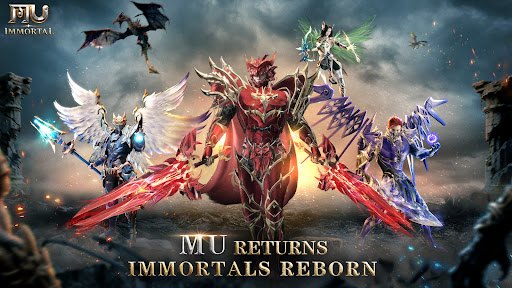
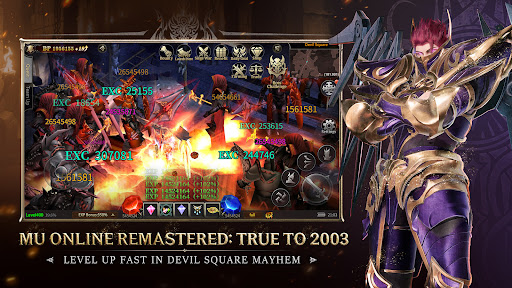
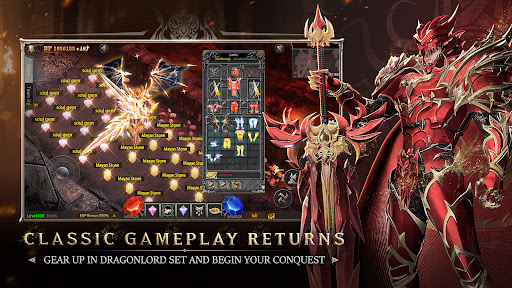
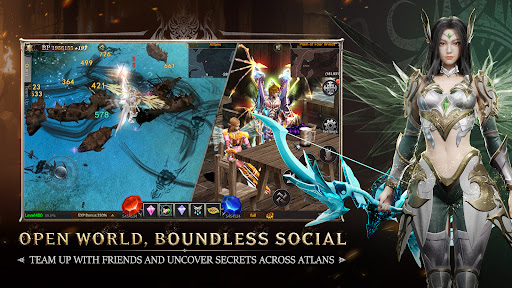
MU: Immortal — A Classic Reborn. Relive the Golden Era!
Pre-register now to claim the exclusive “Miracle Savior” title and the MU Gold Medal!
Step into a faithful recreation of MU’s legendary battles. Relive the fierce clashes in Blood Castle, the iconic 9-slot Inventory, and the epic warfare of Loren Valley. Don the radiant Archangel Set and conquer the newly unveiled Kanturu Ruins. Your old allies await in Lorencia — this time, shake the world with your return!
---
[Classic Revival, Class Revolution]
■ The original MU Reimagined! Revamped classic zones, wings, and gem systems—nostalgia meets next-gen!
■ Start with 3 Core Classes + Magic Gladiator unlocked from Lv.0!
Switch freely between melee and ranged forms!
[Open World Exploration, Boundless Brotherhood]
■ Journey from Devias to Atlans with full-map exploration!
Uncover hidden quests and random events—team up and unlock legendary loot!
■ Real-time voice chat, free trading, dynamic alliances—build a team and reshape the world!
[Cross-Server Wars, PVP Legends Rise]
■ Massive player Sieges and Crywolf Fortress battles — clash of power ignites the battlefield!
■ 1v1 Duels, 3v3 Tournaments, and Vulcanus Survival — climb the rankings to earn the “Dark Star Overlord” title!
[True Loot, True Power]
■ 100% Boss Drop Rate: Legendary gear with random stats — no paywalls, just pure skill!
■ Collect Iconic Wings & Sets: Strut in Dragonlord Armor and Archangel Weapons — dominate in both strength and style!
System Requirements:
Android: Requires Android 7.0 or later, with 4GB RAM or more
Official Community:
Discord: https://discord.gg/MppjxTEfqt
Facebook Page: https://www.facebook.com/MUImmortalGlobal/
Facebook Group: https://www.facebook.com/groups/muimmortalglobal/
Show more

1. Download MEmu installer and finish the setup

2. Start MEmu then open Google Play on the desktop

3. Search MU Immortal in Google Play
Install
4. Download and Install MU Immortal
5. On install completion click the icon to start

6. Enjoy playing MU Immortal on PC with MEmu
MEmu Play is the best Android emulator and 100 million people already enjoy its superb Android gaming experience. The MEmu virtualization technology empowers you to play thousands of Android games smoothly on your PC, even the most graphic-intensive ones.
Bigger screen with better graphics; Long duration, without limitation of battery or mobile data.
Full Keymapping support for precise control of keyboard and mouse or gamepad.
Multiple game accounts or tasks on single PC at one time with Multi-Instance manager.
Play MU Immortal on PC by following steps: