My True Friend Bucky
Updated
Current Version
1.210155
Offered By

With your passion for My True Friend Bucky, you shouldn’t have to limit yourself to the small screen of a phone. Play like a pro and take full control of the game using a keyboard and mouse. MEmu gives you everything you’re looking for. Download and play My True Friend Bucky on PC. Play as long as you want — no more worries about battery life, mobile data, or unexpected calls. The all-new MEmu 9 is the best way to play My True Friend Bucky on PC. With our expertly designed keymapping system, My True Friend Bucky feels just like a real PC game. The MEmu multi-instance manager lets you run two or more accounts on the same device at the same time. Most importantly, our exclusive emulation engine unlocks your PC’s full potential, delivering smooth and seamless performance.
Show more
Download My True Friend Bucky on PC with MEmu Android Emulator. Enjoy playing on big screen. Take care of little Bucky and go on adventures in the world of Be-Be-Bears!
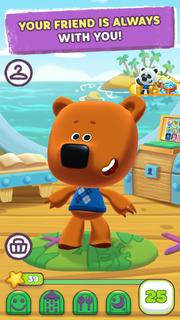
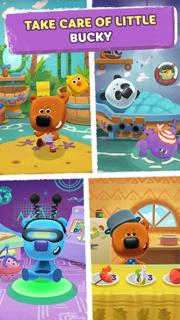

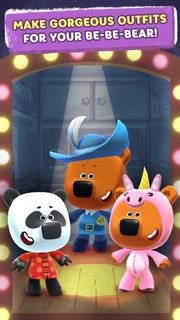
Take care of little Bucky and go on adventures in the world of Be-Be-Bears!Your friend is always with you!Take care of Bucky the little Be-Be-Bear - tend to him, make sure he stays healthy, entertain him, dress him up, go on adventures together, and discover an amazing world!TAKE CARE OF LITTLE BUCKY Make sure Bucky the little Be-Be-Bear stays healthy so he can grow up big and strong! Feed him, put him to bed on time, keep him clean, and don’t forget to have fun together. DECORATE BUCKY’S HOME Make Bucky’s home even cozier! The older the bear gets, the more you’ll want to make his home beautiful and get new items for it.CHOOSE OUTFITSCreate a one-of-a-kind style so your Be-Be-Bear can become a truly special teddy! Bucky’s closet is full of unique outfits to satisfy any taste, so get creative! HAVE FUN AND LEARN ABOUT THE WORLD WITH BUCKYEveryone likes to play and have fun, and doing it with Bucky is even better! There are lots of fun mini-games in the app, so you’ll never get bored!HOW DO YOU PLAY?As you take care of Bucky and complete levels you collect beautiful stickers and phtotographs in a special album and earn experience and in-game currency you can use to buy even more outfits and decorations for your home. The better you take care of your Be-Be-Bear, the more new things you can do in the game! Be a nice, attentive friend so you can have fun with Bucky and watch him grow up!The current version of the User Agreement is available at: https://i-moolt.com/agreement/enPrivacy policy: https://i-moolt.com/privacy/enIf you have any questions or suggestions, please write to us at [email protected], and you will definitely get a response!
Show more

1. Download MEmu installer and finish the setup

2. Start MEmu then open Google Play on the desktop

3. Search My True Friend Bucky in Google Play
Install
4. Download and Install My True Friend Bucky
5. On install completion click the icon to start

6. Enjoy playing My True Friend Bucky on PC with MEmu
MEmu Play is the best Android emulator and 100 million people already enjoy its superb Android gaming experience. The MEmu virtualization technology empowers you to play thousands of Android games smoothly on your PC, even the most graphic-intensive ones.
Bigger screen with better graphics; Long duration, without limitation of battery or mobile data.
Full Keymapping support for precise control of keyboard and mouse or gamepad.
Multiple game accounts or tasks on single PC at one time with Multi-Instance manager.
Play My True Friend Bucky on PC by following steps: