Neo Neon
Updated
Current Version
0.0.0.2
Offered By

With your passion for Neo Neon, you shouldn’t have to limit yourself to the small screen of a phone. Play like a pro and take full control of the game using a keyboard and mouse. MEmu gives you everything you’re looking for. Download and play Neo Neon on PC. Play as long as you want — no more worries about battery life, mobile data, or unexpected calls. The all-new MEmu 9 is the best way to play Neo Neon on PC. With our expertly designed keymapping system, Neo Neon feels just like a real PC game. The MEmu multi-instance manager lets you run two or more accounts on the same device at the same time. Most importantly, our exclusive emulation engine unlocks your PC’s full potential, delivering smooth and seamless performance.
Show more
Download Neo Neon on PC with MEmu Android Emulator. Enjoy playing on big screen. Welcome to Neo Neon, an endless vertical arcade game where every tap sends your neon character flying upward through a tower of floating platforms.
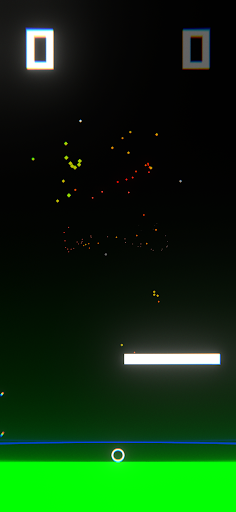
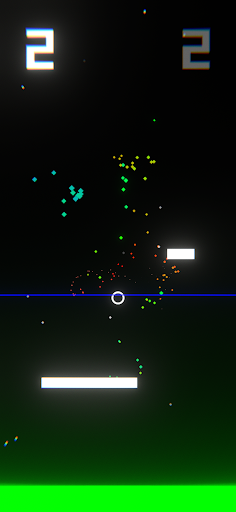
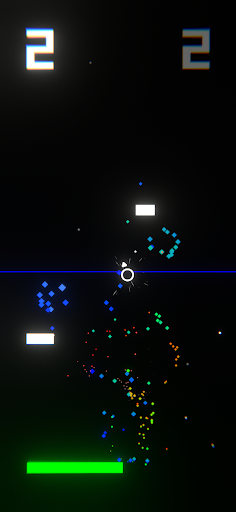
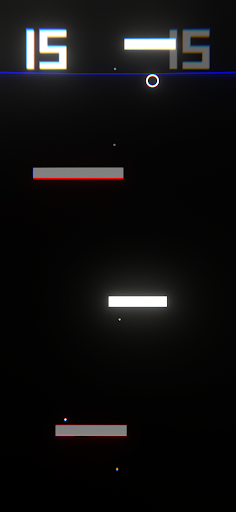
Welcome to Neo Neon, an endless vertical arcade game where every tap sends your neon character flying upward through a tower of floating platforms. Simple to learn, hard to master, Neo Neon challenges your timing and reflexes in a stylish neon world built for modern smartphones.
OVERVIEW
In Neo Neon you start at the bottom of an infinite stack of glowing platforms. Each successful landing takes you higher and adds to your score. Miss a jump or land on a dangerous tile, and it’s game over. Neo Neon combines easy one‑tap controls with deeper mechanics that reward precision and quick thinking.
HOW TO PLAY
Tap to jump
- A single tap makes your character leap straight up.
- Landing perfectly on a platform keeps your flow going.
Hold to charge a double jump
- While in mid‑air, press and hold to slow down time and show an aiming arrow.
- Let go when you’re ready, and your character will launch in the chosen direction.
- Practice aiming to reach distant platforms or recover from tight spots.
Collect boost orbs
- Some platforms hide glowing orbs. Touch one to activate a short burst of extra lift.
- During boost, your character shines bright blue and moves faster upward.
Wrap‑around movement
- Move off the right edge and reappear on the left side, or vice versa.
- This keeps the action fluid and lets you plan sideways moves.
PLATFORMS AND HAZARDS
Color changes
- Platforms start white, turn green on first landing, and then red.
- White and green landings are safe. Red means instant game over.
- Learn the color cycle to climb higher without falling.
Score and record keeping
- Your height gives your score; the higher you go, the more points you earn.
- The game saves your best score automatically and shows it on the screen.
VISUAL STYLE
Dark background
- Deep black fills most of the screen, making neon colors stand out and saving battery on OLED devices.
- Bright white lines and colorful particles pop against the darkness.
Neon glow and particles
- Every jump, landing and boost creates glowing sparks and light trails.
- A rotating arrow made of neon lines guides your double jump aim.
Minimal user interface
- Your current score appears at the top left, and your best score at the top right.
- A simple neon frame surrounds the game area, keeping focus on the action.
SOUND AND MUSIC
Interactive sound effects
- Each move has its own sound: jumping, landing, charging and boosting.
- Sounds play with slight random pitch changes so the game always feels fresh.
- Charging a double jump fills the air with a rising tone, then a punchy launch sound.
Background music
- A driving synthwave track plays softly in the background.
- Music speed and intensity match the game’s pace, making each run feel urgent.
WHY YOU’LL LOVE NEO NEON
Easy to start
- One-tap controls get you playing in seconds.
- No complicated menus—tap to jump and see how far you can go.
Deep challenge
- Master the slow‑motion double jump to reach new heights.
- Learn platform colors and plan your landings to avoid sudden death.
Stylish presentation
- A clean, neon‑on‑black design that looks great on any phone.
- Sparkling particles and glow effects make every jump feel exciting.
Quick sessions
- Perfect for short plays on the bus, in line or whenever you have a minute.
- Each run lasts just a few seconds or several minutes, depending on your skill.
COMPETE AND SHARE
Challenge friends to beat your top score. Take a screenshot when you set a new record and share it on social media. See who has the sharpest reflexes and the steadiest hands.
GET STARTED
Download Neo Neon now and dive into a world of endless neon jumps. Tap, charge, boost and survive as long as you can. How high will you climb before the neon fades?
Show more

1. Download MEmu installer and finish the setup

2. Start MEmu then open Google Play on the desktop

3. Search Neo Neon in Google Play
Install
4. Download and Install Neo Neon
5. On install completion click the icon to start

6. Enjoy playing Neo Neon on PC with MEmu
MEmu Play is the best Android emulator and 100 million people already enjoy its superb Android gaming experience. The MEmu virtualization technology empowers you to play thousands of Android games smoothly on your PC, even the most graphic-intensive ones.
Bigger screen with better graphics; Long duration, without limitation of battery or mobile data.
Full Keymapping support for precise control of keyboard and mouse or gamepad.
Multiple game accounts or tasks on single PC at one time with Multi-Instance manager.
Play Neo Neon on PC by following steps:



![Neon Valley [AMOLED] PC](https://dl.memuplay.com/new_market/img/com.QuanticBit.NeonValley.icon.2026-07-15-09-56-44.png)
![Eternal Void [RUNNER] PC](https://dl.memuplay.com/new_market/img/com.QuanticBit.EternalVoid.icon.2026-01-09-10-18-10.png)
![Neon Valley 2 [AMOLED 3D] PC](https://dl.memuplay.com/new_market/img/com.QuanticBit.NeonValley23D.icon.2026-02-07-22-46-33.png)
![Neon Valley [CLASSIC] PC](https://dl.memuplay.com/new_market/img/com.QuanticBit.NeonValley2.icon.2026-04-11-01-10-29.png)