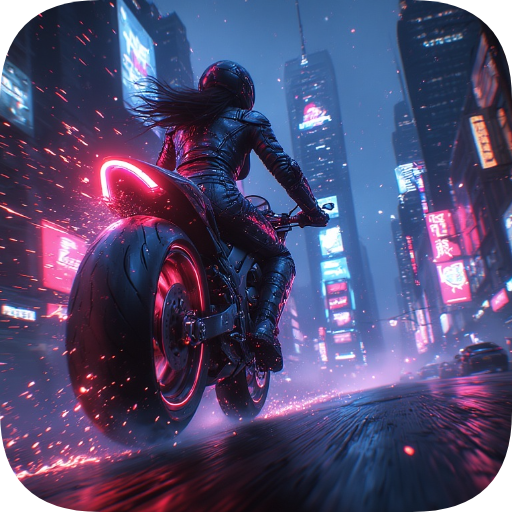
Neon Rider: Cyberpunk Racing
Updated
Current Version
1.0.0
Offered By

With your passion for Neon Rider: Cyberpunk Racing, you shouldn’t have to limit yourself to the small screen of a phone. Play like a pro and take full control of the game using a keyboard and mouse. MEmu gives you everything you’re looking for. Download and play Neon Rider: Cyberpunk Racing on PC. Play as long as you want — no more worries about battery life, mobile data, or unexpected calls. The all-new MEmu 9 is the best way to play Neon Rider: Cyberpunk Racing on PC. With our expertly designed keymapping system, Neon Rider: Cyberpunk Racing feels just like a real PC game. The MEmu multi-instance manager lets you run two or more accounts on the same device at the same time. Most importantly, our exclusive emulation engine unlocks your PC’s full potential, delivering smooth and seamless performance.
Show more
Download Neon Rider: Cyberpunk Racing on PC with MEmu Android Emulator. Enjoy playing on big screen. Neon Rider is an electrifying arcade racing game set in a realistic 3D world : neon lights , city rain , unpredictable traffic , and a charismatic rider at the wheel.
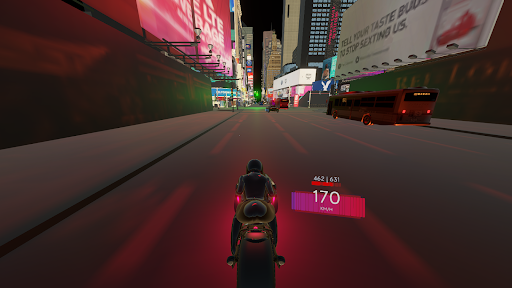
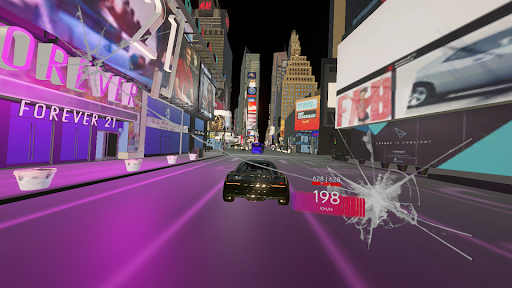
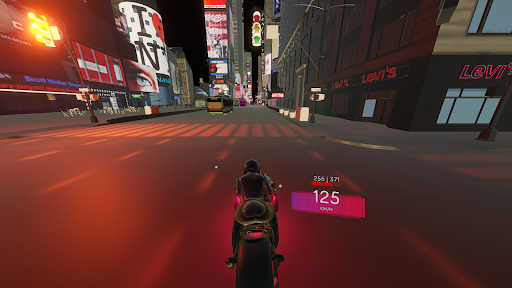
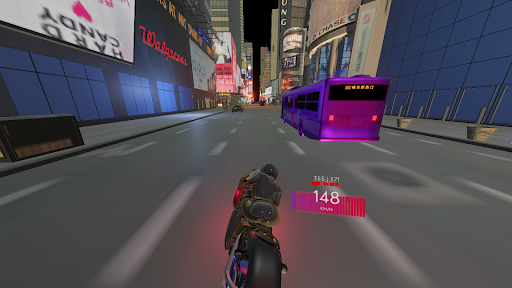
Neon Rider is an electrifying arcade racing game set in a realistic 3D world : neon lights , city rain , unpredictable traffic , and a charismatic rider at the wheel. Neon Rider combines speed, adrenaline, and intense racing, offering an arcade experience that challenges your reflexes. The goal is simple yet addictive — go as far as possible at full speed , avoid crashes , and beat your own record .
Key features
- Detailed 3D urban world with cyberpunk aesthetics and neon lighting.
- Realistic bike physics with an authentic sense of speed — perfect for racing enthusiasts.
- Dynamic traffic and obstacles: react fast, change lanes, and showcase your racing skills in Neon Rider arcade.
- Scoring system based on distance traveled and high-speed time, challenging you to master your bike.
- Progression with upgrades that enhance acceleration, control, and impact resistance.
- Immersive sound effects and soundtrack that respond to your riding.
- Responsive controls optimized for touch, gamepad, and keyboard.
- Local leaderboard and visual indicators to track your progress in real-time in Neon Rider.
Gameplay
- Infinite arcade-style races where each bike ride is unique: day/night cycles , weather, and traffic density change every run.
- ⭐ Hit bonus zones, reach top speeds for multipliers , and try to beat your racing record without crashing into other vehicles.
Why play Neon Rider?
- Easy to learn, hard to master arcade: perfect for quick sessions and improving your racing skills.
- Intense and thrilling atmosphere without losing focus on the bike, neon, and action.
- Constant rewards keep the arcade game fresh, addictive, and full of neon.
Download Neon Rider now , enter the neon world, and prove your bike racing is the deadliest and most stylish in the city. Accelerate, survive, play this arcade, and dominate the neon streets.
Show more

1. Download MEmu installer and finish the setup

2. Start MEmu then open Google Play on the desktop

3. Search Neon Rider: Cyberpunk Racing in Google Play
Install
4. Download and Install Neon Rider: Cyberpunk Racing
5. On install completion click the icon to start

6. Enjoy playing Neon Rider: Cyberpunk Racing on PC with MEmu
MEmu Play is the best Android emulator and 100 million people already enjoy its superb Android gaming experience. The MEmu virtualization technology empowers you to play thousands of Android games smoothly on your PC, even the most graphic-intensive ones.
Bigger screen with better graphics; Long duration, without limitation of battery or mobile data.
Full Keymapping support for precise control of keyboard and mouse or gamepad.
Multiple game accounts or tasks on single PC at one time with Multi-Instance manager.
Play Neon Rider: Cyberpunk Racing on PC by following steps:

![Neon Valley [AMOLED] PC](https://dl.memuplay.com/new_market/img/com.QuanticBit.NeonValley.icon.2026-07-15-09-56-44.png)
![Eternal Void [RUNNER] PC](https://dl.memuplay.com/new_market/img/com.QuanticBit.EternalVoid.icon.2026-01-09-10-18-10.png)
![Neon Valley 2 [AMOLED 3D] PC](https://dl.memuplay.com/new_market/img/com.QuanticBit.NeonValley23D.icon.2026-02-07-22-46-33.png)
![Neon Valley [CLASSIC] PC](https://dl.memuplay.com/new_market/img/com.QuanticBit.NeonValley2.icon.2026-04-11-01-10-29.png)
![Neon Valley [TAP] PC](https://dl.memuplay.com/new_market/img/com.QuanticBit.NeonValleyTAP.icon.2026-04-18-23-17-46.png)