Neverfall: Dungeon Trials
Updated
Current Version
Offered By

With your passion for Neverfall: Dungeon Trials, you shouldn’t have to limit yourself to the small screen of a phone. Play like a pro and take full control of the game using a keyboard and mouse. MEmu gives you everything you’re looking for. Download and play Neverfall: Dungeon Trials on PC. Play as long as you want — no more worries about battery life, mobile data, or unexpected calls. The all-new MEmu 9 is the best way to play Neverfall: Dungeon Trials on PC. With our expertly designed keymapping system, Neverfall: Dungeon Trials feels just like a real PC game. The MEmu multi-instance manager lets you run two or more accounts on the same device at the same time. Most importantly, our exclusive emulation engine unlocks your PC’s full potential, delivering smooth and seamless performance.
Show more
Download Neverfall: Dungeon Trials on PC with MEmu Android Emulator. Enjoy playing on big screen. Log in now to claim 1 monthly card, an Optional Hero, and an infinite summon ticket!



Log in now to claim 1 monthly card, an Optional Hero, and an infinite summon ticket!
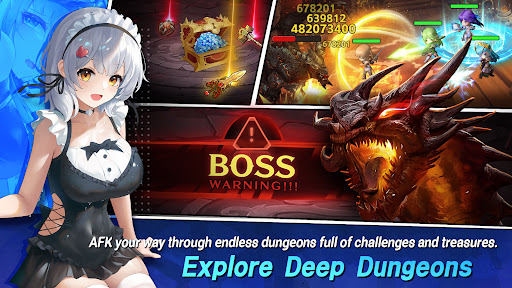
Neverfall: Dungeon Trials is an idle fantasy RPG where beauty meets strategy. Explore endless dungeons, summon stunning Live2D heroines, and master tactical combat with flexible team builds, artifact choices, and skill customisation etc. Lead your heroines, find the light, and never fall.
Why choose to play Neverfall?
Collect 100+ unique heroes: assemble your dream roster with varied classes and styles.
Stunning Live2D art & bilingual voices: premium character illustrations brought to life with dynamic animations and Japanese voiceovers.
Relaxed idle progression: auto-explore dungeons, auto-challenge bosses, and gather materials even while offline. Perfect for casual play sessions.
Strategic Freedom, Build Your Own Way: Freely mix leader skills, artifacts, formations and make full use of faction synergy, etc, to overcome any challenge. Outsmart enemies with tactical setups that reward creativity and precision.
Player-friendly gacha: an infinite ten-pull mechanic makes pulls fairer, keep summoning until you get the hero you want.
Varied gameplay modes: campaign dungeons, boss raids, co-op challenges and seasonal events keep progression fresh.
■Core features
• Idle & Auto-battle, earn rewards while you’re away.
• Gacha & Summons, chase SSR heroes with generous mechanics.
• Strategic Team-Building, mix factions, elemental counters and bond systems for max synergy.
• Endless Dungeon Trials, randomized events, treasure, and epic bosses.
• Social & Competitive, co-op raids and PvP arenas for global competition.
Whether you are a collector, a casual player who wants meaningful idle progression, or a strategy fan building perfect team synergies, Neverfall: Dungeon Trials delivers beautiful characters, satisfying summon moments, and rich dungeon gameplay.
Start your journey through the maze now.
Community
Discord: https://discord.gg/Gr4rURRapE
Facebook: https://www.facebook.com/Neverfall-Dungeon-Trials-61579190381551
Show more

1. Download MEmu installer and finish the setup

2. Start MEmu then open Google Play on the desktop

3. Search Neverfall: Dungeon Trials in Google Play
Install
4. Download and Install Neverfall: Dungeon Trials
5. On install completion click the icon to start

6. Enjoy playing Neverfall: Dungeon Trials on PC with MEmu
MEmu Play is the best Android emulator and 100 million people already enjoy its superb Android gaming experience. The MEmu virtualization technology empowers you to play thousands of Android games smoothly on your PC, even the most graphic-intensive ones.
Bigger screen with better graphics; Long duration, without limitation of battery or mobile data.
Full Keymapping support for precise control of keyboard and mouse or gamepad.
Multiple game accounts or tasks on single PC at one time with Multi-Instance manager.
Play Neverfall: Dungeon Trials on PC by following steps: