
Fallen Souls: Idle RPG
Updated
Current Version
1.0.3
Offered By

With your passion for Fallen Souls: Idle RPG, you shouldn’t have to limit yourself to the small screen of a phone. Play like a pro and take full control of the game using a keyboard and mouse. MEmu gives you everything you’re looking for. Download and play Fallen Souls: Idle RPG on PC. Play as long as you want — no more worries about battery life, mobile data, or unexpected calls. The all-new MEmu 9 is the best way to play Fallen Souls: Idle RPG on PC. With our expertly designed keymapping system, Fallen Souls: Idle RPG feels just like a real PC game. The MEmu multi-instance manager lets you run two or more accounts on the same device at the same time. Most importantly, our exclusive emulation engine unlocks your PC’s full potential, delivering smooth and seamless performance.
Show more
Download Fallen Souls: Idle RPG on PC with MEmu Android Emulator. Enjoy playing on big screen. Enter Fallen Souls: Idle RPG, a dark-fantasy idle adventure filled with deep strategy and fast progression.
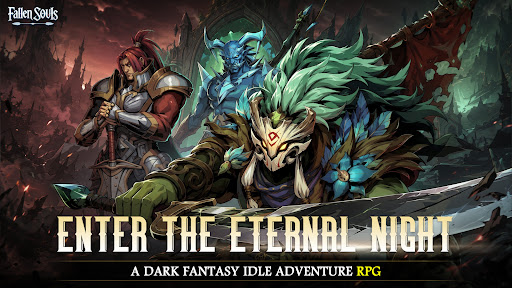
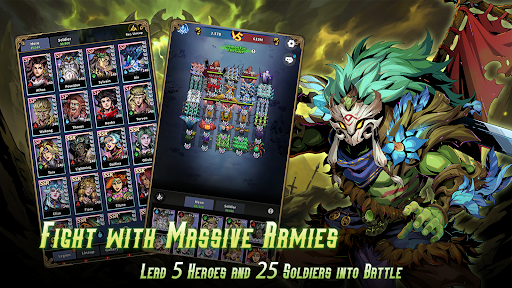
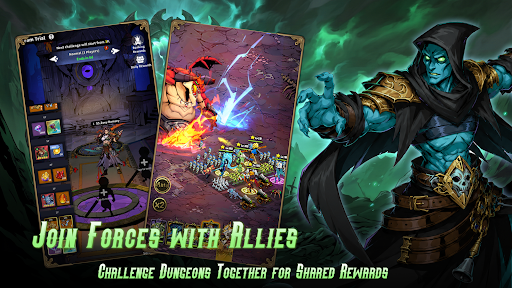
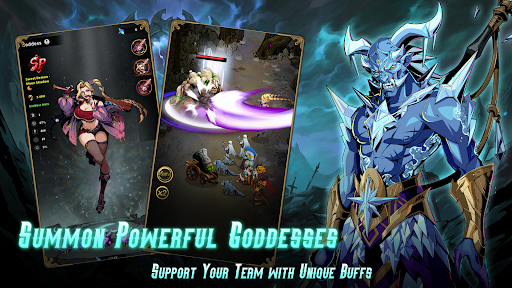
Enter Fallen Souls: Idle RPG, a dark-fantasy idle adventure filled with deep strategy and fast progression. Claim all heroes and 3400 draws as newbie gifts with pushing game progress!
Enjoy the real F2P game, collect heroes, summon goddesses, merge soldiers, and command your formation across a 30-slot tactical battlefield right now to reveal the secret of the eternal night!
Core features
■Unique formation combat
Place 5 Heroes and 25 Soldiers across a 30-slot battlefield for nearly endless tactical combinations. Deploy Goddesses as an additional unit outside the grid to support your whole team.
■Idle Progress. Real Strategy
Earn rewards offline, then return to meaningful strategic choices in combat and growth. Time your heroes’ ultimate skills to turn the tide with smart strategy.
■Merge & evolve soldiers
Combine troops to unlock higher-tier units to deal more damage. Stronger forms. Greater damage. New visuals.
■Base building unlocks systems
Construct and upgrade facilities that open recruitment, artifact crafting, soldier upgrades, and advanced gameplay modes.
■Co-op team dungeons
Join friends and other players to clear challenging stages, coordinate tactics, and claim superior loot.
■Rich gameplay variety
Progress through story chapters, face epic boss challenges, climb tower trials, explore resource dungeons, and participate in seasonal events, ensuring fresh content and long-term replayability.
Start now! summon, merge, build, and dominate.
Our Community
Facebook: https://www.facebook.com/FallenSoulsIdleRPG
Discord: https://discord.gg/v3fsKezFNP
Show more

1. Download MEmu installer and finish the setup

2. Start MEmu then open Google Play on the desktop

3. Search Fallen Souls: Idle RPG in Google Play
Install
4. Download and Install Fallen Souls: Idle RPG
5. On install completion click the icon to start

6. Enjoy playing Fallen Souls: Idle RPG on PC with MEmu
MEmu Play is the best Android emulator and 100 million people already enjoy its superb Android gaming experience. The MEmu virtualization technology empowers you to play thousands of Android games smoothly on your PC, even the most graphic-intensive ones.
Bigger screen with better graphics; Long duration, without limitation of battery or mobile data.
Full Keymapping support for precise control of keyboard and mouse or gamepad.
Multiple game accounts or tasks on single PC at one time with Multi-Instance manager.
Play Fallen Souls: Idle RPG on PC by following steps: