
No. 10: Full Confidence
Updated
Current Version
1.6.0
Offered By

With your passion for No. 10: Full Confidence, you shouldn’t have to limit yourself to the small screen of a phone. Play like a pro and take full control of the game using a keyboard and mouse. MEmu gives you everything you’re looking for. Download and play No. 10: Full Confidence on PC. Play as long as you want — no more worries about battery life, mobile data, or unexpected calls. The all-new MEmu 9 is the best way to play No. 10: Full Confidence on PC. With our expertly designed keymapping system, No. 10: Full Confidence feels just like a real PC game. The MEmu multi-instance manager lets you run two or more accounts on the same device at the same time. Most importantly, our exclusive emulation engine unlocks your PC’s full potential, delivering smooth and seamless performance.
Show more
Download No. 10: Full Confidence on PC with MEmu Android Emulator. Enjoy playing on big screen. Welcome to 10 Downing Street.
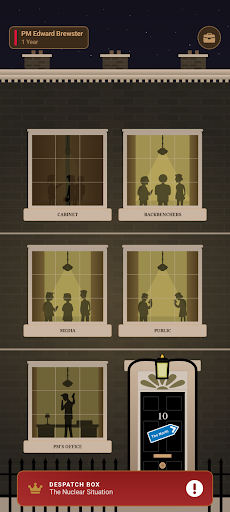
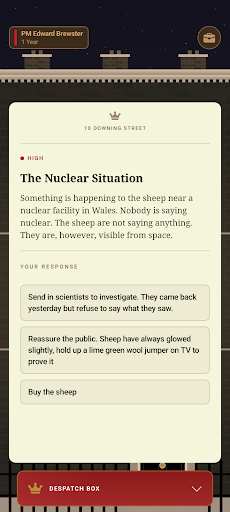
Welcome to 10 Downing Street. You're the new Prime Minister of the United Kingdom in this satirical strategy game for people who think they could do better. Try not to get sacked.
A crisis lands on your desk every month. Pretty much everyone is on strike. Your Chancellor has done something you're hoping the press don't find out about. The Daily Reckoning has turned. You have seconds to respond but every decision might please one faction and infuriate another.
Four groups hold your fate:
- Cabinet: Your inner circle. Lose them, lose control.
- Backbenchers: Your own MPs. Several have started a WhatsApp group.
- Media: They were briefly on your side. That was a different week.
- Public: Patient, mostly. They remember the big decisions.
Let any faction hit zero and it's over. A new Prime Minister inherits your mess and the world remembers every decision you made.
FEATURES
- 300+ political crises
- Multi-part storylines where your choices echo forward
- Timed decisions under pressure
- General elections, second terms and escalating instability
- Custom PMs - change your portrait, name and party colour
- Each PM continues where the last one fell
- The Queen of the Humber leadership challenge
- Reshuffles to help you stay in power
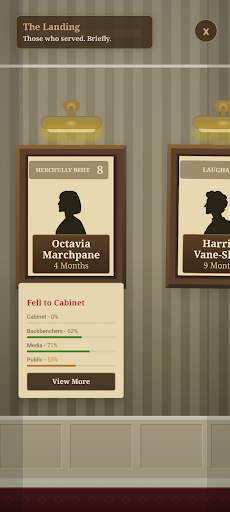
- PM history, records and portraits of your fallen leaders
- The Daily Reckoning newspaper reacts to your every failure
- Game Centre achievements
- Optional Special Adviser Pack with impact previews, longer timer, crisis log and post-crisis briefings
THE WORLD REMEMBERS
Each Prime Minister continues where the last one fell. Decisions echo forward. A bad call from the first PM can land on your successor's desk. The longer Britain has been ungoverned, the harder it is to govern.
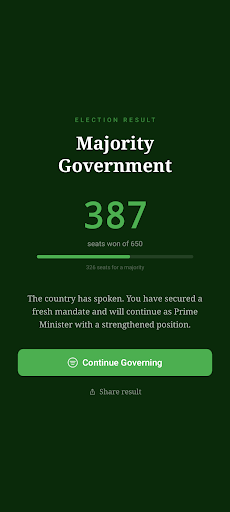
Survive a term and face a general election. Win a majority and carry on into a second term, with harder crises, and a party that is starting to wonder if someone else might do it better. Lose and it's over. Britain moves on. It always does.
HOW LONG WILL YOU LAST?
Your record as PM will be remembered. The epitaphs are not kind. Your portrait will hang in a corridor no-one visits but you can do better than that. Maybe.
A work of satire. All characters, crises, and political parties are entirely fictional. Any resemblance to actual governance is purely coincidental.
Show more

1. Download MEmu installer and finish the setup

2. Start MEmu then open Google Play on the desktop

3. Search No. 10: Full Confidence in Google Play
Install
4. Download and Install No. 10: Full Confidence
5. On install completion click the icon to start

6. Enjoy playing No. 10: Full Confidence on PC with MEmu
MEmu Play is the best Android emulator and 100 million people already enjoy its superb Android gaming experience. The MEmu virtualization technology empowers you to play thousands of Android games smoothly on your PC, even the most graphic-intensive ones.
Bigger screen with better graphics; Long duration, without limitation of battery or mobile data.
Full Keymapping support for precise control of keyboard and mouse or gamepad.
Multiple game accounts or tasks on single PC at one time with Multi-Instance manager.
Play No. 10: Full Confidence on PC by following steps: