Railroad Ink Challenge
Updated
Current Version
3.4.2
Offered By

With your passion for Railroad Ink Challenge, you shouldn’t have to limit yourself to the small screen of a phone. Play like a pro and take full control of the game using a keyboard and mouse. MEmu gives you everything you’re looking for. Download and play Railroad Ink Challenge on PC. Play as long as you want — no more worries about battery life, mobile data, or unexpected calls. The all-new MEmu 9 is the best way to play Railroad Ink Challenge on PC. With our expertly designed keymapping system, Railroad Ink Challenge feels just like a real PC game. The MEmu multi-instance manager lets you run two or more accounts on the same device at the same time. Most importantly, our exclusive emulation engine unlocks your PC’s full potential, delivering smooth and seamless performance.
Show more
Download Railroad Ink Challenge on PC with MEmu Android Emulator. Enjoy playing on big screen. In Railroad Ink Challenge, you have 7 rounds to make as many points as possible.
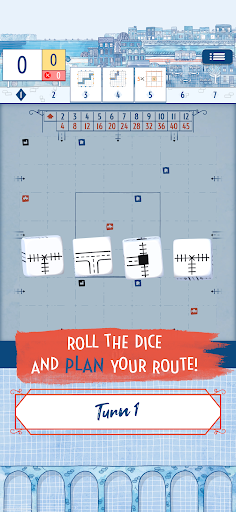
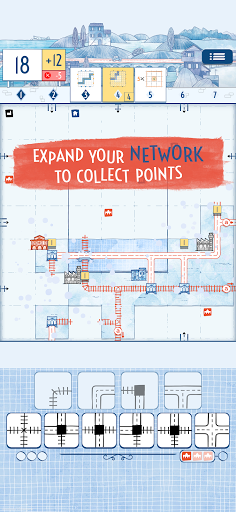
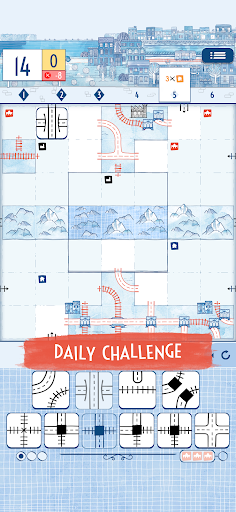
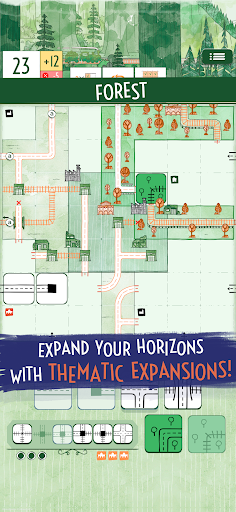
In Railroad Ink Challenge, you have 7 rounds to make as many points as possible. Roll the dice and draw the routes to connect the exits around your board. Expand your network with railways, highways, and stations to collect points, but you will be penalized for any open connections, so plan carefully! Play solo to improve your best score, or challenge players from all over the world!
HOW TO PLAY
Each round you will have to roll the dice and use the available routes to build your transportation network and connect as many exits as possible. Expand your network to collect points. You’ll also score bonus points for your longest highway and railway, for building into the central spaces of your map, and for completing optional, time-dependent goals before they expire.
You can also connect special structures to your network to trigger their special effects, such as duplicating routes, unlocking powerful special routes, and more. But beware: Try to not leave any open connections, as each one will cost you points at the end of the game.
EXPANSIONS
Forest and Desert expansions add special dice and rules to create even more intricate landscapes for your highways and railways.
MODES
Play solo with random objectives and join the online rankings or challenge players from all over the world with custom game configurations! The online leaderboards (Daily, Monthly, and All-Time) are completely cross-platform!
"• The wonderful art of the roll and write game by Marta Tranquilli, fleshed out and digitally enhanced.
• Network planning gameplay: try to make the best use of the available routes each round to create the perfect transportation network
• Try to conquer the top of the online leaderboards (Daily, Monthly, and All-Time)!
• Cross-platform, asynchronous multiplayer challenges with your friends!
100% Asynchronous multiplayer challenges
Don’t like to wait while your opponents complete their turn? Fear not! With the 100% asynchronous multiplayer challenges, that is an issue of the past! Play a full game on your own, then post the challenge online! Players from all over the world will be able to play with the same dice and goals you had and try to beat your score! Who’s gonna get the best score?
Railroad Ink Challenge is the official adaptation of the critically acclaimed roll and write game created by award-winning designers Hjalmar Hach & Lorenzo Silva and illustrated by artist Marta Tranquilli.
Show more

1. Download MEmu installer and finish the setup

2. Start MEmu then open Google Play on the desktop

3. Search Railroad Ink Challenge in Google Play
Install
4. Download and Install Railroad Ink Challenge
5. On install completion click the icon to start

6. Enjoy playing Railroad Ink Challenge on PC with MEmu
MEmu Play is the best Android emulator and 100 million people already enjoy its superb Android gaming experience. The MEmu virtualization technology empowers you to play thousands of Android games smoothly on your PC, even the most graphic-intensive ones.
Bigger screen with better graphics; Long duration, without limitation of battery or mobile data.
Full Keymapping support for precise control of keyboard and mouse or gamepad.
Multiple game accounts or tasks on single PC at one time with Multi-Instance manager.
Play Railroad Ink Challenge on PC by following steps: