SANTASE BY FORTEGAMES ( 66 )
Updated
Current Version
11.0.67
Offered By

With your passion for SANTASE BY FORTEGAMES ( 66 ), you shouldn’t have to limit yourself to the small screen of a phone. Play like a pro and take full control of the game using a keyboard and mouse. MEmu gives you everything you’re looking for. Download and play SANTASE BY FORTEGAMES ( 66 ) on PC. Play as long as you want — no more worries about battery life, mobile data, or unexpected calls. The all-new MEmu 9 is the best way to play SANTASE BY FORTEGAMES ( 66 ) on PC. With our expertly designed keymapping system, SANTASE BY FORTEGAMES ( 66 ) feels just like a real PC game. The MEmu multi-instance manager lets you run two or more accounts on the same device at the same time. Most importantly, our exclusive emulation engine unlocks your PC’s full potential, delivering smooth and seamless performance.
Show more
Download SANTASE BY FORTEGAMES ( 66 ) on PC with MEmu Android Emulator. Enjoy playing on big screen. Play Santase Online with your friends.
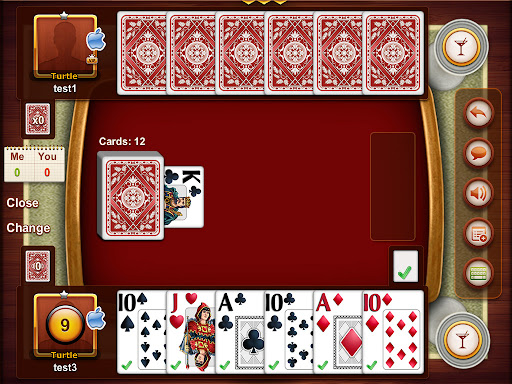


Play Santase Online with your friends. Santase (or Sixty six) is very popular card game for two players. The goal of the game is to be the first player to score 66 points. if neither player scores 66 points, the player who take the final card wins. In the game we have only 24 cards ( from 9's to Aces) . Each player get six cards and we flip over one card which is the trump suite
Playing
One player plays a card, then the other player plays a card. High card of the same suit takes the cards. Aces are high. Alternatively, any card of the trump suit takes any card of another suit.
Each player then draws one card from the remaining cards in the deck. Winner draws first.
Kings and Queens
If you have the king and queen of the same suit, you may show it and score 20 points. King and queen of the trump suit scores 40. You may only do this if you are leading the turn (laying down first). Do it at the start of your turn. Leave the queen down and take back the king.
Exchanging the 9
If you have the 9 of the trump suit in your hand you may exchange it for the displayed trump card. But only if you are leading the turn, and only at the start of your turn.
The Run-off
Once no more cards are available in the deck, play proceeds a little differently. The player who won the last hand lays down first. If the other player has a card of the same suit they must play it. If they do not, they must play a card from the trump suit if they have one. As before, play continues until one player scores 66 points or more, or all cards have been taken.
Card Scoring
In Santase, cards have the following values. Note that a ten is more powerful than a jack, queen or king. In other words, a ten takes a jack, queen or king.
9's = 0 points
J = 2 points
Q = 3 points
K = 4 points
10's = 10 points
A = 11 points
Closing the Deck
At any point in the game, provided there are at least 3 cards remaining in the deck plus the displayed trump card, a player may close the deck. To do this, turn over the displayed trump card. You must do this at the start of your turn and you must be leading (laying down first). Then the game proceeds as in the "run-off". There is danger in this play. If the player who closed does not score 66 points, the other player scores 3 points for the win.
Game Scoring
The player who wins the game scores one point. If the loser has fewer than 31 points (30 or less), the winner scores two points. If the loser has scored no points, the winner scores three.
Games are played to any point value the players agree on. Typically, the first person to reach 11 points wins.
Show more

1. Download MEmu installer and finish the setup

2. Start MEmu then open Google Play on the desktop

3. Search SANTASE BY FORTEGAMES ( 66 ) in Google Play
Install
4. Download and Install SANTASE BY FORTEGAMES ( 66 )
5. On install completion click the icon to start

6. Enjoy playing SANTASE BY FORTEGAMES ( 66 ) on PC with MEmu
MEmu Play is the best Android emulator and 100 million people already enjoy its superb Android gaming experience. The MEmu virtualization technology empowers you to play thousands of Android games smoothly on your PC, even the most graphic-intensive ones.
Bigger screen with better graphics; Long duration, without limitation of battery or mobile data.
Full Keymapping support for precise control of keyboard and mouse or gamepad.
Multiple game accounts or tasks on single PC at one time with Multi-Instance manager.
Play SANTASE BY FORTEGAMES ( 66 ) on PC by following steps: