Screw Out 3D: Nut Sort Jam
Updated
Current Version
2.7
Offered By

With your passion for Screw Out 3D: Nut Sort Jam, you shouldn’t have to limit yourself to the small screen of a phone. Play like a pro and take full control of the game using a keyboard and mouse. MEmu gives you everything you’re looking for. Download and play Screw Out 3D: Nut Sort Jam on PC. Play as long as you want — no more worries about battery life, mobile data, or unexpected calls. The all-new MEmu 9 is the best way to play Screw Out 3D: Nut Sort Jam on PC. With our expertly designed keymapping system, Screw Out 3D: Nut Sort Jam feels just like a real PC game. The MEmu multi-instance manager lets you run two or more accounts on the same device at the same time. Most importantly, our exclusive emulation engine unlocks your PC’s full potential, delivering smooth and seamless performance.
Show more
Download Screw Out 3D: Nut Sort Jam on PC with MEmu Android Emulator. Enjoy playing on big screen. Screw Out 3D – Relax, Twist, Solve!


Screw Out 3D – Relax, Twist, Solve!
Looking for a satisfying, smart, and beautifully designed 3D puzzle game — and one you can enjoy offline?
Welcome to Screw Out 3D — the ultimate combination of calming visuals, logical thinking, and screw-turning satisfaction! One of the top no wifi games that helps you unwind anywhere.
What is Screw Out 3D?
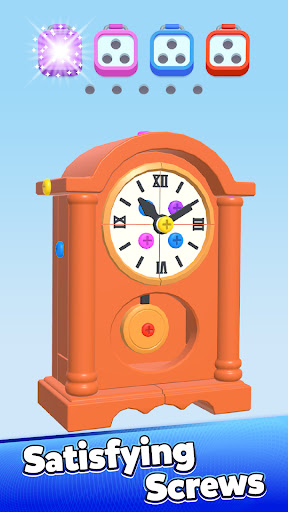
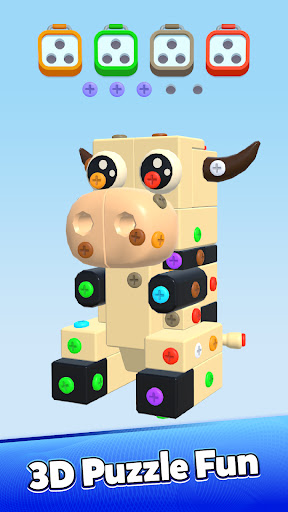
Screw Sort is a tactile, relaxing puzzle game where you twist and turn screws, dismantle parts, and sort them into their correct trays. It’s simple to start but surprisingly deep as levels evolve. Each puzzle is a miniature 3D structure filled with bolts, bars, plates, and surprises. Your job? Take it apart with precision — and pleasure.
Whether you're out of signal or just love no internet games, this one delivers.
Key Features
Satisfying screw-unscrewing mechanics – twist, turn, and click with precision
Hundreds of levels – from beginner-friendly to mind-bending
Color and shape sorting challenges – not just screws!
Smooth 3D visuals and calming ASMR sound effects
Easy to play, hard to master – great for all skill levels
Daily challenges and level packs
No timers – play at your own pace
Great for fun games with no wifi and no pressure
A Puzzle Game That Feels Like Fidgeting for Your Brain
Screw Sort isn’t about speed. It’s about flow. Each turn, match, and click is a micro-reward for your senses. Whether on a short break or winding down, this games without wifi experience offers focus and calm.
The gameplay feels like a tactile toy. It improves mindfulness and gently challenges the brain. Just a few levels can help you reset mentally.
Visual Puzzles That Come to Life
Every puzzle is a piece of art. Dismantle objects layer by layer, sort parts by shape or color, and restore order.
Smooth animations and clean interactions make each moment feel satisfying.
Customize trays, unlock screw styles, and face growing challenges as you progress.
Who Is This Game For?
Whether you’re a puzzle lover or someone who enjoys relaxing games — Screw Out 3D is for you. Ideal for:
Fans of 3D puzzles and satisfying visuals
ASMR-style gameplay and sensory fun
Players who enjoy color-matching and tinkering
Those wanting calm, pressure-free brain teasers
People looking for enjoyable games for free
Why You’ll Love It
We designed Screw Out 3D to be both relaxing and rewarding. The levels increase in depth, but the core stays the same: a soothing, tactile loop that makes your brain feel good.
No annoying ads after every level. No pressure. Just clean, focused gameplay. And yes — it’s one of those great games free to play and love.
Start Twisting Today!
Join players around the world discovering the pleasure of screw sorting. Whether you’re home, commuting, or want no wifi options, this is one of the best puzzle games for free.
Download now and enjoy smart, calm gameplay — wherever you are!
Show more

1. Download MEmu installer and finish the setup

2. Start MEmu then open Google Play on the desktop

3. Search Screw Out 3D: Nut Sort Jam in Google Play
Install
4. Download and Install Screw Out 3D: Nut Sort Jam
5. On install completion click the icon to start

6. Enjoy playing Screw Out 3D: Nut Sort Jam on PC with MEmu
MEmu Play is the best Android emulator and 100 million people already enjoy its superb Android gaming experience. The MEmu virtualization technology empowers you to play thousands of Android games smoothly on your PC, even the most graphic-intensive ones.
Bigger screen with better graphics; Long duration, without limitation of battery or mobile data.
Full Keymapping support for precise control of keyboard and mouse or gamepad.
Multiple game accounts or tasks on single PC at one time with Multi-Instance manager.
Play Screw Out 3D: Nut Sort Jam on PC by following steps: