SOL: enchant
Updated
Current Version
Offered By

With your passion for SOL: enchant, you shouldn’t have to limit yourself to the small screen of a phone. Play like a pro and take full control of the game using a keyboard and mouse. MEmu gives you everything you’re looking for. Download and play SOL: enchant on PC. Play as long as you want — no more worries about battery life, mobile data, or unexpected calls. The all-new MEmu 9 is the best way to play SOL: enchant on PC. With our expertly designed keymapping system, SOL: enchant feels just like a real PC game. The MEmu multi-instance manager lets you run two or more accounts on the same device at the same time. Most importantly, our exclusive emulation engine unlocks your PC’s full potential, delivering smooth and seamless performance.
Show more
Download SOL: enchant on PC with MEmu Android Emulator. Enjoy playing on big screen. 당'신'의 뜻대로 .


당'신'의 뜻대로
전지적 MMORPG, SOL: enchant
6월 18일(목) 낮 12시 정식 오픈!
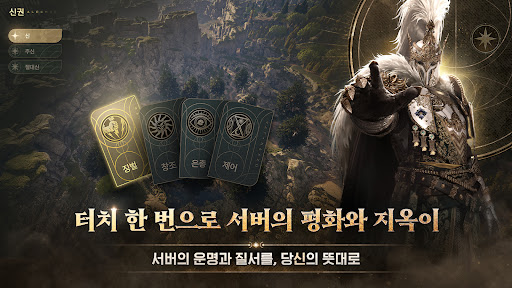
■ 압도적인 힘, 신권
신이 선택하는 업데이트, 신이 창조하는 아이템, 신이 오픈하는 콘텐츠
직접 신이 되어 서버, 월드의 질서와 운명을 결정하세요.
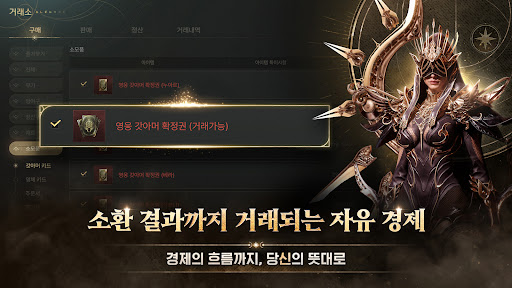
■ 제한 없는 자유 거래
갓아머, 영체 등 소환 결과부터 성장 재화까지 거래 가능한
거대한 자유 경제에서 부를 창출하세요.
■ 24시간 연속 무접속 플레이
24시간 연속으로 모드 지원!
당신의 일상과 함께할 수 있는 MMO 플레이를 즐겨보세요.
■ 언리얼 엔진 5로 구현한 살아있는 세계
로딩없이 하나로 이어진 세계에서 거대한 몬스터들을 사냥하세요.
최고의 그래픽으로 그려낸 더 큰 세계가 기다립니다.
당'신'의 선택이 새로운 역사가 되는 경험을 시작하세요.
※ 유료 아이템 구매 시 별도의 요금이 부과됩니다. (확률형 아이템 포함)
- 공급자: 넷마블㈜ 대표이사 김병규
- 이용조건 및 기간: 게임 내 별도 고지된 내용에 따름
(사용기간이 표시되지 않은 경우, 서비스의 종료일까지를 사용기간으로 간주)
- 결제금액 및 방법: 상품 별 별도 고지된 결제금액 및 결제방법에 따름
(외화 결제 시 환율 및 수수료 등으로 인해 실제 청구금액과 다를 수 있음)
- 상품지급방식: 게임 내 구매한 아이디(캐릭터)로 즉시 지급
- 최소OS사양: Android 11
- 주소: 서울특별시 구로구 디지털로 26길 38, G-Tower 넷마블
- 사업자 번호: 105-87-64746
- 통신판매업 번호: 제 2014-서울구로-1028 호
[접근권한 안내]
▶ 필수적 접근권한
- 없음
▶ 선택적 접근권한
- 알림 (Android 13 이상): 푸시 알림 수신 시 사용합니다.
※ 접근권한에 동의하지 않아도 서비스 이용이 가능합니다.
▶ 접근권한 철회방법
- 운영체제 6.0 이상 : 설정 > 어플리케이션 관리자 > 앱 선택 > 권한 > 접근권한 철회 가능
* 게임물 등급 분류 번호 : 제 CC-NP-250925-004 호
- 이용약관 : https://help.netmarble.com/ko/terms/terms_of_service_ko
- 개인정보 처리방침 : https://help.netmarble.com/terms/privacy_policy_ko?lcLocale=ko
- 서비스 운영 정책 : https://help.netmarble.com/web/sol/policy
- 고객센터: 1588-3995 (평일 오전10시~오후7시 상담가능)
- 사업자 이메일 : netmarbles@igsinc.co.kr
- 사업자정보 확인/문의하기: https://help.netmarble.com/
----
개발자 연락처 :
넷마블(주) 구로구 디지털로26길 38(구로동, 지타워)
구로구, 서울특별시 08393
South Korea 557819606 제 2014-서울구로-1028 호 구로구청
----
개발자 연락처 :
넷마블(주) 구로구 디지털로26길 38(구로동, 지타워)
구로구, 서울특별시 08393
South Korea 557819606 제 2014-서울구로-1028 호 구로구청
Show more

1. Download MEmu installer and finish the setup

2. Start MEmu then open Google Play on the desktop

3. Search SOL: enchant in Google Play
Install
4. Download and Install SOL: enchant
5. On install completion click the icon to start

6. Enjoy playing SOL: enchant on PC with MEmu
MEmu Play is the best Android emulator and 100 million people already enjoy its superb Android gaming experience. The MEmu virtualization technology empowers you to play thousands of Android games smoothly on your PC, even the most graphic-intensive ones.
Bigger screen with better graphics; Long duration, without limitation of battery or mobile data.
Full Keymapping support for precise control of keyboard and mouse or gamepad.
Multiple game accounts or tasks on single PC at one time with Multi-Instance manager.
Play SOL: enchant on PC by following steps: