Sonic Rumble
Updated
Current Version
Offered By

With your passion for Sonic Rumble, you shouldn’t have to limit yourself to the small screen of a phone. Play like a pro and take full control of the game using a keyboard and mouse. MEmu gives you everything you’re looking for. Download and play Sonic Rumble on PC. Play as long as you want — no more worries about battery life, mobile data, or unexpected calls. The all-new MEmu 9 is the best way to play Sonic Rumble on PC. With our expertly designed keymapping system, Sonic Rumble feels just like a real PC game. The MEmu multi-instance manager lets you run two or more accounts on the same device at the same time. Most importantly, our exclusive emulation engine unlocks your PC’s full potential, delivering smooth and seamless performance.
Show more
Download Sonic Rumble on PC with MEmu Android Emulator. Enjoy playing on big screen. Ready Set Rumble!
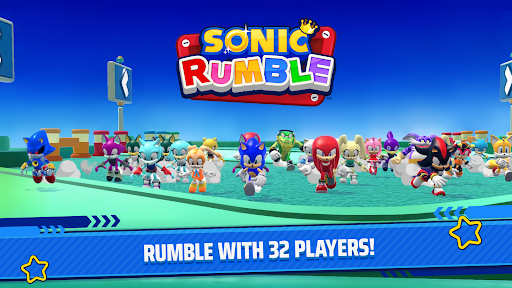

Ready Set Rumble! Join Sonic and friends in Sonic Rumble, a chaotic multiplayer party game where up to 32 players battle for survival! Get ready for a thrilling and fast-paced experience unlike any other! Unleash the Sonic mania within!
■■ Explore a world full of charming stages and exciting game modes! ■■
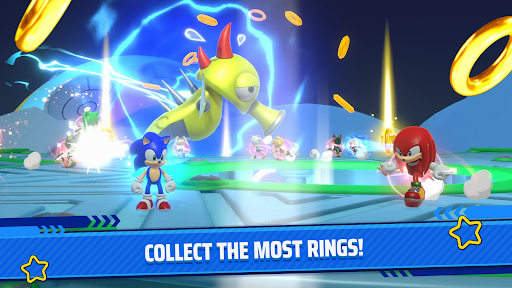
Experience a vast array of stages with different themes and ways to play! Sonic Rumble is packed with different gameplay styles, including Run, where players race for the top spot; Survival, where players compete to stay in the game; Ring Battle, where players duke and dodge it out for the most rings; and lots more! Matches are short and sweet, so anyone can pick it up and play in their spare time. Jump into the action and become the ultimate rumbler! Experience the thrill of Sonic racing in this fast-paced competition for the top spot!
■■ Play with friends and family alike! ■■
Form a squad of 4 players and work together to take on other squads around the world! Team up, strategize, and climb the leaderboards in this competitive online multiplayer experience. Show off your skills and prove you're the best team around! Experience the thrill of victory with your friends! Ready to play Sonic games? You will never see one like this!
■■ All your favorite Sonic characters are here! ■■
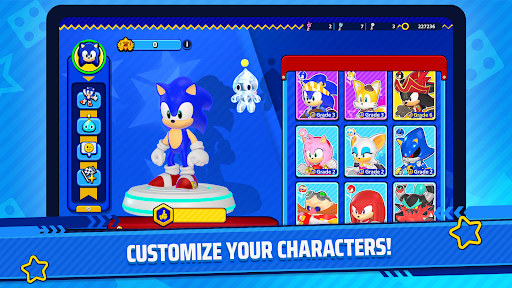
Play as Sonic, Tails, Knuckles, Amy, Shadow, Dr. Eggman, and other Sonic-series favorites! Express yourself and customize your Sonic characters with unique skins, animations, and effects! Unleash your creativity and make your character truly your own! Sonic the Hedgehog awaits!
■■ Game Setting ■■
Players control a character from the Sonic series as they enter a toy world created by the villainous Dr. Eggman, making their way through treacherous obstacle courses and dangerous arenas! Navigate through a whimsical world filled with challenges and surprises in this exciting adventure game! Prepare for non-stop fun and excitement! Experience new ways to play Sonic games!
■■ Loads of music brings the world of Sonic Rumble to life! ■■
Sonic Rumble features sprightly audio for those with a need for speed! Keep an ear out for iconic tunes from the Sonic series as well! Get ready to groove to the beat and immerse yourself in the vibrant soundscape of the game! Be part of the saga and play Sonic games as you never did.
Official Website: https://sonicrumble.sega.com
Official X: https://twitter.com/Sonic_Rumble
Official Facebook: https://www.facebook.com/SonicRumbleOfficial
Official Discord: https://discord.com/invite/sonicrumble
Show more

1. Download MEmu installer and finish the setup

2. Start MEmu then open Google Play on the desktop

3. Search Sonic Rumble in Google Play
Install
4. Download and Install Sonic Rumble
5. On install completion click the icon to start

6. Enjoy playing Sonic Rumble on PC with MEmu
MEmu Play is the best Android emulator and 100 million people already enjoy its superb Android gaming experience. The MEmu virtualization technology empowers you to play thousands of Android games smoothly on your PC, even the most graphic-intensive ones.
Bigger screen with better graphics; Long duration, without limitation of battery or mobile data.
Full Keymapping support for precise control of keyboard and mouse or gamepad.
Multiple game accounts or tasks on single PC at one time with Multi-Instance manager.
Play Sonic Rumble on PC by following steps: