SUPER3
Updated
Current Version
1.2.1
Offered By

With your passion for SUPER3, you shouldn’t have to limit yourself to the small screen of a phone. Play like a pro and take full control of the game using a keyboard and mouse. MEmu gives you everything you’re looking for. Download and play SUPER3 on PC. Play as long as you want — no more worries about battery life, mobile data, or unexpected calls. The all-new MEmu 9 is the best way to play SUPER3 on PC. With our expertly designed keymapping system, SUPER3 feels just like a real PC game. The MEmu multi-instance manager lets you run two or more accounts on the same device at the same time. Most importantly, our exclusive emulation engine unlocks your PC’s full potential, delivering smooth and seamless performance.
Show more
Download SUPER3 on PC with MEmu Android Emulator. Enjoy playing on big screen. SUPER3 is an open-source Sega Model 3 emulator for Android.
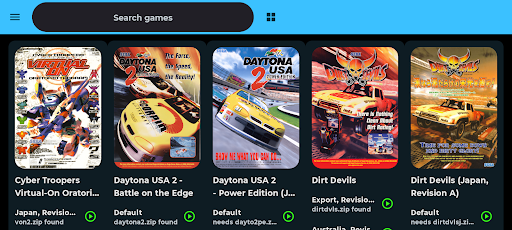
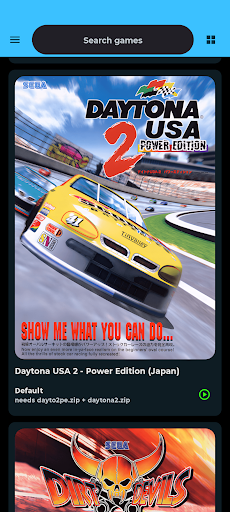
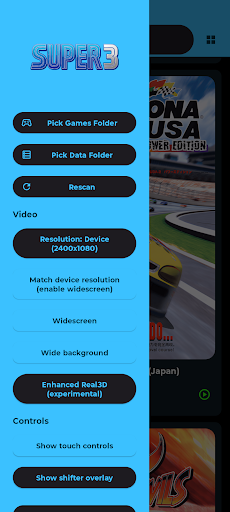
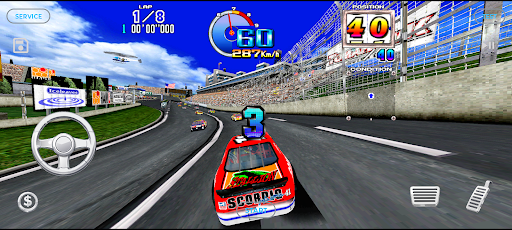
SUPER3 is an open-source Sega Model 3 emulator for Android. It is based on the Supermodel emulator by trzy, with additional work derived from the model3emu-code-sinden (ARM) fork.
No games are included. This app does not include any games, ROMs, BIOS files, or copyrighted game content. You must supply your own legally obtained game ROMs.
Features:
Sega Model 3 emulation (compatibility varies by title/device)
On-screen touch controls (Service/Test/Coin/Start and game-specific controls)
Virtual on-screen steering wheel for driving games (when supported)
Save states (10 slots) with automatic screenshot thumbnails and tap-to-preview
In-game pause/resume button
Game flyers (front/back) in the launcher list
Video settings (Resolution & Widescreen)
Video Settings
From the main game list, open the side menu (toolbar “menu” icon) and look under Video.
Resolution: Native (496x384) and integer scale options (2x through 8x). Higher values look sharper but can reduce performance.
Match device resolution: Sets the internal resolution to your device’s exact pixel resolution (landscape). This also enables Widescreen and Wide background.
Widescreen: Expands the horizontal field of view (Supermodel -wide-screen). At very wide aspect ratios some games may cull objects at the edges.
Wide background: Stretches the 2D background layers when using widescreen (Supermodel -wide-bg).
Enhanced Real3D (experimental): Enables more desktop-like Real3D rendering (multi-pass transparency compositing + scroll fog). This can improve visuals in some games/areas, but may reduce performance on lower-end devices..
Files & Storage
Save states & thumbnails: Stored under .../Android/data//files/super3/Saves/
Optional sync/export: May use Android’s Storage Access Framework; if enabled, the app only accesses folder(s) you explicitly choose.
Flyers:
Flyers are downloaded on-demand (when you switch to Flyer view) from https://github.com/izzy2lost/Model3flyers.
Legal / Google Play Policy Notes
No games included: SUPER3 does not ship with ROMs or game data, and it is not intended to facilitate piracy.
You must own the games: Only use ROMs you are legally permitted to use in your region.
Trademarks: “SEGA” and all associated game names, trademarks, and copyrighted works are the property of their respective owners.
Not affiliated: This project is not affiliated with or endorsed by SEGA or any arcade hardware manufacturer.
Privacy:
SUPER3 can run offline for emulation, but Flyer view may download artwork from GitHub.
The app stores emulator settings, save states, and screenshots locally on your device.
If you opt into selecting a user folder for syncing/export, access is limited to the folder you select via the system file picker.
Upstream / Credits:
Supermodel (upstream): https://github.com/trzy/Supermodel
Model3Emu fork reference (ARM): https://github.com/DirtBagXon/model3emu-code-sinden/tree/arm
SDL2: Used for the Android shell and input/audio/video integration
License
This project is licensed under the GNU GPL v3.0 (see LICENSE).
No games, ROMs, BIOS files, or copyrighted content are included. SUPER3 is not affiliated with or endorsed by SEGA.
Show more

1. Download MEmu installer and finish the setup

2. Start MEmu then open Google Play on the desktop

3. Search SUPER3 in Google Play
Install
4. Download and Install SUPER3
5. On install completion click the icon to start

6. Enjoy playing SUPER3 on PC with MEmu
MEmu Play is the best Android emulator and 100 million people already enjoy its superb Android gaming experience. The MEmu virtualization technology empowers you to play thousands of Android games smoothly on your PC, even the most graphic-intensive ones.
Bigger screen with better graphics; Long duration, without limitation of battery or mobile data.
Full Keymapping support for precise control of keyboard and mouse or gamepad.
Multiple game accounts or tasks on single PC at one time with Multi-Instance manager.
Play SUPER3 on PC by following steps: