
Survival of Goddess
Updated
Current Version
Offered By

With your passion for Survival of Goddess, you shouldn’t have to limit yourself to the small screen of a phone. Play like a pro and take full control of the game using a keyboard and mouse. MEmu gives you everything you’re looking for. Download and play Survival of Goddess on PC. Play as long as you want — no more worries about battery life, mobile data, or unexpected calls. The all-new MEmu 9 is the best way to play Survival of Goddess on PC. With our expertly designed keymapping system, Survival of Goddess feels just like a real PC game. The MEmu multi-instance manager lets you run two or more accounts on the same device at the same time. Most importantly, our exclusive emulation engine unlocks your PC’s full potential, delivering smooth and seamless performance.
Show more
Download Survival of Goddess on PC with MEmu Android Emulator. Enjoy playing on big screen. When the world fell, they rose.


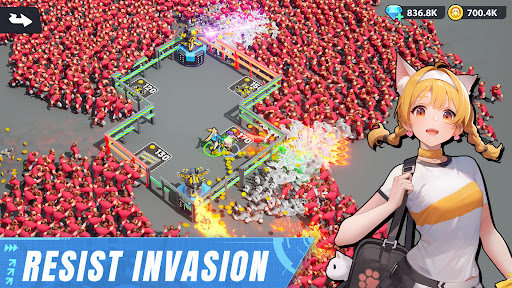

When the world fell, they rose.
In the ashes of a failed genetic experiment, the world was overrun by the X-Virus—twisting humanity into relentless undead and fusing machines with flesh. Civilization collapsed in seven days. But from the darkness, a spark of hope ignited.
You are the Commander—and they are the last goddesses.
[Survival of Goddess] is a post-apocalyptic strategy RPG where cyber-enhanced girls wield elemental powers to reclaim the world from viral chaos. Lead, build, and survive in a world where despair meets defiance.
[Key Features]
- Elemental Warfare: Ice. Flame. Thunder. Wind.
Each goddess channels a primal force. Assemble synergistic squads to unleash combo attacks, battlefield control, and devastating burst skills.
- Rogue Encounter System
No two missions are alike. Navigate branching routes, random events, enemy ambushes, and high-risk rewards in a dynamic roguelike format.
- Base Construction & Real-time Operations
Start from the ruins. Rebuild energy cores, manage modules, assign survivors to jobs, and defend the last stronghold of humanity—your home.
- Strategic Combat with Tactical Positioning
Real-time deployment and live skill chains make every battle a test of brains and reflexes. Adjust formations. Exploit elemental counters. Dominate with precision.
- Strategic Depth, Diverse Growth
Enhance each heroine by upgrading skills, equipping gear, and unlocking their unique combat potential. Focus on impactful growth that shapes battles and defines your strategy.
- Global Alliances & Co-op Raids
Team up with players worldwide to raid World Bosses, defend territory, and fight for dominance in a brutal post-civilization world.
Reclaim the surface. Reignite civilization. Rewrite the end.
Show more

1. Download MEmu installer and finish the setup

2. Start MEmu then open Google Play on the desktop

3. Search Survival of Goddess in Google Play
Install
4. Download and Install Survival of Goddess
5. On install completion click the icon to start

6. Enjoy playing Survival of Goddess on PC with MEmu
MEmu Play is the best Android emulator and 100 million people already enjoy its superb Android gaming experience. The MEmu virtualization technology empowers you to play thousands of Android games smoothly on your PC, even the most graphic-intensive ones.
Bigger screen with better graphics; Long duration, without limitation of battery or mobile data.
Full Keymapping support for precise control of keyboard and mouse or gamepad.
Multiple game accounts or tasks on single PC at one time with Multi-Instance manager.
Play Survival of Goddess on PC by following steps: