Tap Break Out
Updated
Current Version
Offered By

With your passion for Tap Break Out, you shouldn’t have to limit yourself to the small screen of a phone. Play like a pro and take full control of the game using a keyboard and mouse. MEmu gives you everything you’re looking for. Download and play Tap Break Out on PC. Play as long as you want — no more worries about battery life, mobile data, or unexpected calls. The all-new MEmu 9 is the best way to play Tap Break Out on PC. With our expertly designed keymapping system, Tap Break Out feels just like a real PC game. The MEmu multi-instance manager lets you run two or more accounts on the same device at the same time. Most importantly, our exclusive emulation engine unlocks your PC’s full potential, delivering smooth and seamless performance.
Show more
Download Tap Break Out on PC with MEmu Android Emulator. Enjoy playing on big screen. A fast-paced, one-handed portrait-mode combat experience.
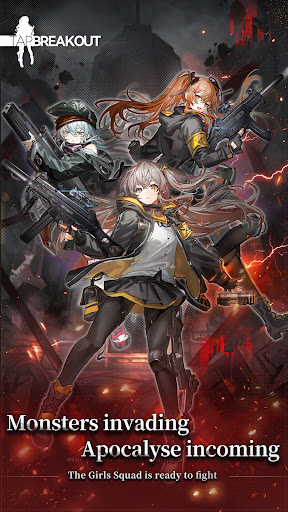
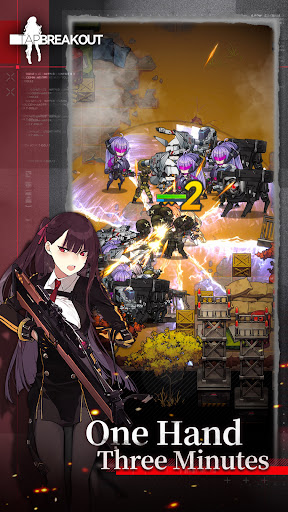
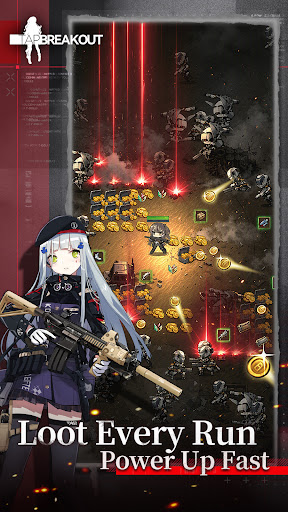
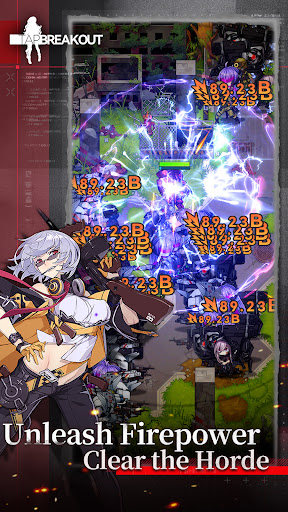
A fast-paced, one-handed portrait-mode combat experience. Complete 1–3 minute battles, collect powerful gear, and strengthen your T-Dolls with every run. Lead your team through fierce battles and reclaim your homeland, one step at a time!
Fingertip Breakout — A One-Handed Portrait-Mode Survival RPG
Command your T-Dolls, break through enemy lines, and take back your homeland one battle at a time.
As storms and fog engulf the remnants of the old world, you take command of scattered T-Dolls and lead them through the wasteland. Fight through the wasteland, collect powerful gear, strengthen your T-Dolls, and rebuild a new future from the ruins.
Enjoy fast-paced 1–3 minute battles with simple one-handed controls. Collect gear after every run, unleash devastating attacks, and experience the thrill of turning the tide against endless enemy waves.
◆ One-Handed Command | Thrilling 1–3 Minute Runs
Simply move with the virtual joystick while your squad fires automatically. Whether you're commuting, waiting in line, or relaxing before bed, jump into a quick run anytime, anywhere.
◆ Gear Drops Every Run | Equip in One Tap and Power Up Fast
Every battle drops gear, with multiple gear slots for flexible builds. Equip everything in one tap and watch your Combat Power soar—after every run, you'll be stronger than before. ◆ Screen-Filling Firepower | Unleash Devastating Horde-Clearing Action Countless enemies flood the battlefield as your T-Dolls unleash a storm of firepower. Watch your kill streak climb higher and higher—the larger the horde, the greater the thrill.
◆ Rally Your T-Dolls | Build Your Strongest Team
Recruit dozens of unique T-Dolls, each with stunning character art, personal voice lines, and distinct personalities. Build your team, unlock bonds, and customize your formations to overcome every enemy.
◆ Decorate the Dorm | A Home in a Fallen World
Between battles, manage your own base and freely arrange furniture and decorations. Build a warm haven in the ruined wasteland where your squad can rest.
◆ Endless Supplies | Grow Stronger Without the Grind
Receive continuous supplies, claim rewards instantly, and equip your T-Dolls with a single tap. No tedious grinding, no pressure—return anytime and get your team ready for battle.
▍Official Community
Customer Support Email: [sharpstudio-cs@sunborngame.com]
Facebook: [https://www.facebook.com/profile.php?id=61593238119824]
Show more

1. Download MEmu installer and finish the setup

2. Start MEmu then open Google Play on the desktop

3. Search Tap Break Out in Google Play
Install
4. Download and Install Tap Break Out
5. On install completion click the icon to start

6. Enjoy playing Tap Break Out on PC with MEmu
MEmu Play is the best Android emulator and 100 million people already enjoy its superb Android gaming experience. The MEmu virtualization technology empowers you to play thousands of Android games smoothly on your PC, even the most graphic-intensive ones.
Bigger screen with better graphics; Long duration, without limitation of battery or mobile data.
Full Keymapping support for precise control of keyboard and mouse or gamepad.
Multiple game accounts or tasks on single PC at one time with Multi-Instance manager.
Play Tap Break Out on PC by following steps: